

If you’re starting your journey in SEO and website growth, one of the most powerful free tools you can use is Google Search Console (GSC). It helps you understand how your website performs in Google search results and gives you actionable insights to improve your visibility.
In the evolving world of SEO, data-driven optimization has become essential for achieving long-term visibility in search engines. One of the most powerful tools available for website owners, bloggers, marketers, and businesses is Google Search Console. It provides direct insights from Google, helping us understand how our website performs in search results and where improvements are needed.
From indexing pages to tracking keyword rankings, fixing technical errors, and improving click-through rates, Google Search Console plays a central role in modern SEO strategies. In 2026, where AI-driven search experiences and semantic search dominate rankings, mastering this tool is no longer optional it is essential.
Table of Contents
What Is Google Search Console?
Google Search Console is a free web service offered by Google that helps website owners monitor, maintain, and optimize their presence in search results.
The platform allows us to:
- Track website performance in Google Search
- Monitor keyword rankings and clicks
- Submit sitemaps for indexing
- Detect crawl and indexing errors
- Analyze backlinks and internal links
- Improve mobile usability and page experience
Google Search Console?
Google Search Console is a free tool provided by Google that allows website owners, bloggers, and developers to monitor, maintain, and troubleshoot their website’s presence in search results.
In simple terms, it shows:
- How your website appears on Google
- Which keywords bring traffic
- How many people click your site
- Technical issues affecting performance
You don’t need to be an expert to use it beginners can easily start learning and improving their website with its user-friendly interface.
Why Google Search Console Is Important for SEO in 2026
Search engines now prioritize:
- User intent
- Content quality
- Technical performance
- Search experience optimization
Google Search Console helps align websites with these ranking signals.
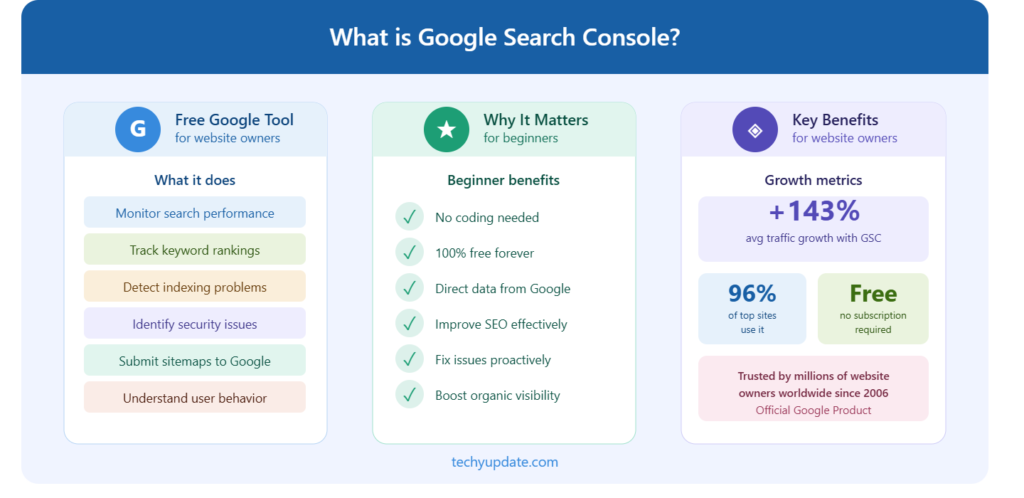
Key Benefits of Using Google Search Console
1. Real Search Data
We gain access to actual search queries users type before visiting our website.
2. Faster Indexing
New pages can be submitted directly for quicker visibility in search results.
3. Technical SEO Monitoring
We can identify:
- Crawl errors
- Broken pages
- Mobile usability issues
- Core Web Vitals problems
4. Keyword Performance Insights
Search Console reveals:
- Top-performing keywords
- Low CTR opportunities
- High-impression search terms
5. Improved Search Visibility
Through continuous optimization, websites gain:
- Higher rankings
- Better click-through rates
- Increased organic traffic
Why It Is Important for Beginners
For beginners, SEO can feel overwhelming. That’s where Google Search Console becomes essential.
It helps you:
- Understand how Google sees your website
- Identify errors that prevent your site from ranking
- Discover which pages are performing well
- Learn what users are searching for
Instead of guessing what works, GSC gives you real data, making it easier to improve your website step by step.
Benefits for Website Owners
Using Google Search Console regularly offers several powerful benefits:
1. Track Website Performance
You can monitor clicks, impressions, and average ranking positions for your pages.
2. Find High-Performing Keywords
See which search terms bring traffic and optimize your content accordingly.
3. Identify and Fix Errors
GSC alerts you to issues such as broken pages, indexing problems, and mobile usability errors.
4. Improve SEO Strategy
With real insights, you can make smarter SEO decisions instead of relying on assumptions.
5. Submit Sitemaps and URLs
You can directly submit your website pages to Google for faster indexing.
6. Enhance User Experience
Reports like Core Web Vitals help improve your site’s speed and usability.
Final Thoughts
For anyone starting a blog, website, or online business, Google Search Console is not optional it’s essential. It acts like a direct communication channel between your website and Google, helping you grow smarter and faster.
Setting Up Google Search Console
Getting started with Google Search Console is simple, even if you’re a complete beginner. Follow these steps to set up your account and properly connect your website.
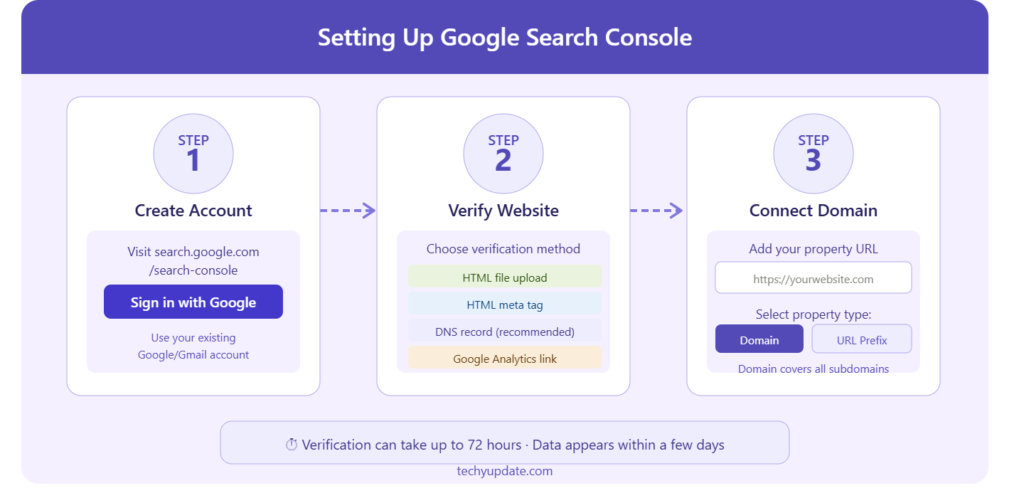
Creating an Account
To begin, you need a Google account. If you already use services like Gmail or YouTube, you’re good to go.
- Go to Google Search Console
- Click on “Start Now”
- Sign in using your Google account
Once logged in, you’ll be asked to add your website as a property.
Connecting with Your Domain
Google Search Console offers two main property types:
1. Domain Property (Recommended)
- Covers your entire domain (e.g., example.com)
- Includes all subdomains (www, m, etc.) and protocols (http, https)
2. URL Prefix Property
- Tracks only a specific URL (e.g., https://www.example.com)
- Easier setup, but limited tracking
For beginners, Domain Property is better because it gives complete data.
To connect:
- Enter your domain name (without https:// or www)
- Click Continue
Verifying Your Website
Verification proves that you own the website. This is the most important step.
Method 1: DNS Verification (Best for Domain Property)
- Copy the TXT record provided by Google
- Go to your domain provider (e.g., GoDaddy, Namecheap).
- Add the TXT record in the DNS settings
- Return to GSC and click Verify
Method 2: HTML File Upload
- Download the verification file from GSC
- Upload it to your website’s root directory
- Click Verify
Method 3: HTML Tag
- Copy the meta tag
- Paste it inside the <head> section of your website
- Save and verify
Method 4: Google Analytics / Tag Manager
- If you already use Google Analytics or Google Tag Manager, you can verify instantly
Final Thoughts
Setting up Google Search Console may seem technical at first, but it only takes a few minutes. Once verified, you unlock powerful insights that can help grow your website traffic and improve SEO performance.
How to Set Up Google Search Console
Setting up Google Search Console is simple and only takes a few minutes.
1: Sign In
Visit the Google Search Console platform and sign in with your Google account.
2: Add Your Website
Choose between:
- Domain Property (recommended)
- URL Prefix Property
The Domain Property tracks all versions of your site, including:
- HTTPS and HTTP
- WWW and non-WWW versions
3: Verify Website Ownership
Verification methods include:
- DNS TXT record
- HTML file upload
- Meta tag insertion
- Integration with Google Analytics
4: Submit Your Sitemap
Upload your XML sitemap to help Google discover and index your pages efficiently.
Understanding the Dashboard of Google Search Console
In the modern search landscape, mastering the Google Search Console dashboard is a decisive advantage. We gain direct access to performance data, indexing insights, and technical signals that influence visibility. By understanding every element of the dashboard, we can make precise, data-driven decisions that improve rankings and organic traffic.
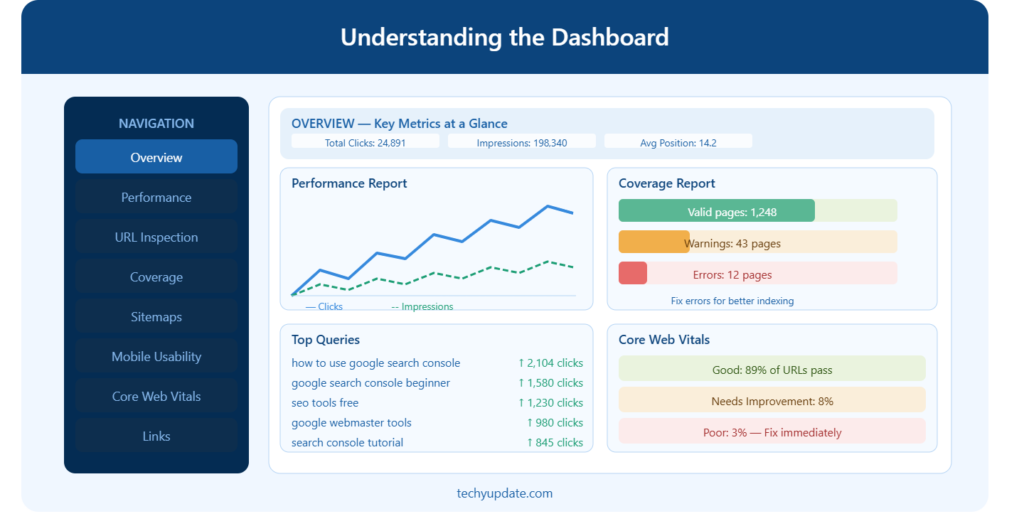
Overview of Key Metrics in Google Search Console
The dashboard presents a streamlined yet powerful snapshot of website performance. Each metric serves a specific purpose, and together they provide a complete view of search visibility.
Total Clicks: Measuring Real Traffic Impact
Total clicks indicate how many users actually visit our website from search results. This is not just visibility, it reflects engagement and intent fulfillment. High impressions with low clicks signal an opportunity to improve titles, meta descriptions, and overall SERP appeal.
We analyze:
- Pages with high impressions but low clicks
- Queries that generate clicks consistently
- Trends over time to identify growth or decline
Total Impressions: Understanding Search Visibility
Impressions are the number of times our website appears in search results. This metric reveals our true reach within search engines.
A rising impression count indicates:
- Expanding keyword presence
- Improved indexing
- Broader topic authority
We leverage impressions to uncover untapped keyword opportunities and optimize content around high-visibility queries.
Average Click-Through Rate (CTR): Optimizing Search Appeal
CTR is a critical performance indicator that measures how effectively our listings attract users. A strong CTR reflects compelling headlines, relevant descriptions, and strong keyword alignment.
To improve CTR, we refine:
- Title tags with power words
- Meta descriptions with clear value propositions
- Structured data for enhanced snippets
Average Position: Tracking Keyword Rankings
The average position shows where our pages rank in search results. This metric allows us to monitor keyword performance and ranking stability.
We focus on:
- Keywords ranking between positions 5–15 (quick-win opportunities)
- Pages are losing ranking positions over time
- Content requiring refresh or expansion
Performance Report
The most valuable SEO section, showing:
- Search queries
- Clicks
- Impressions
- CTR
- Average position
We use this report to optimize keywords and identify traffic opportunities.
Indexing Report
Shows:
- Indexed pages
- Excluded URLs
- Crawl issues
- Sitemap status
This helps ensure all valuable pages appear in search results.
Experience Report
Focuses on:
- Core Web Vitals
- Mobile usability
- Page experience
User experience now strongly influences rankings in AI-driven search environments.
Links Report
Provides insights into:
- External backlinks
- Internal links
- Top linked pages
Strong backlink profiles improve domain authority and search trust.
READ MORE: How to Do Keyword Research for Articles
Navigation and Main Sections of the Dashboard
The Google Search Console dashboard is structured for clarity and efficiency. Each section plays a vital role in managing and improving our website.
Overview Section: The Performance Snapshot
The Overview tab provides a consolidated summary of:
- Performance metrics
- Indexing status
- Experience signals
This section is our starting point for identifying issues or spotting trends at a glance.
Performance Section: Deep Search Analytics
The Performance report is the core of the dashboard. It delivers detailed insights into how users interact with our site in search results.
Within this section, we analyze:
- Queries (keywords driving traffic)
- Pages (top-performing URLs)
- Countries (geographic reach)
- Devices (desktop vs mobile performance)
This allows us to refine our SEO strategy with precision and clarity.
Indexing Section: Ensuring Visibility in Search
The Indexing tab shows how well our pages are being indexed by Google.
Key components include:
- Indexed pages
- Excluded pages
- Crawling issues
We use this section to:
- Identify pages not appearing in search
- Fix technical errors
- Improve crawl efficiency
Experience Section: Enhancing User Satisfaction
User experience directly impacts rankings. The Experience section focuses on performance factors such as:
- Core Web Vitals
- Mobile usability
- Page experience signals
We optimize loading speed, interactivity, and visual stability to meet Google’s standards and improve rankings.
Enhancements Section: Unlocking Advanced Features
The Enhancements tab highlights opportunities to improve search appearance using structured data.
This includes:
- Rich results
- Schema markup performance
- Feature eligibility
We implement structured data to increase visibility and gain enhanced SERP features.
Performance Reports: Data-Driven Optimization
The Performance Reports are the most valuable component of the dashboard. They provide actionable insights that guide every SEO decision.
Query Analysis: Discovering High-Value Keywords
We analyze search queries to understand what users are searching for. This helps us:
- Identify trending topics
- Expand keyword coverage
- Optimize existing content
By aligning content with user intent, we increase relevance and ranking potential.
Page-Level Insights: Optimizing Individual URLs
Each page has unique performance metrics. We examine:
- Clicks per page
- Impressions per page
- CTR variations
This allows us to prioritize updates for pages with the highest growth potential.
Device Segmentation: Mobile vs Desktop Performance
User behavior varies across devices. Performance reports allow us to compare:
- Mobile traffic trends
- Desktop engagement
- Device-specific CTR
We ensure our website is fully optimized for mobile-first indexing.
Geographic Insights: Targeting Global Traffic
We analyze traffic by country to understand our audience distribution. This enables us to:
- Localize content
- Target specific regions
- Expand into new markets
Date Range Comparison: Measuring Growth Over Time
We compare data across different time periods to evaluate progress. This helps us:
- Track SEO improvements
- Identify seasonal trends
- Measure campaign success
Advanced Dashboard Strategies for Maximum Results
To fully leverage the dashboard, we implement advanced strategies that go beyond basic analysis.
Identifying Content Gaps
By analyzing queries with impressions but no clicks, we uncover content gaps. These gaps represent opportunities to create targeted content that captures untapped traffic.
Improving Underperforming Pages
Pages with deep impressions but low CTR are optimized through:
- Title enhancements
- Content updates
- Internal linking improvements
Monitoring Algorithm Impact
Sudden changes in metrics often indicate algorithm updates. We monitor:
- Traffic drops
- Ranking fluctuations
- CTR changes
This allows us to adapt quickly and maintain performance.
Combining Data with Other Tools
For deeper insights, we integrate data from:
- Google Analytics
- Keyword research tools
- SEO auditing platforms
This creates a comprehensive strategy backed by accurate data.
Mastering the Dashboard for SEO Success
By fully understanding the Google Search Console dashboard, we unlock the ability to analyze, optimize, and dominate search results. Every metric, report, and section provides valuable insights that guide our strategy.
We do not rely on assumptions we rely on data precision, continuous optimization, and strategic execution. Through consistent analysis and improvement, we transform raw data into measurable growth, higher rankings, and sustained organic traffic success.
How to Use Google Search Console Effectively
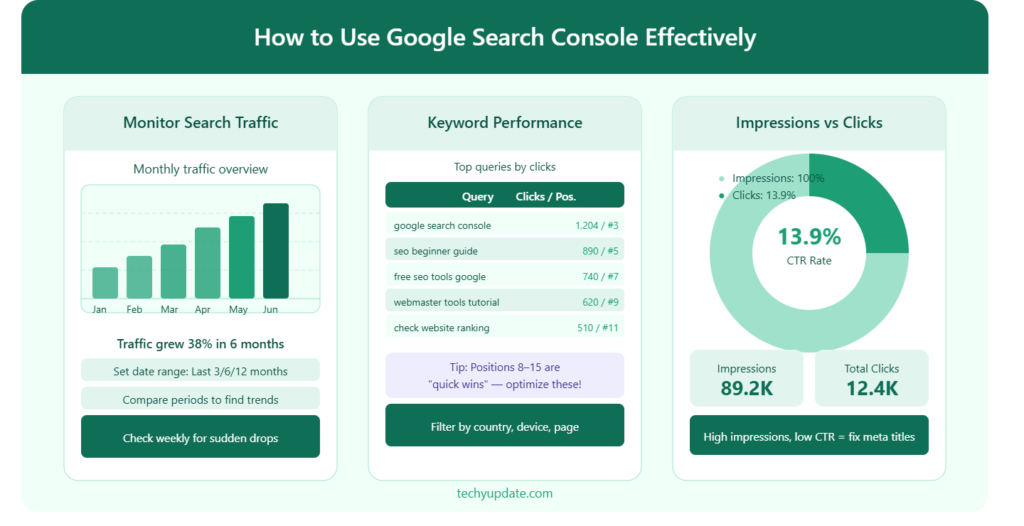
Mastering Google Search Console transforms raw search data into a precise growth engine. We leverage its reports to monitor traffic patterns, uncover high-value keywords, and accurately interpret impressions and clicks. By systematically analyzing these signals, we strengthen rankings, increase visibility, and scale organic traffic with consistency.
Monitoring Search Traffic with Precision
Search traffic is the foundation of measurable SEO success. Inside Google Search Console, we access the Performance report, where all critical traffic data is consolidated into actionable insights.
Tracking Total Clicks for Real Engagement
Total clicks represent users who actively visit our website from search results. We examine this metric daily to understand which pages drive the most engagement.
We identify:
- Pages generating consistent traffic growth
- URLs are losing click volume over time
- Newly indexed pages are gaining traction
By isolating high-performing pages, we replicate their structure, content depth, and keyword alignment across other pages.
Analyzing Traffic Trends Over Time
We compare data across 7-day, 28-day, and 3-month periods to detect patterns. This enables us to track:
- Sudden increases linked to optimized content
- Declines caused by outdated pages
- Seasonal traffic fluctuations
We rely on trend consistency to validate content improvements and ensure sustained growth.
Segmenting Traffic by Device and Location
Search behavior varies across devices and regions. We segment traffic into:
- Mobile vs Desktop performance
- Country-specific engagement
- Region-based keyword variations
This segmentation allows us to refine content for targeted audiences and improve mobile-first performance standards.
Checking Keyword Performance for Maximum Visibility
Keyword performance defines how effectively our content aligns with user intent. The query data inside Google Search Console provides direct insight into search behavior.
Identifying High-Impact Keywords
We analyze queries that generate:
- Deep impressions with moderate clicks
- Strong CTR and consistent rankings
- Emerging visibility trends
These keywords represent growth opportunities. We expand content depth around them to dominate search results.
Optimizing Keywords with Ranking Potential
Keywords ranking between positions 5 and 15 are prioritized. These are near the top of the page and require minimal optimization to improve rankings.
We refine:
- Headings and subheadings
- Keyword placement within content
- Semantic keyword variations
This targeted optimization leads to faster improvements in rankings.
Eliminating Low-Performing Keywords
Not all keywords deliver value. We filter out:
- Queries with low impressions and zero clicks
- Irrelevant search terms
- Keywords misaligned with content intent
By removing inefficiencies, we focus entirely on high-impact opportunities.
Expanding Keyword Coverage Strategically
We identify related queries and long-tail variations to broaden visibility. This includes:
- Question-based searches
- Informational keyword variations
- Topic clusters around primary keywords
Expanding keyword coverage strengthens topical authority and increases search presence.
Understanding Impressions and Clicks in Depth
Impressions and clicks form the core metrics of search performance. Their relationship defines how effectively our content converts visibility into traffic.
Interpreting Impressions for Search Reach
Impressions indicate how often our pages appear in search results. A high impression count reflects:
- Strong indexing
- Wide keyword reach
- Increased search visibility
We analyze impressions to identify:
- Pages with untapped potential
- Keywords generating exposure without engagement
- Content requiring CTR optimization
Transforming Impressions into Clicks
A gap between impressions and clicks signals an opportunity. We improve conversion by enhancing:
- Title tags with compelling language
- Meta descriptions with clear value propositions
- Structured snippets for better visibility
This transformation directly increases traffic without needing additional rankings.
Maximizing Click-Through Rate (CTR)
CTR measures how effectively our listings attract users. We increase CTR by:
- Using power words in titles
- Adding numbers and data-driven phrases
- Matching search intent precisely
A higher CTR improves both traffic and ranking signals.
Balancing Clicks and Position for Growth
We analyze the relationship between:
- Average position
- CTR performance
- Click volume
Pages ranking in the top 3 naturally receive more clicks. However, lower-ranking pages can still outperform competitors with optimized snippets.
Advanced Strategies for Using Google Search Console Effectively
To fully use Google Search Console, we use advanced techniques to maximize performance.
Identifying Content Opportunities from Query Data
We uncover queries that:
- Generate impressions, but lack dedicated pages
- Appear frequently across multiple URLs
- Show rising trends in search volume
We create targeted content to capture these opportunities and expand traffic.
Improving Underperforming Pages
Pages with high impressions but low clicks are optimized through:
- Rewriting titles for stronger engagement
- Enhancing content depth and clarity
- Improving internal linking structure
This approach converts passive visibility into active traffic.
Leveraging Historical Data for Long-Term Growth
We analyze historical performance to identify:
- Long-term growth trends
- Declining keyword performance
- Content requiring updates
Regular updates ensure that content remains competitive and relevant.
Aligning Content with Search Intent
Search intent determines ranking success. We align content with:
- Informational queries
- Transactional intent
- Navigational searches
Matching intent improves engagement and increases ranking stability.
Combining Search Console with Data Ecosystems
For a comprehensive strategy, we integrate insights from:
- Google Analytics
- Keyword research tools
- Technical SEO audits
This combined approach ensures complete visibility into user behavior and performance metrics.
Scaling Organic Growth with Data-Driven Execution
Effective use of Google Search Console requires consistent monitoring, precise optimization, and strategic execution. We rely on real data to guide every decision, ensuring that each update contributes to measurable growth.
We refine keyword strategies, enhance click-through rates, and continuously optimize content performance. By transforming insights into action, we build a scalable SEO system that delivers sustained traffic, stronger rankings, and long-term digital authority.
Fixing Indexing Issues with Google Search Console: A Complete Data-Driven Guide
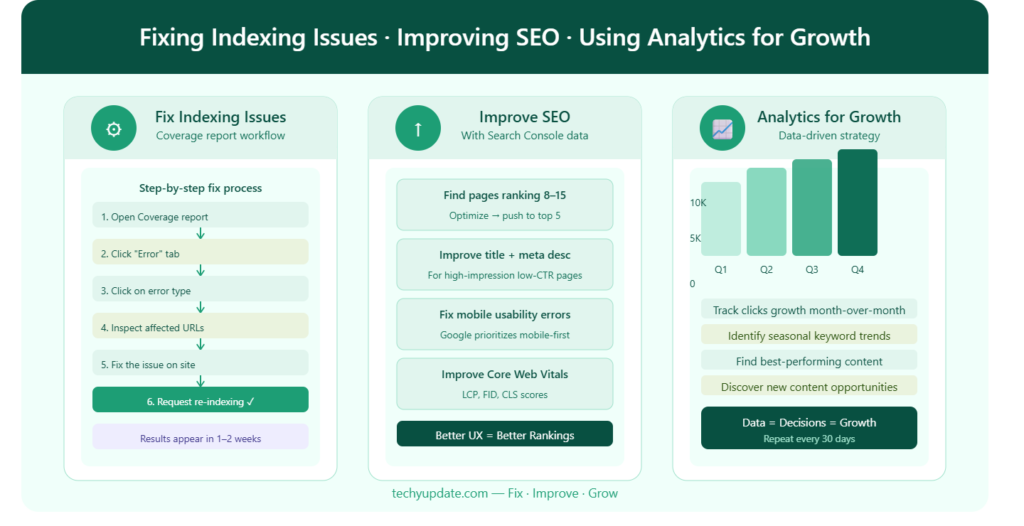
Achieving consistent search visibility requires precise control over indexing. We utilize Google Search Console to detect, analyze, and resolve indexing issues that limit organic performance. By systematically addressing crawl errors, submitting optimized sitemaps, and refining indexing signals, we ensure that every valuable page is discoverable, accessible, and ranked effectively.
Identifying Crawl Errors with Precision
Crawl errors directly impact how Google accesses and processes our website. We analyze these errors within the Indexing Report to maintain a clean, efficient crawl path.
Understanding the Types of Crawl Errors
We focus on the most critical error categories:
- 404 Errors (Page Not Found): Pages that no longer exist but are still being requested
- 500 Server Errors: Temporary or persistent server failures preventing access
- Redirect Errors: Broken or infinite redirect loops disrupting navigation
- Blocked Resources: Pages restricted by robots.txt or meta directives
Each error type is categorized and displayed clearly within Google Search Console, allowing us to prioritize fixes efficiently.
Analyzing Error Patterns for Root Causes
We do not treat errors individually; we identify patterns. By grouping similar issues, we uncover:
- Structural problems in URL architecture
- Outdated internal links
- Broken external backlinks
- Misconfigured server responses
Pattern recognition enables us to resolve multiple issues with a single corrective action.
Fixing Crawl Errors for Optimal Accessibility
We implement targeted fixes:
- Redirect outdated URLs using 301 redirects
- Restore critical pages if mistakenly removed
- Update internal links to valid URLs
- Adjust robots.txt to allow essential pages
After applying corrections, we validate fixes directly inside the platform to ensure proper resolution.
Submitting Sitemaps for Efficient Indexing
A properly structured sitemap accelerates indexing and improves crawl efficiency. We submit and manage sitemaps within Google Search Console to ensure complete coverage.
Creating a High-Performance XML Sitemap
We generate sitemaps that include:
- Only indexable URLs
- Canonical versions of pages
- Updated last-modified timestamps
- Logical URL hierarchy
This structure ensures that search engines prioritize valuable content.
Submitting and Monitoring Sitemap Status
Inside the Sitemaps section, we:
- Submit the sitemap URL
- Monitor indexing status
- Track discovered vs indexed pages
We continuously compare submitted URLs with indexed pages to identify discrepancies.
Optimizing Sitemap Strategy
We refine sitemap performance by:
- Splitting large sitemaps into smaller segments
- Prioritizing high-value pages
- Removing low-quality or duplicate URLs
This ensures efficient crawl allocation and faster indexing cycles.
Resolving Indexing Problems for Maximum Visibility
Indexing issues prevent pages from appearing in search results. We use the indexing reports in Google Search Console to systematically resolve these challenges.
Diagnosing Index Coverage Issues
We examine:
- Excluded pages
- Crawled but not indexed URLs
- Duplicate pages without canonical tags
- Soft 404 errors
Each category provides insight into why pages are not indexed.
Fixing “Crawled but Not Indexed” Pages
These pages require improvements in content and quality. We enhance them by:
- Increasing content depth
- Improving keyword relevance
- Adding internal links
- Ensuring clear search intent alignment
This increases their eligibility for indexing.
Resolving Duplicate Content Issues
Duplicate pages dilute ranking signals. We correct duplication by:
- Implementing canonical tags
- Consolidating similar pages
- Redirecting duplicate URLs
This strengthens authority and improves index clarity.
Using URL Inspection for Immediate Indexing
We use the URL Inspection Tool to:
- Check indexing status
- Test live URLs
- Request indexing for updated pages
This accelerates the visibility of new or optimized content.
Improving Website SEO with Search Console
Beyond fixing errors, Google Search Console serves as a powerful optimization engine. We use its data to enhance content, track rankings, and refine user experience.
Optimizing Content Using Data Insights
Data-driven content optimization ensures alignment with search demand.
Leveraging Query Data for Content Enhancement
We analyze queries to identify:
- High-impression keywords
- Low-CTR opportunities
- Content gaps
We integrate these insights into existing pages, strengthening keyword relevance and improving visibility.
Enhancing Content Structure and Depth
We refine content by:
- Expanding sections with detailed information
- Adding structured headings
- Improving readability and formatting
This increases engagement and improves ranking signals.
Improving Click-Through Rates
We optimize SERP appearance through:
- Compelling title tags
- Data-rich meta descriptions
- Clear value propositions
Higher CTR translates directly into increased traffic.
Tracking Ranking Improvements with Accuracy
Continuous tracking ensures that optimization efforts deliver measurable results.
Monitoring Keyword Positions
We track keyword rankings to identify:
- Upward movement trends
- Declining performance
- Stable high-ranking pages
This allows us to prioritize further improvements.
Comparing Performance Over Time
We use date comparisons to evaluate:
- Traffic growth
- Ranking improvements
- Impact of content updates
Consistent tracking ensures sustained progress.
Identifying Quick Wins
We focus on keywords ranking near the first page and optimize them aggressively to achieve top positions.
Enhancing User Experience for Better Rankings
User experience directly influences search performance. We optimize technical and usability factors using insights from Google Search Console.
Improving Core Web Vitals
We enhance:
- Page loading speed
- Visual stability
- Interactivity
These improvements strengthen page experience signals.
Optimizing Mobile Usability
We ensure:
- Responsive design
- Fast mobile performance
- Easy navigation
Mobile optimization aligns with modern search behavior.
Strengthening Internal Linking Structure
We build strong internal links to:
- Distribute authority across pages
- Improve crawlability
- Guide users through relevant content
Eliminating Technical Barriers
We remove obstacles such as:
- Broken links
- Slow-loading pages
- Unoptimized resources
This ensures smooth user interaction and better indexing.
How to Use Google Search Console for SEO Growth
Monitoring Search Traffic
We analyze:
- Traffic trends
- Top-performing pages
- Search visibility changes
Consistent monitoring helps identify growth opportunities quickly.
Finding High-Value Keywords
Search Console reveals:
- Keywords with deep impressions
- Queries driving clicks
- Ranking opportunities near page one
We optimize pages around these keywords to increase visibility.
Improving Click-Through Rate (CTR)
A low CTR often means titles and descriptions need improvement.
We optimize:
- Title tags
- Meta descriptions
- Rich snippets
Higher CTR leads to increased organic traffic without needing higher rankings.
Fixing Indexing and Technical SEO Issues
Technical SEO directly affects visibility. Google Search Console helps diagnose and resolve issues efficiently.
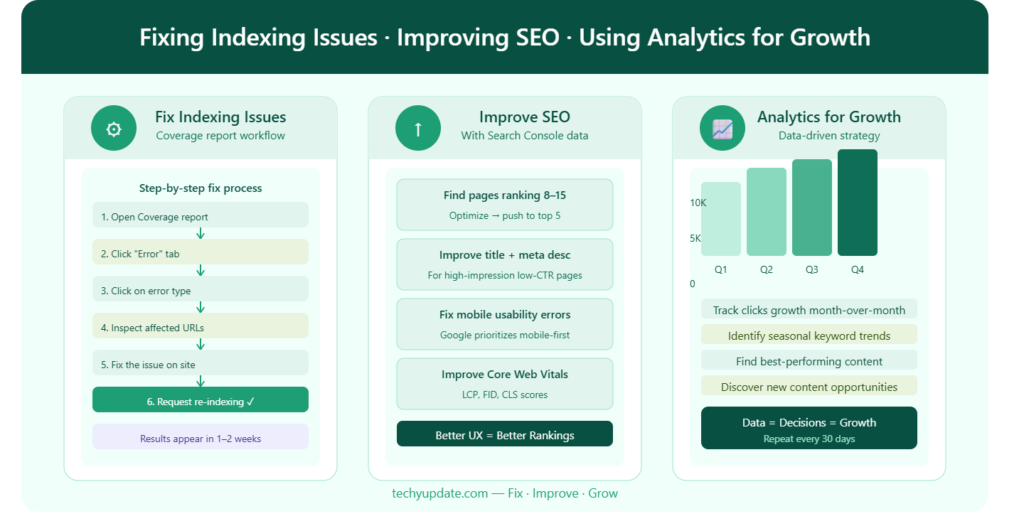
Common Indexing Problems
We identify:
- 404 errors
- Redirect loops
- Duplicate content
- Blocked pages
Using URL Inspection
The URL Inspection Tool allows us to:
- Check indexing status
- Test live pages
- Request re-indexing
This accelerates visibility for updated or newly published content.
Optimizing Crawlability
We improve crawl efficiency by:
- Fixing broken links
- Updating XML sitemaps
- Removing unnecessary redirects
- Strengthening internal linking
Advanced SEO Strategies with Google Search Console
Integrating with Google Analytics
Combining both tools provides:
- SEO data
- User behavior insights
- Conversion tracking
This creates a complete digital marketing analysis system.
Analyzing Search Intent
Modern SEO focuses heavily on user intent.
We optimize content for:
- Informational searches
- Commercial searches
- Navigational queries
Matching intent improves rankings and engagement.
Search Analytics Strategies for Growth
To achieve consistent results, we use advanced strategies to make the most of search analytics data.
Identifying Content Gaps
We analyze queries that generate impressions but lack dedicated pages. These gaps are filled with targeted content designed to capture additional traffic.
Prioritizing Quick Wins
We focus on keywords ranking between positions 5 and 15. These keywords require minimal optimization to reach top positions.
Leveraging Internal Linking
We strengthen internal links to:
- Boost page authority
- Improve crawlability
- Guide users to relevant content
Monitoring Backlinks
Backlinks remain critical ranking signals.
We track:
- Referring domains
- Linked pages
- Anchor text usage
High-quality backlinks improve authority and trust.
Tracking Core Web Vitals
Performance metrics include:
- Loading speed
- Visual stability
- Interactivity
Fast websites provide better user experiences and stronger rankings.
Using Search Analytics for Growth with Google Search Console
Search analytics is the core engine behind measurable SEO growth. By using Google Search Console’s full capabilities, we turn raw performance data into precise optimization strategies. We focus on identifying top-performing pages, uncovering keyword opportunities, and maximizing click-through rates to create a scalable system for organic traffic growth.
Analyzing Top-Performing Pages for Maximum Impact
The foundation of growth lies in identifying which pages already generate strong results. Within Google Search Console, the Performance Report provides direct visibility into high-performing URLs.
Identifying High-Traffic Pages
We begin by filtering pages based on total clicks. These pages represent the strongest drivers of organic traffic and serve as models for future content.
We evaluate:
- Pages with the highest click volume
- URLs with consistent traffic growth
- Content with strong ranking stability
By isolating these pages, we gain insights into successful structures, keyword usage, and content depth.
Extracting Winning Content Patterns
We analyze high-performing pages to identify patterns such as:
- Effective headline structures
- Keyword placement within headings
- Content formatting and readability
- Internal linking strategies
These patterns are replicated across other pages to ensure consistency in performance.
Scaling Success Across the Website
Once we identify winning elements, we expand them across the website by:
- Updating older pages with improved structures
- Creating new content based on proven formats
- Strengthening internal linking to high-performing pages
This approach amplifies existing success and accelerates overall growth.
Finding Keyword Opportunities with Precision
Keyword discovery within Google Search Console provides direct insight into user search behavior. We use this data to uncover opportunities that competitors often overlook.
Analyzing Queries for Hidden Opportunities
We filter queries based on:
- Deep impressions with low clicks
- Keywords ranking beyond position 10
- Emerging search trends
These queries represent untapped opportunities for higher visibility.
Expanding Keyword Coverage
We build comprehensive keyword coverage by:
- Targeting long-tail variations
- Including question-based queries
- Developing topic clusters around core keywords
This approach increases search visibility and strengthens topical authority.
Optimizing Existing Content for New Keywords
Instead of creating new pages for every keyword, we enhance existing content by:
- Adding relevant keyword variations
- Expanding sections with additional information
- Improving semantic relevance
This maximizes the value of already indexed pages.
Targeting High-Conversion Keywords
We prioritize keywords that show:
- Strong click-through rates
- High engagement potential
- Clear search intent alignment
This ensures that the traffic generated is both relevant and valuable.
Improving CTR (Click-Through Rate) for Better Performance
CTR is the bridge between visibility and traffic. Even with high rankings, low CTR limits growth. We optimize every element of search listings to maximize clicks.
Crafting High-Impact Title Tags
We create titles that:
- Include primary keywords
- Use compelling language
- Highlight clear benefits
Titles are designed to stand out in search results and attract user attention immediately.
Enhancing Meta Descriptions for Engagement
Meta descriptions are optimized to:
- Communicate value clearly
- Include relevant keywords
- Encourage action
A well-crafted description significantly increases CTR.
Aligning Content with Search Intent
We ensure that titles and descriptions precisely match the user’s intent. Misalignment leads to low CTR and reduced engagement.
Using Data to Continuously Improve CTR
We monitor CTR performance inside Google Search Console and refine:
- Underperforming titles
- Weak descriptions
- Irrelevant keyword targeting
Continuous optimization leads to steady improvements in click-through rates
Common Mistakes Beginners Should Avoid
Even with powerful tools like Google Search Console, mistakes can limit growth. We eliminate these issues to maintain consistent performance.
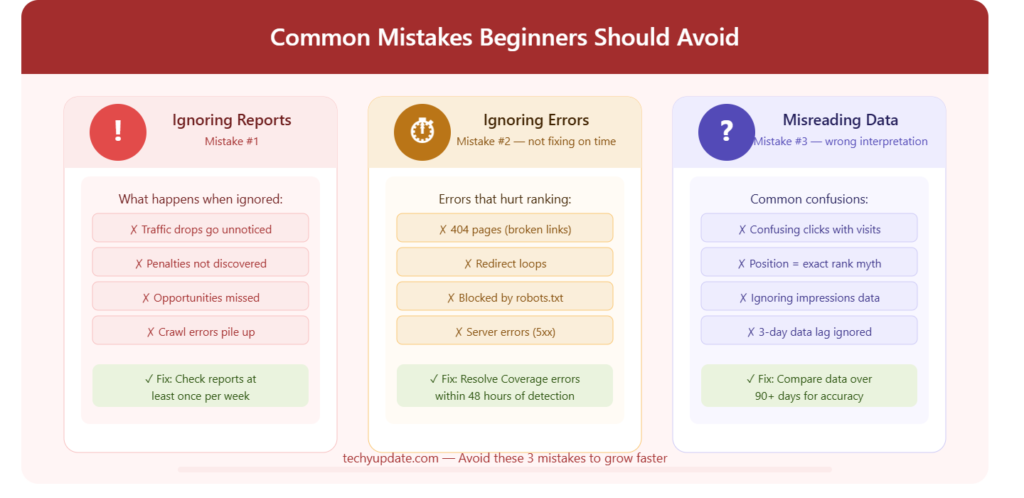
Ignoring Reports and Missing Insights
One of the most critical mistakes is neglecting performance reports. Without regular analysis, valuable insights are lost.
We ensure:
- Daily monitoring of key metrics
- Weekly performance reviews
- Immediate action on emerging trends
Consistent monitoring allows us to stay ahead of changes and maintain growth.
Not Fixing Errors on Time
Delays in resolving issues lead to:
- Reduced indexing efficiency
- Lower rankings
- Poor user experience
We address errors immediately, including:
- Crawl issues
- Broken links
- Indexing problems
Fast resolution ensures uninterrupted performance.
Misinterpreting Data and Making Incorrect Decisions
Data misinterpretation leads to ineffective strategies. We avoid this by:
- Focusing on meaningful metrics
- Comparing data across time periods
- Understanding the relationship between impressions, clicks, and rankings
Accurate interpretation ensures that every decision is based on reliable insights.
Overlooking CTR Optimization Opportunities
Many beginners focus only on rankings and ignore CTR. We prioritize CTR improvements to maximize traffic from existing rankings.
Failing to Update Content Regularly
Outdated content loses relevance over time. We continuously update pages to:
- Maintain accuracy
- Improve keyword targeting
- Enhance user experience
Conclusion
By using Google Search Console to its full potential, we turn search analytics into a powerful growth system. We identify high-performing pages, uncover keyword opportunities, and optimize CTR to maximize traffic.
We eliminate common mistakes, refine strategies based on data, and continuously improve performance. Through disciplined execution and precise optimization, we achieve sustained organic growth, stronger rankings, and long-term search dominance.
By systematically fixing indexing issues and leveraging insights from Google Search Console, we establish a strong foundation for search visibility. We ensure that every page is accessible, properly indexed, and optimized for maximum performance.
We transform technical data into strategic action, refine content using real search insights, and continuously enhance user experience. This integrated approach delivers consistent rankings, increased traffic, and long-term SEO success.
Advanced Tips for Better Results in Google Search Console
To move beyond basic SEO and achieve consistent growth, we apply advanced strategies that combine data analysis, technical monitoring, and continuous optimization. These techniques ensure that our website remains competitive, visible, and aligned with search engine expectations.
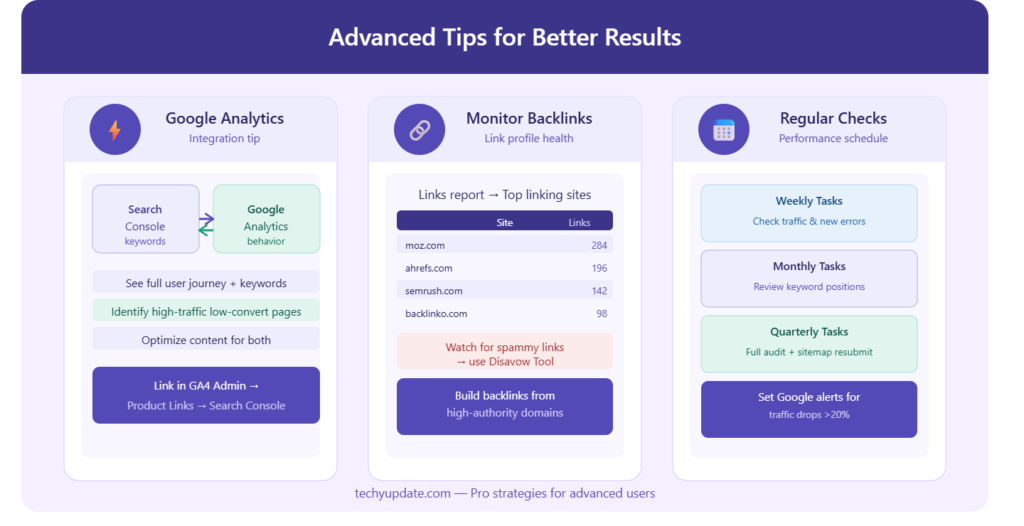
Integrating with Google Analytics for Deeper Insights
We strengthen our SEO strategy by connecting Google Search Console with Google Analytics. This integration allows us to combine search performance data with user behavior insights, giving us a complete understanding of how visitors interact with our website.
With this integration, we can:
- Track how users behave after clicking on search results
- Identify pages with high traffic but low engagement
- Measure conversions from organic traffic
- Analyze bounce rates and session durations
By combining both tools, we move from simple data tracking to strategic decision-making, ensuring every optimization is backed by real user behavior.
Monitoring Backlinks for Authority Growth
Backlinks remain one of the strongest signals for search rankings. Inside Google Search Console, we monitor our backlink profile to maintain and improve domain authority.
We focus on:
- Top linking websites
- Most linked pages
- Anchor text distribution
This helps us:
- Identify high-quality backlinks driving authority
- Detect harmful or spammy links
- Strengthen internal linking based on external signals
By regularly analyzing backlinks, we ensure our website maintains a strong, trustworthy link profile.
Regular Performance Checks for Continuous Improvement
SEO success depends on consistency. We conduct regular performance checks within Google Search Console to stay ahead of changes and maintain growth.
Our routine includes:
- Monitoring clicks, impressions, and CTR
- Checking keyword rankings and trends
- Reviewing indexing and crawl reports
- Identifying sudden drops or spikes in traffic
We perform:
- Daily quick checks for major changes
- Weekly analysis for trends and improvements
- Monthly audits for deeper optimization
This structured approach ensures that no issue goes unnoticed and every opportunity is captured.
Conclusion
Google Search Console remains one of the most powerful SEO tools for improving search visibility, fixing technical issues, and increasing organic traffic. By combining technical monitoring, keyword analysis, indexing management, and AI-focused optimization strategies, we create a strong foundation for long-term digital growth.
Consistent use of Search Console allows us to make data-driven decisions, improve user experience, and adapt to changing search engine algorithms. In the competitive SEO landscape of 2026, mastering Google Search Console is essential for achieving sustainable rankings, stronger authority, and lasting online success.
Mastering Google Search Console requires more than basic usage—it demands consistent analysis, strategic integration, and continuous improvement.
Recap of Key Points
We have explored how to:
- Integrate Google Search Console with Google Analytics for deeper insights
- Monitor backlinks to build authority and trust
- Perform regular performance checks to maintain growth
Each of these strategies contributes to a strong, data-driven SEO system that delivers measurable results.
Importance of Consistent Monitoring
Consistency is the defining factor in long-term SEO success. By regularly analyzing data, fixing issues, and optimizing performance, we ensure that our website remains competitive in search results.
We do not rely on one-time efforts, we build a system of continuous monitoring and improvement. This approach leads to:
- Stable rankings
- Increased organic traffic
- Long-term digital growth
By applying these advanced tips with discipline and precision, we create a scalable SEO strategy that consistently delivers results.
FAQs (Frequently Asked Questions) About Google Search Console
What is Google Search Console used for?
Google Search Console is used to monitor, analyze, and improve a website’s performance in search results. It helps track clicks, impressions, keyword rankings, indexing status, and technical issues, enabling website owners to optimize their content and visibility.
Is Google Search Console free to use?
Yes, Google Search Console is completely free. It is provided by Google and does not require any payment, making it one of the most valuable tools for beginners and professionals alike.
How do beginners use Google Search Console?
Beginners can start by:
- Adding their website as a property
- Verifying ownership
- Submitting a sitemap
- Monitoring basic metrics like clicks, impressions, and CTR
Once familiar with it, they can explore performance reports, indexing status, and keyword data to improve their website step by step.
How can I verify my website in Search Console?
You can verify your website using several methods:
- DNS record (recommended for full domain tracking)
- HTML file upload
- Meta tag in the website header
- Integration with tools like Google Analytics or Google Tag Manager
After adding the verification method, simply click Verify inside the dashboard.
What is the difference between clicks and impressions?
- Clicks: The number of users who click your website link in search results
- Impressions: The number of times your website appears in search results
Impressions show visibility, while clicks show actual traffic.
How do I fix indexing issues in Search Console?
To fix indexing issues:
- Check the Indexing Report for errors
- Resolve problems like 404 pages, blocked URLs, or duplicate content
- Improve content quality for “Crawled but not indexed” pages
- Use the URL Inspection Tool to request indexing
Regular monitoring ensures your pages are properly indexed.
Can Google Search Console improve SEO?
Yes, Google Search Console directly supports SEO by providing real data. It helps identify keyword opportunities, fix technical issues, improve CTR, and track performance, all of which contribute to better rankings.
How often should I check Search Console data?
For best results:
- Daily: Quick performance overview
- Weekly: Analyze trends and keyword performance
- Monthly: Conduct deep SEO audits
Regular checks ensure consistent improvement and quick issue resolution.
What are the most important reports in Search Console?
The most important reports include:
- Performance Report (clicks, impressions, CTR, rankings)
- Indexing Report (index status and errors)
- Experience Report (Core Web Vitals and usability)
- Links Report (backlinks and internal links)
These reports provide a complete overview of website health and SEO performance.
How does Search Console help in keyword research?
Google Search Console shows the actual keywords users search to find your website. You can:
- Discover high-impression keywords
- Identify low-CTR opportunities
- Find new content ideas
- Optimize existing pages with real search data
This makes it one of the most reliable tools for data-driven keyword research.