

If you want to grow online without spending money, learning how to rank your website on the first page of Google for free is one of the most valuable skills in 2026. Whether you are a student, beginner, or content creator, ranking on Google can drive consistent organic traffic, build authority, and create long-term success.
Today, search engines are smarter than ever. Google uses AI, user intent, and content quality signals to decide which pages deserve top positions. This means anyone can compete even without a budget if they understand the right strategies.
In this guide, we will break down everything step by step. You will learn how Google ranking works, why organic traffic matters, and how AI tools like ChatGPT are transforming SEO. By the end, you will have a clear roadmap to rank your website on the Google first page for free.
Understand How Google Works
To successfully rank any website, the first step is to understand how Google works. Many beginners focus only on writing content, but ranking on the first page depends on how Google discovers, understands, and evaluates your pages. Once you know this process, SEO becomes much easier to apply strategically.
What Is SEO (Search Engine Optimization)?
SEO (Search Engine Optimization) is the process of improving your website so it appears higher in Google search results organically (for free). Instead of paying for ads, SEO helps you attract visitors through valuable content and technical optimization.
SEO mainly includes:
- On-page SEO – optimizing titles, headings, keywords, images, and content structure
- Off-page SEO – building authority through backlinks and mentions from other websites
- Technical SEO – improving website speed, mobile usability, indexing, and site structure
For example, if someone searches “how to rank a website on Google”, SEO helps Google understand that your page is the best answer for that query.
In simple words, SEO means making your website easy for Google to read and useful for people to trust.
Crawling, Indexing, and Ranking
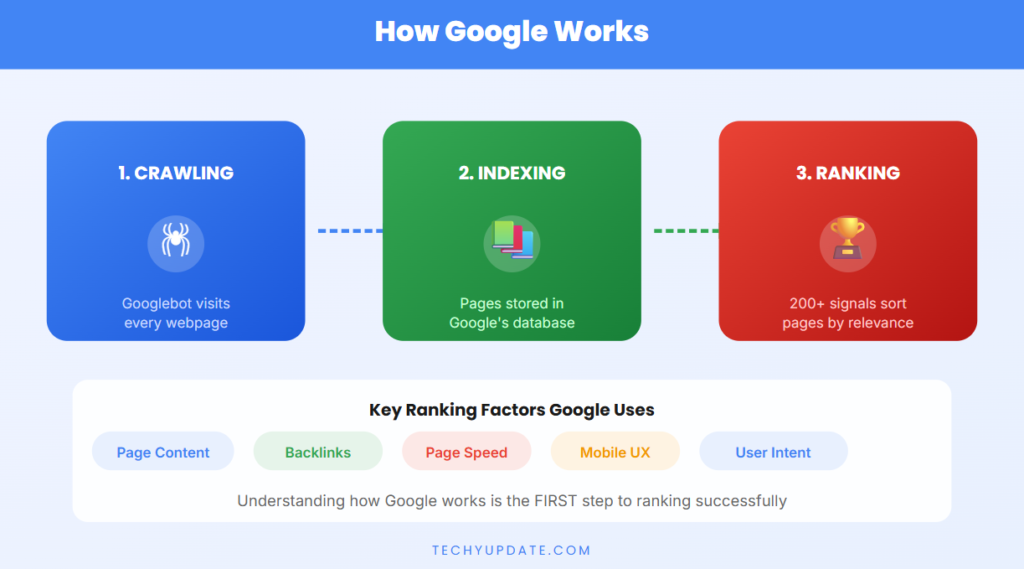
Google works in three main steps:
1. Crawling
Google uses automated bots, often called Google crawlers or spiders, to discover pages on the internet.
These bots visit your website by following:
- Internal links
- External backlinks
- Sitemaps
- Newly published pages
Think of crawling as Google finding your content first.
2. Indexing
After crawling, Google analyzes your content and stores it in its database. This process is called indexing.
Google checks:
- What your page is about
- Which keywords are used
- Content quality
- User experience signals
If your page is useful, it gets added to Google’s searchable index.
3. Ranking
When a user searches for something, Google sorts indexed pages and ranks them based on quality, relevance, authority, and user intent.
The best and most relevant pages appear on the first page of Google.
Importance of Relevance + Authority
Two major ranking factors are relevance and authority.
Relevance
Google wants to show the most relevant answer to the user’s search.
For example:
- If someone searches “best SEO tips for beginners”, Google prefers pages specifically covering beginner-friendly SEO advice.
This means your content must:
- Match search intent
- Use clear headings
- Answer user questions directly
- Include related keywords naturally
Authority
Authority means trust and credibility.
Google checks signals like:
- Backlinks from trusted websites
- Quality content depth
- Author expertise
- User engagement
The more trustworthy your content looks, the better it ranks.
In short, relevance gets you noticed, and authority gets you ranked higher.
Quick Summary
To rank on Google, remember this simple formula:
Google finds your page → understands it → compares it → ranks it
Focus on:
- Strong SEO basics
- Helpful content
- Relevance to user intent
- Building authority over time
This is the foundation of every successful SEO strategy.
Keyword Research (Foundation of SEO)
If you want consistent organic traffic, keyword research is the foundation of SEO. Every successful page starts with choosing the right keywords that people actually search for. When done correctly, keyword research helps you match user intent, reduce competition, and improve your chances of ranking on the first page of Google.
What Are Keywords?
Keywords are the words or phrases users type into Google to find information. For example, “how to rank a website,” “free SEO tools,” or “best study apps.”
In SEO, keywords act as a bridge between your content and the user’s search intent. When your page uses the right keywords naturally, Google understands what your content is about and when to show it.
Strong keyword usage means:
- Your content answers real questions
- Google can categorize your page correctly
- Users find exactly what they need
The goal is not just to include keywords, but to use them in a helpful, natural, and context-driven way.
Types of Keywords
Understanding keyword types helps you choose smarter strategies.
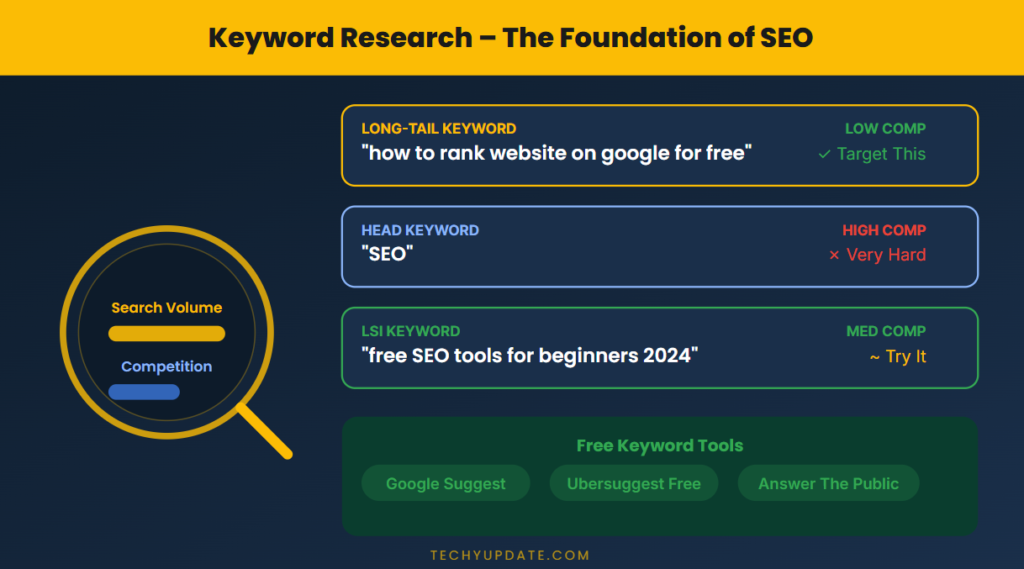
Short-Tail Keywords
Short-tail keywords are broad and general terms, usually 1–2 words.
Examples:
- “SEO”
- “blogging”
- “AI tools”
Characteristics:
- Very high search volume
- Extremely competitive
- Hard to rank for beginners
These keywords are useful for awareness but are not ideal for new websites.
Long-Tail Keywords (Easier to Rank)
Long-tail keywords are specific phrases, usually 3–6 words.
Examples:
- “How to rank a website on Google for free.”
- “Best AI tools for students 2026”
- “easy SEO tips for beginners”
Benefits:
- Lower competition
- Higher conversion rate
- Clear user intent
For beginners, long-tail keywords are the fastest way to get traffic and rankings.
Free Keyword Research Tools
You don’t need expensive tools to start. Several free tools can help you find powerful keywords.
Google Keyword Planner
- Provides search volume data
- Shows keyword ideas related to your topic
- Helps identify demand trends
Best for understanding how many people search for a keyword.
Ubersuggest
- Offers keyword suggestions
- Shows SEO difficulty
- Provides content ideas
Useful for finding low-competition keyword opportunities.
Google Search Suggestions
When you type in Google, it automatically shows suggestions.
These are:
- Real searches by users
- Long-tail keyword ideas
- Highly relevant queries
Also check:
- “People Also Ask” section
- Related searches at the bottom
These are goldmines for content ideas.
Choosing Low-Competition Keywords
The secret to ranking faster is choosing low-competition keywords.
Here’s how to identify them:
- Look for keywords with specific intent
- Avoid overly broad terms
- Analyze competitors on the first page
- Target keywords with lower domain authority competition
Example Strategy:
Instead of targeting:
- “SEO tips” (high competition)
Target:
- “SEO tips for beginners 2026” (lower competition)
Quick Action Plan
- Start with a broad topic
- Use tools to find keyword variations
- Focus on long-tail keywords
- Check the competition level
- Create high-quality content around it
Quick Summary
- Keywords connect your content to user searches
- Short-tail = high competition
- Long-tail = easier ranking + better results
- Use free tools like Google Keyword Planner, Ubersuggest, and search suggestions
- Focus on low-competition keywords for faster growth
Mastering keyword research gives you a strong SEO foundation and a clear path to ranking success.
Create High-Quality Content
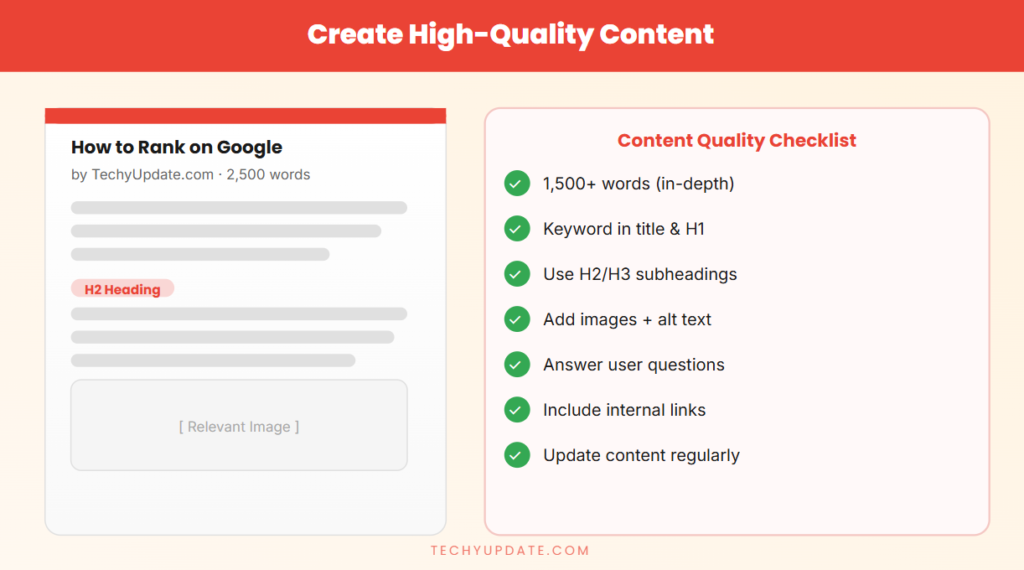
High-quality content is the core driver of SEO success. No matter how strong your keywords or technical setup are, your website will not rank if your content fails to deliver real value. In 2026, Google prioritizes content that is helpful, trustworthy, and user-focused. To succeed, you must create content that answers questions clearly, keeps readers engaged, and solves real problems.
Write for Humans, Not Just Search Engines
One of the most common mistakes beginners make is writing only for Google. Modern SEO is different. Google now rewards content that is written for real people first.
Focus on:
- Clear and simple language
- Easy-to-read formatting
- Logical flow of ideas
- Engaging tone
If your content is easy to understand and useful, Google will automatically consider it valuable.
Tip: Always ask, “Would a real person find this helpful?” If yes, you’re on the right track.
Solve Real Problems
Content that ranks well always addresses specific user problems. Instead of writing general information, focus on providing practical solutions.
For example:
- Instead of writing “SEO basics,” write
→ “Step-by-step SEO guide for beginners.” - Instead of “AI tools,” write
→ “Best free AI tools for students in 2026.”
When your content directly solves a problem, it becomes:
- More relevant
- More shareable
- More likely to rank
Use Storytelling + Value-Based Writing
Storytelling makes your content more engaging and memorable. Instead of just listing facts, explain concepts with examples or simple scenarios.
For instance:
- Share a quick example of how a beginner ranked their blog
- Explain a mistake and how it was fixed
- Show before-and-after results
Value-based writing means every paragraph should:
- Teach something useful
- Add clarity
- Provide actionable insight
Avoid fluff. Focus on depth and usefulness.
Content Length (1000+ Words Recommended)
Long-form content performs better because it provides complete information. Articles with 1000+ words tend to rank higher because they:
- Cover topics in detail
- Answer multiple related questions
- Increase user engagement
However, length alone is not enough. Your content must remain:
- Relevant
- Structured
- Easy to read
Use:
- Headings (H2, H3)
- Bullet points
- Short paragraphs
This improves readability and SEO performance.
Use Your Main Keyword Naturally
Keywords are important, but they must be used naturally and strategically.
Best practices:
- Include your main keyword in:
- Title
- Introduction
- Headings
- Conclusion
- Avoid keyword stuffing
- Use variations and related terms
For example, instead of repeating the same phrase, use:
- “rank website on Google”
- “improve Google ranking”
- “SEO optimization tips”
This makes your content more natural and helps Google understand context better.
Quick Summary
- Focus on helpful, human-first content
- Solve real user problems
- Use storytelling for engagement
- Write detailed content (1000+ words)
- Add keywords naturally without overuse
On-Page SEO Optimization
On-page SEO is where your content and structure come together to signal relevance, clarity, and quality to Google. When done right, it helps search engines understand your page instantly and improves your chances of ranking on the first page. Focus on clean structure, smart keyword placement, and a strong user experience.
Optimize Title Tag (Include Keyword)
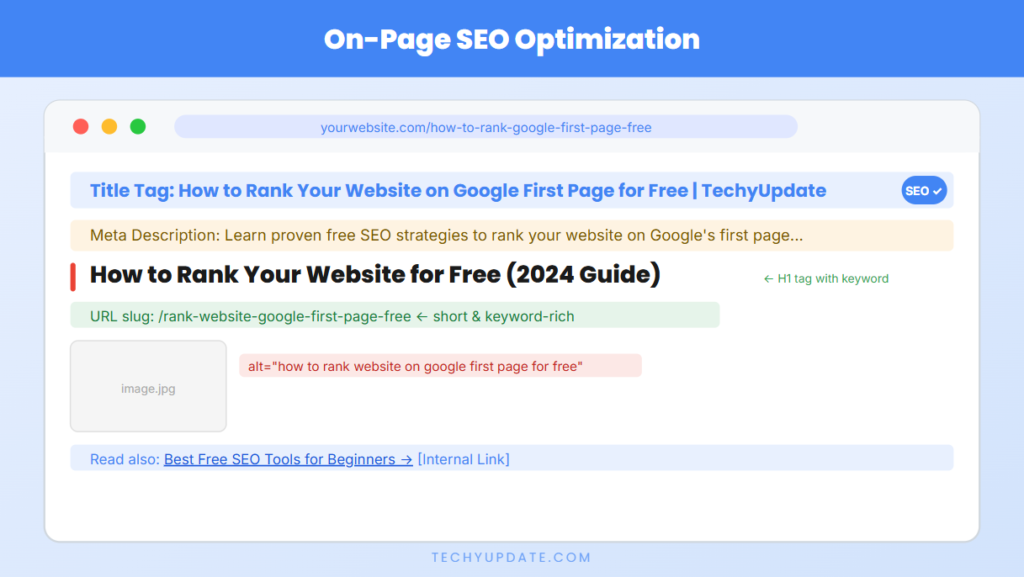
Your title tag is the first thing users see in search results. It must be clear, compelling, and include your main keyword naturally.
Best practices:
- Keep it 50–60 characters
- Place the keyword near the beginning
- Add a benefit or hook (e.g., “step-by-step,” “complete guide”)
Example:
How to Rank Your Website on Google First Page for Free (Beginner Guide)
A strong title improves click-through rate (CTR) and signals relevance to Google.
Write a Compelling Meta Description
The meta description summarizes your page in search results. While not a direct ranking factor, it heavily influences clicks.
Best practices:
- Keep it 150–160 characters
- Include your main keyword once
- Highlight value or outcome
Example:
“Learn how to rank your website on the Google first page for free with proven SEO strategies and tools for beginners.”
Make it action-driven and benefit-focused.
Use Proper Headings (H1, H2, H3)
Headings structure your content for both users and search engines.
- H1: One per page (main topic)
- H2: Main sections
- H3: Subtopics within sections
Benefits:
- Improves readability
- Helps Google scan content
- Increases chances for featured snippets
Use keywords and variations in headings where natural.
Keyword Placement Strategy
Smart placement helps Google understand your page without over-optimization.
Include your main keyword in:
- First 100 words (establish topic early)
- At least one H2 or H3 heading
- URL slug (short and clean)
Example URL:
/rank-website-google-first-page-free
Also, use related keywords throughout the content to build context.
Image Optimization (ALT Text)
Images improve engagement, but they must be optimized.
Best practices:
- Use descriptive file names (e.g., seo-checklist.png)
- Add ALT text with keywords
- Compress images for faster loading
Example ALT text:
“How to rank a website on the Google first page for free infographic.”
This helps with image SEO and accessibility.
Internal Linking Strategy
Internal links connect your pages and guide both users and search engines.
Benefits:
- Improves site structure
- Distributes SEO value (link equity)
- Keeps users engaged longer
Best practices:
- Link to relevant pages within your site
- Use descriptive anchor text (not “click here”)
- Add 3–5 internal links per article
Example:
Link to related posts like “Keyword Research Guide” or “Content Writing Tips.”
Quick Checklist
- Keywords in the title, URL, and first paragraph
- Clear meta description
- Proper heading structure
- Optimized images with ALT text
- Strategic internal links
Quick Summary
On-page SEO is about clarity, structure, and relevance. When you optimize titles, headings, keywords, images, and links properly, you make it easier for Google to understand your content—and easier for users to trust it.
Technical SEO Basics
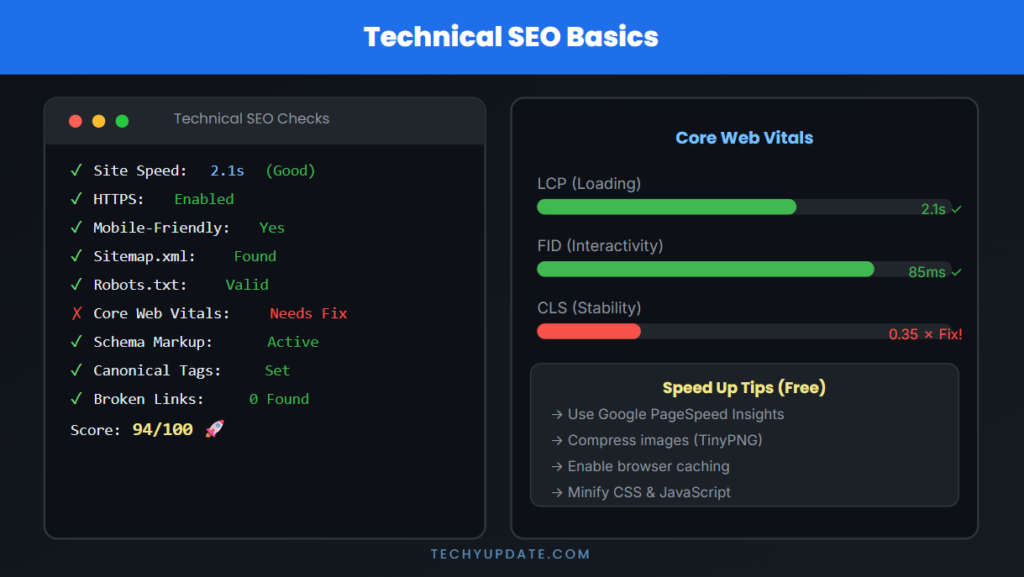
Technical SEO ensures your website is fast, accessible, secure, and easy for search engines to crawl and index. Even the best content can struggle to rank if your site has technical issues. Mastering these basics creates a strong foundation that supports all your SEO efforts.
Mobile-Friendly Website
A mobile-friendly design is essential because most users browse on smartphones. Google uses mobile-first indexing, meaning it primarily evaluates the mobile version of your site.
Best practices:
- Use a responsive design that adapts to all screen sizes
- Ensure text is readable without zooming
- Keep buttons and menus easy to tap
- Avoid intrusive pop-ups
Test your site on multiple devices and screen sizes. A smooth mobile experience improves engagement, dwell time, and rankings.
Fast Loading Speed
Page speed directly impacts both user experience and SEO. Slow pages lead to higher bounce rates and lower rankings.
How to improve speed:
- Compress images (use modern formats like WebP)
- Enable browser caching
- Minify CSS, JavaScript, and HTML
- Use a reliable hosting provider
- Implement a Content Delivery Network (CDN)
Aim for a load time under 2–3 seconds. Faster pages keep users engaged and signal quality to Google.
Use HTTPS (Secure Website)
Security is a ranking factor. A website with HTTPS (SSL certificate) protects user data and builds trust.
Why it matters:
- Encrypts data between the user and the server
- Prevents security warnings in browsers
- Improves credibility and conversions
Ensure all pages redirect from HTTP → HTTPS and fix mixed-content issues (insecure assets on secure pages).
Fix Broken Links
Broken links (404 errors) harm user experience and waste crawl budget.
How to manage:
- Regularly audit your site for broken links
- Redirect outdated URLs using 301 redirects
- Update or remove dead internal links
- Monitor with tools like Google Search Console
Clean links help search engines crawl efficiently and keep users on your site.
Create and Submit a Sitemap
A sitemap is a file that lists all important pages on your website, helping search engines discover and index them.
Best practices:
- Include only indexable, high-quality pages
- Keep it updated automatically
- Submit it to Google Search Console
Typical URL:
yourwebsite.com/sitemap.xml
A well-structured sitemap ensures your content gets found faster.
Create and Optimize robots.txt
The robots.txt file tells search engines which pages they can or cannot crawl.
Basic uses:
- Block duplicate or low-value pages (e.g., admin areas)
- Allow important sections for indexing
- Prevent the crawling of unnecessary files
Example:
User-agent: *
Disallow: /admin/
Allow: /
Be careful, incorrect rules can block important pages from indexing.
Quick Checklist
- Mobile-responsive design
- Fast page load (under 3 seconds)
- HTTPS-enabled site-wide
- No broken links or 404 errors
- Updated sitemap submitted
- Proper robots.txt configuration
Quick Summary
Technical SEO is about making your website easy to access, fast to load, and easy for crawlers to crawl. When your site is technically strong, Google can index it efficiently—and your content has a much better chance of ranking on the first page.
Build Backlinks (Free Methods)
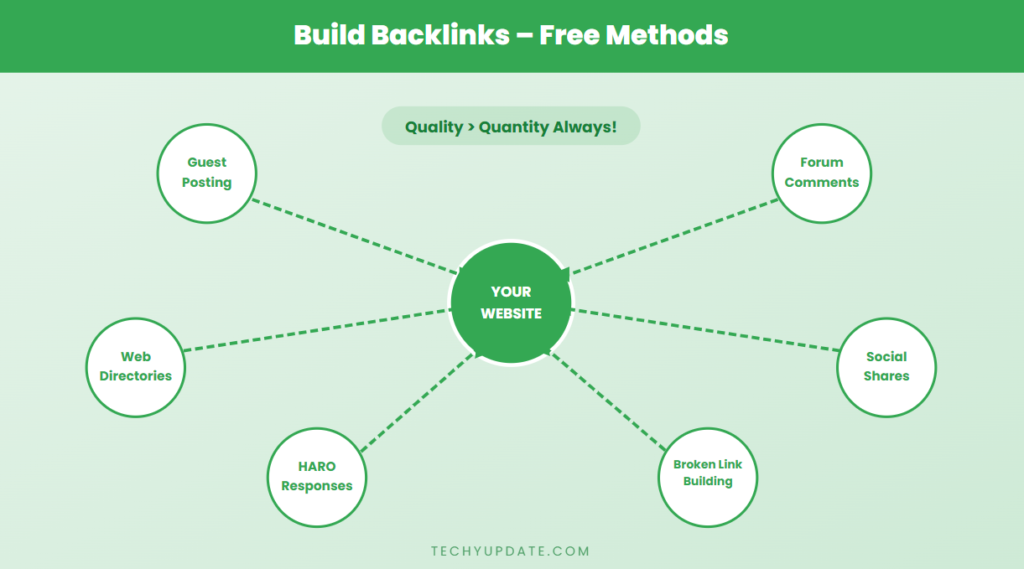
Backlinks remain one of the strongest ranking factors in SEO. If you want to improve your authority and visibility, learning how to build backlinks—especially using free methods is essential. Backlinks act as votes of confidence from other websites, signaling to Google that your content is valuable and trustworthy.
What Are Backlinks and Why Do They Matter
A backlink is a link from another website that points to your page. When a trusted site links to you, Google sees it as a sign that your content is credible.
Why backlinks matter:
- Increase authority: More high-quality links = stronger domain trust
- Improve rankings: Pages with backlinks tend to rank higher
- Drive referral traffic: Users click links from other websites
- Boost indexing: Search engines discover your content faster
However, not all backlinks are equal. A single link from a high-quality site is often more valuable than dozens of low-quality links.
Free Backlink Strategies
You don’t need to spend money to build strong backlinks. Here are proven free strategies that beginners can use.
1. Guest Posting
Guest posting means writing content for other websites in your niche and including a link back to your site.
How to do it:
- Find blogs that accept guest posts
- Pitch useful, original topics
- Write high-quality articles
- Include a natural backlink in the content or author bio
Benefits:
- Builds authority
- Drives targeted traffic
- Creates long-term SEO value
2. Blog Commenting
Commenting on blogs is a simple way to build links and visibility.
Best practices:
- Add meaningful comments, not spam
- Contribute insights or ask relevant questions
- Use your website link where allowed
Avoid:
- One-line comments like “Great post.”
- Posting links without value
When done correctly, blog commenting can increase engagement and brand awareness.
3. Forum Participation
Online forums are excellent for building backlinks and authority.
Examples include:
- Niche discussion forums
- Q&A platforms
How to use forums:
- Answer questions in your niche
- Share helpful advice
- Add your link when it adds value
This method builds trust and credibility, not just links.
4. Social Bookmarking
Social bookmarking platforms allow you to share your content publicly.
Benefits:
- Faster indexing
- Increased visibility
- More traffic opportunities
Best practices:
- Use proper titles and descriptions
- Share only high-quality content
- Stay consistent
Focus on Quality Over Quantity
The biggest mistake beginners make is chasing too many low-quality backlinks. This can harm your SEO rather than help it.
Focus on:
- Links from relevant websites
- Natural link placement
- Content-driven backlinks
- Building relationships
Google values quality, relevance, and trust more than the number of links.
Quick Action Plan
- Start with guest posting on small blogs
- Engage in blog comments and forums
- Share content through social bookmarking
- Focus on building authority gradually
Quick Summary
- Backlinks are signals of trust and authority
- Free methods include guest posting, commenting, forums, and bookmarking
- Always prioritize quality over quantity
- Build links naturally through valuable content
Consistent backlink building helps your website gain authority, improve rankings, and grow organically over time.
Use Google Tools (Must Do)
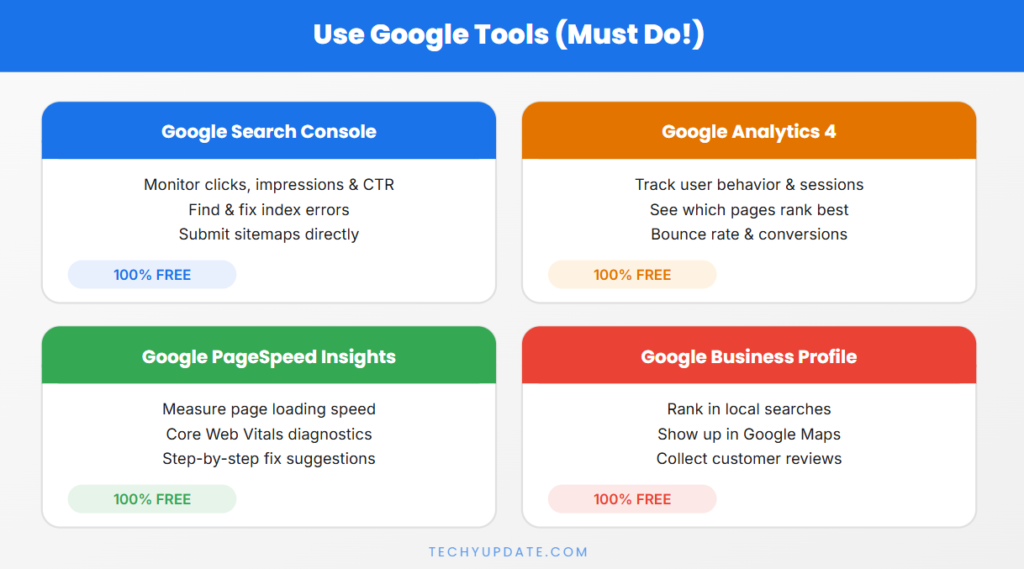
If you want to improve your SEO results without spending money, using Google’s free tools is absolutely essential. These tools give you direct insights into how your website performs in search results, helping you identify problems, track growth, and make smarter decisions. For beginners, mastering these tools is one of the fastest ways to understand what works and what needs improvement.
Google Search Console
Google Search Console (GSC) is a powerful tool that helps you monitor your website’s presence in Google search results.
Submit Sitemap
Submitting your sitemap ensures that Google can discover and index your pages efficiently.
Steps:
- Create your sitemap (e.g., sitemap.xml)
- Go to Google Search Console
- Navigate to “Sitemaps”
- Enter your sitemap URL and submit
Benefits:
- Faster indexing of new content
- Better crawl coverage
- Improved visibility
Track Performance
GSC allows you to analyze how your website performs in search.
Key metrics:
- Clicks – how many users visit your site
- Impressions – how often your page appears in search
- CTR (Click-Through Rate) – percentage of clicks
- Average position – your ranking on Google
Use this data to:
- Identify top-performing keywords
- Improve low CTR pages
- Optimize underperforming content
Fix Indexing Issues
Google Search Console also highlights indexing problems.
Common issues:
- Pages not indexed
- Crawl errors
- Mobile usability problems
How to fix:
- Use the “URL Inspection” tool
- Request indexing after updates
- Fix errors shown in reports
Resolving these issues ensures your pages are visible and accessible to Google.
Google Analytics
Google Analytics helps you understand how users interact with your website.
Monitor Traffic
Analytics shows detailed insights about your visitors.
Key data includes:
- Number of users
- Traffic sources (Google, social, direct)
- User behavior on pages
- Bounce rate
This helps you:
- Understand which content performs best
- Improve user experience
- Increase engagement
Using Data to Improve SEO
Combining Search Console and Analytics gives you a complete SEO picture.
Example workflow:
- Find keywords in GSC → Improve content
- Check traffic in Analytics → Optimize pages
- Fix errors → Increase rankings
Quick Checklist
- Submit the sitemap in Google Search Console
- Track keyword performance
- Monitor traffic in Google Analytics
- Fix indexing and crawl issues
- Update content based on data
Quick Summary
Google tools are essential for SEO success. They help you track performance, fix issues, and improve rankings using real data. By consistently using Google Search Console and Google Analytics, you can make smarter decisions and grow your website effectively without any cost.
Optimize for User Experience (UX)
User Experience (UX) has become a major ranking factor in 2026. Google now prioritizes websites that are not only informative but also easy to use, visually clean, and engaging. If users enjoy browsing your site, they stay longer, interact more, and are more likely to return—signals that directly improve your rankings.
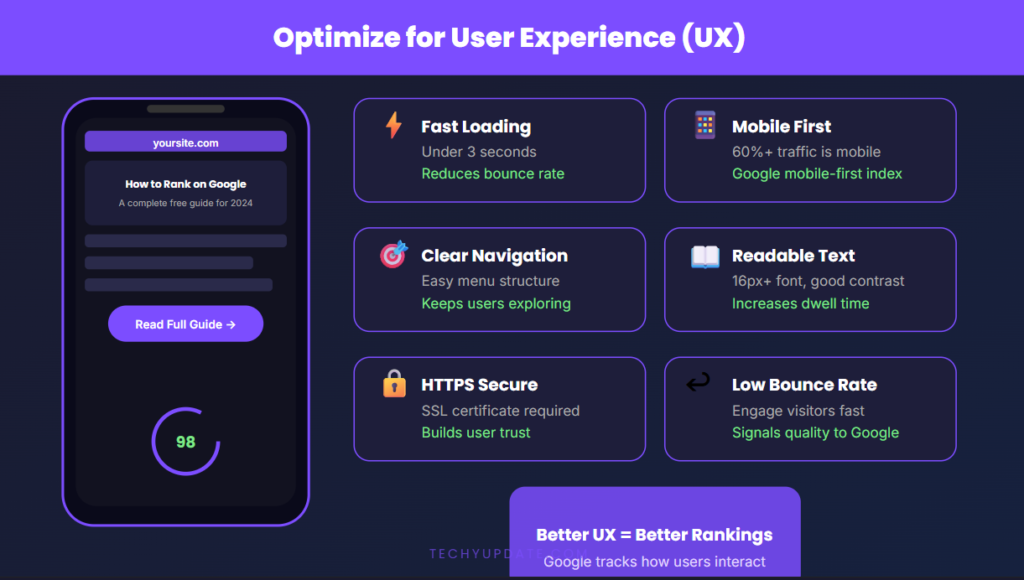
Optimizing UX is essential to reduce bounce rate, increase dwell time, and rank higher on Google.
Easy Navigation
A website should be simple to explore without confusion. Visitors should find what they need within seconds.
Best practices:
- Use a clear menu structure
- Keep important pages easily accessible
- Add categories and subcategories
- Use breadcrumb navigation for clarity
For example, if a user lands on your blog, they should quickly find related articles without searching too much.
Tip: The fewer clicks it takes to reach content, the better the user experience.
Clean and Professional Design
Design plays a huge role in how users perceive your website. A cluttered or outdated design can drive visitors away instantly.
Focus on:
- Minimal and clean layout
- Consistent fonts and colors
- Proper spacing between elements
- Mobile-responsive design
Avoid:
- Too many ads
- Pop-ups that block content
- Distracting animations
A clean design makes your website look trustworthy, modern, and easy to read.
Reduce Bounce Rate
Bounce rate is the percentage of users who leave your site without interacting.
A high bounce rate signals that:
- Content is not relevant
- Page loads slowly
- Design is poor
How to reduce it:
- Match content with user intent
- Improve page speed
- Use engaging introductions
- Add internal links to keep users exploring
For example, linking to related articles encourages users to stay longer and read more.
Improve Dwell Time
Dwell time is how long a user stays on your page before returning to search results. Longer dwell time indicates valuable content.
Ways to improve dwell time:
- Write engaging and informative content
- Use headings and bullet points for readability
- Add images, infographics, or videos
- Break content into short paragraphs
You can also:
- Ask questions
- Provide actionable tips
- Use storytelling
These techniques keep users interested and engaged throughout the page.
Quick UX Checklist
- Simple and intuitive navigation
- Clean, modern design
- Fast loading pages
- Engaging and readable content
- Internal linking for deeper browsing
Quick Summary
User experience is not just about design—it’s about how users feel and interact with your website. When your site is easy to use, visually appealing, and informative, users stay longer and engage more. This sends strong positive signals to Google, helping your website rank higher and perform better.
Use Social Media for Traffic
Social media is a powerful, free channel for boosting visibility, driving traffic, and supporting SEO efforts. While social signals are not direct ranking factors, they help your content reach a wider audience, which can lead to more clicks, shares, and backlinks.
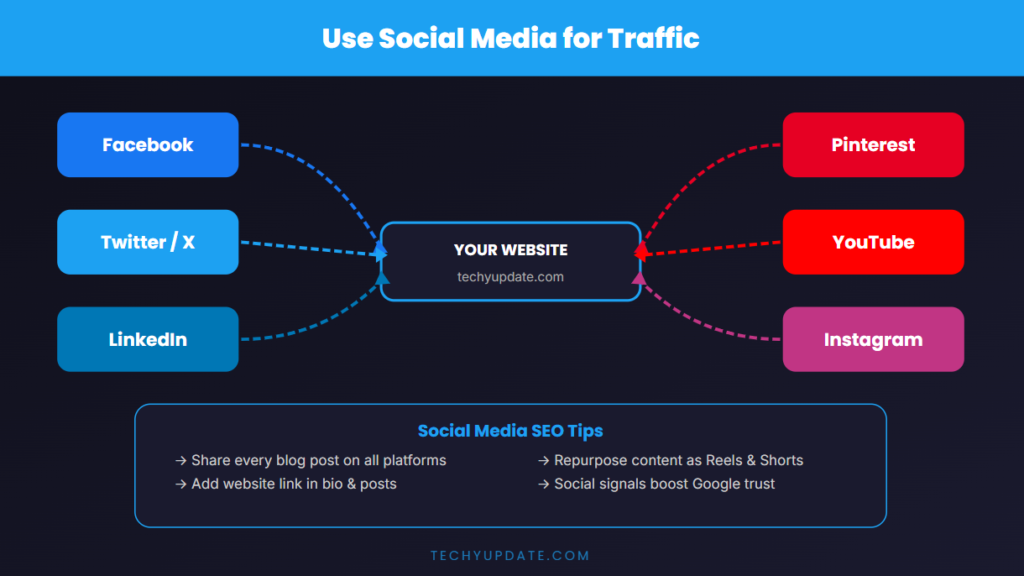
Share Content on Platforms
To maximize reach, consistently share your content across major platforms:
- Facebook groups and pages
- Instagram posts and reels
- Twitter (X) threads
- LinkedIn articles and posts
- Pinterest (for blog visuals)
Best practice: Customize your content for each platform instead of posting the same format everywhere.
Drive Traffic Signals
When users click your links from social media, it sends positive engagement signals to Google.
Benefits include:
- Increased page visits
- Higher engagement rates
- Faster content discovery and indexing
The more people interact with your content, the stronger your overall SEO performance becomes.
Build Audience Engagement
Engagement builds trust and loyalty.
Focus on:
- Responding to comments
- Asking questions in posts
- Creating interactive content (polls, stories)
- Sharing valuable tips
An engaged audience is more likely to visit your site repeatedly and share your content, amplifying your reach.
READ MORE: Best AI Writing Tools Review 2026 (Free vs Paid Comparison)
Focus on Consistency
Consistency is one of the most overlooked yet powerful SEO strategies. Ranking on Google requires continuous effort and regular updates.
Post Content Regularly
Publishing content consistently helps:
- Keep your website active
- Increase indexing frequency
- Build topical authority
Start with a realistic schedule:
- 1–2 blog posts per week
- Regular updates to existing content
Update Old Articles
Refreshing old content can significantly improve rankings.
Update:
- Outdated information
- Keywords and headings
- Internal links
- Images and examples
Google prefers fresh, updated content, which can boost your rankings without creating new posts.
Keep Improving SEO Strategy
SEO is not a one-time task. It requires:
- Testing new strategies
- Monitoring performance
- Adjusting content based on data
Continuous improvement leads to long-term growth and stability.
Target Featured Snippets
Featured snippets appear at the top of Google results and can significantly increase visibility.
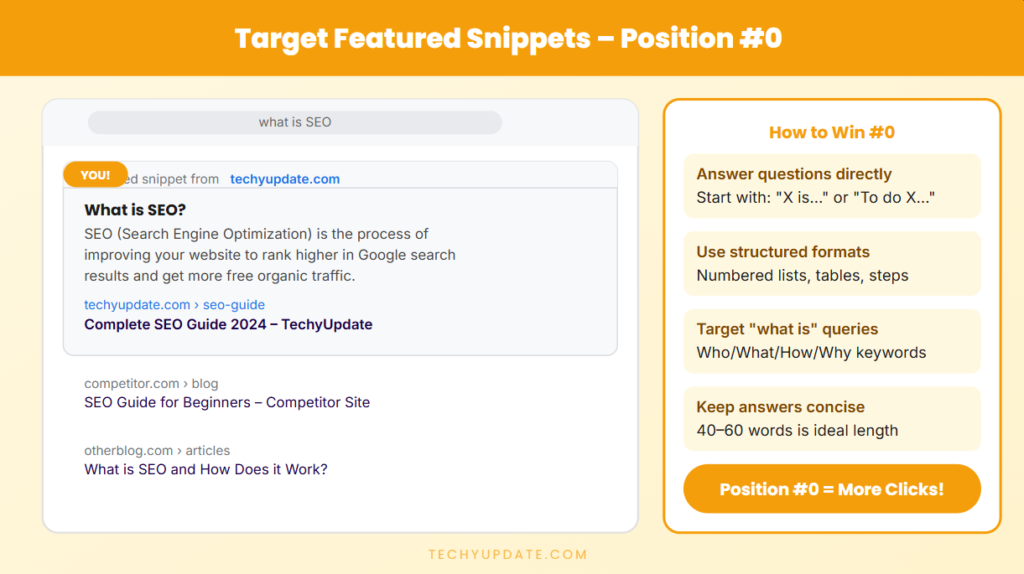
Answer Questions Clearly
Provide direct, concise answers to common questions.
Example:
- “What is SEO?” → Give a clear 2–3 sentence definition
Use Bullet Points and Lists
Google often selects structured content for snippets.
Use:
- Bullet points
- Numbered lists
- Step-by-step guides
Add FAQ Sections
FAQs help target voice search and snippet opportunities.
Include:
- Common questions
- Short, clear answers
This improves your chances of appearing in position zero (featured snippet).
Avoid Common SEO Mistakes
Avoiding mistakes is just as important as applying strategies.
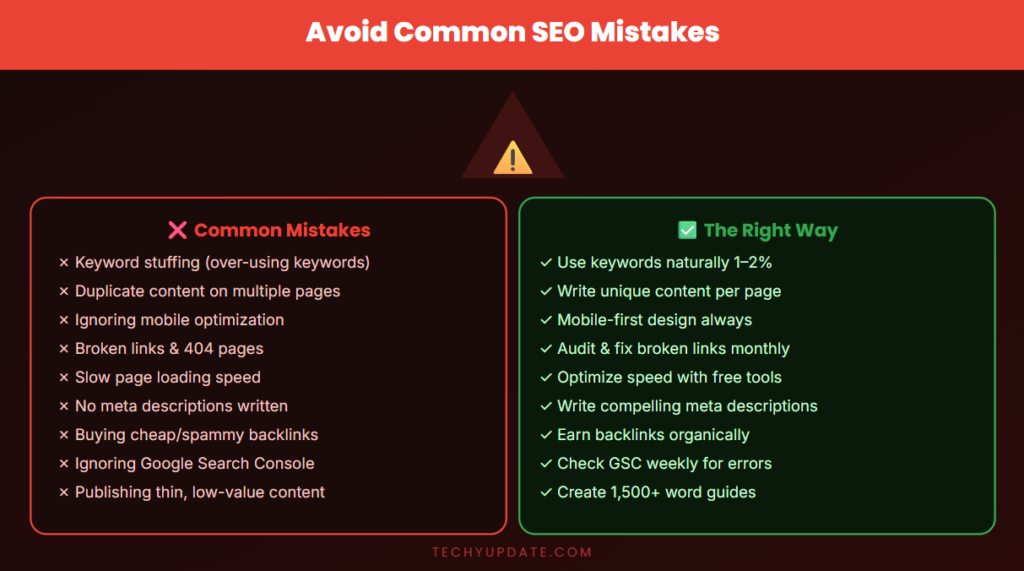
Keyword Stuffing
Overusing keywords makes content unnatural and can harm rankings.
Fix: Use keywords naturally and focus on readability.
Duplicate Content
Copying content from other sites or repeating your own content reduces SEO value.
Fix: Always create original, unique content.
Buying Low-Quality Backlinks
Spammy backlinks can lead to penalties.
Fix: Focus on organic, high-quality backlinks.
Ignoring Mobile Optimization
A non-mobile-friendly site loses both users and rankings.
Fix: Ensure your website works smoothly on all devices.
How Long Does It Take to Rank?
SEO is not instant—it requires patience and consistency.
Realistic Expectations (3–6 Months)
Most websites start seeing results within:
- 3–6 months for low-competition keywords
- Longer for competitive niches
Depends on Competition and Consistency
Ranking speed depends on:
- Keyword difficulty
- Content quality
- Backlinks
- Posting consistency
The more consistent and strategic you are, the faster you’ll see results.
Conclusion
SEO is a long-term strategy, not a quick fix. Success comes from consistently creating valuable content, optimizing your website, and improving user experience.
Focus on:
- High-quality content
- Smart keyword usage
- Strong technical foundation
- Continuous learning
Even without spending money, free SEO methods can help you reach the first page of Google and build sustainable online growth.
Mastering how to rank your website on the Google first page for free is achievable with the right approach. By combining AI tools, SEO strategies, and consistent effort, students can build a strong online presence without spending money.
The future belongs to those who learn, adapt, and create valuable content. Start today, stay consistent, and your website can reach the first page of Google.
FAQs Section
Can I rank without backlinks?
Yes, it is possible to rank without backlinks, especially for low-competition keywords. However, backlinks help build authority and improve rankings faster over time.
How many keywords should I use?
Focus on one main keyword and a few related keywords. Avoid overusing them—keep your content natural and user-friendly.
Is SEO really free?
Yes, SEO can be done for free using tools like Google Search Console and organic strategies. The main investment is your time and effort.
Why is my site not ranking?
Common reasons include:
- Poor keyword selection
- Low-quality content
- Lack of backlinks
- Technical SEO issues
Fixing these areas can significantly improve your rankings.
Do I need to post daily to rank?
No, consistency matters more than frequency. Posting 1–2 high-quality articles per week is enough for steady growth.
What is the fastest way to rank on Google?
Target low-competition keywords, create high-quality content, and optimize your site properly. There is no shortcut, but smart strategies can speed up results.
How long does it take to rank on Google?
Ranking can take weeks to months, depending on competition and content quality. Consistency is key.
Can I rank without spending money?
Yes, learning how to rank your website on the Google first page for free is possible using SEO strategies and free tools.
Is ChatGPT useful for SEO?
Yes, ChatGPT helps with content creation, keyword ideas, and improving writing quality.
What is the most important SEO factor?
Content quality and user intent are the most important factors.
How often should I publish content?
Consistency matters more than frequency. Start with 1–2 posts per week.