

AI tools stopped being a novelty years ago. In 2026 they’re infrastructure — sitting inside your email client, your code editor, your design software, and your spreadsheet. The problem isn’t finding an AI tool anymore; it’s cutting through the noise of thousands of options to find the handful that actually earn a permanent spot in your workflow.
This guide rounds up 100 of the best AI tools available right now, organized by category, so you can pick based on the job you need done rather than hype.
The AI tools landscape shifted meaningfully in the first half of 2026. Microsoft Agent 365 reached general availability on May 1, 2026; Copilot Cowork followed worldwide on June 16; ChatGPT Work launched on July 9; and Claude Cowork reached web and mobile on July 7, marking a broad industry move from single-response chatbots toward persistent, task-running agents.
Image generation also changed shape. Midjourney shipped version 8.2 on July 24, 2026, and remains strong for stylized visual work, but image generation increasingly lives as a feature inside Copilot, Gemini, Canva, and Adobe rather than as a standalone destination. Meanwhile, OpenAI’s GPT Image 2, released in April 2026, brought a capable generator directly into a product many organizations already pay for.
Voice AI had its biggest year yet. ElevenLabs closed a $500 million Series D at an $11 billion valuation in February 2026 and reported crossing $500 million in annual recurring revenue within the first four months of the year, with its Eleven v3 model supporting more than seventy languages, inline direction tags, and multi-speaker dialogue.
On the automation side, SAP made a strategic investment in n8n on May 12, valuing the workflow-automation platform at $5.2 billion, roughly double its prior valuation, with plans to embed it natively in SAP Joule Studio.
Author: TechyUpdate Editorial Team Last Updated: August 1, 2026
Quick Answer Box
The best AI tools in 2026 span chatbots (ChatGPT, Claude, Gemini), coding assistants (Cursor, GitHub Copilot, Claude Code), creative generators (Midjourney, GPT Image 2, ElevenLabs, Runway), and agentic automation platforms (n8n, Zapier, Microsoft Agent 365). No single tool wins every category — the right pick depends on the job you need done.
Table of Contents
What Is an AI Tool
An AI tool is any software application that uses machine learning or large language models to perform tasks that previously required human judgment — writing, coding, designing, analyzing data, generating media, or automating multi-step workflows. Modern AI tools increasingly act as “agents”: they don’t just respond to a prompt; they can plan, use other tools, and complete multi-step jobs with limited supervision.
Key Features to Look For
- Multimodal input/output — text, image, audio, and video in one interface
- Long context windows for handling large documents or codebases
- Native integrations with the apps you already use (email, docs, IDEs, design tools)
- Agentic capability — the ability to complete multi-step tasks, not just answer questions
- Transparent pricing with a usable free tier
- Data privacy and enterprise compliance options if you handle sensitive information
Benefits
AI tools compress hours of manual work into minutes, help non-specialists produce professional-grade output (code, design, copy), surface research faster with citations, and increasingly run background tasks — drafting replies, updating trackers, generating reports — without needing to be babysat step by step.

Real Use Cases
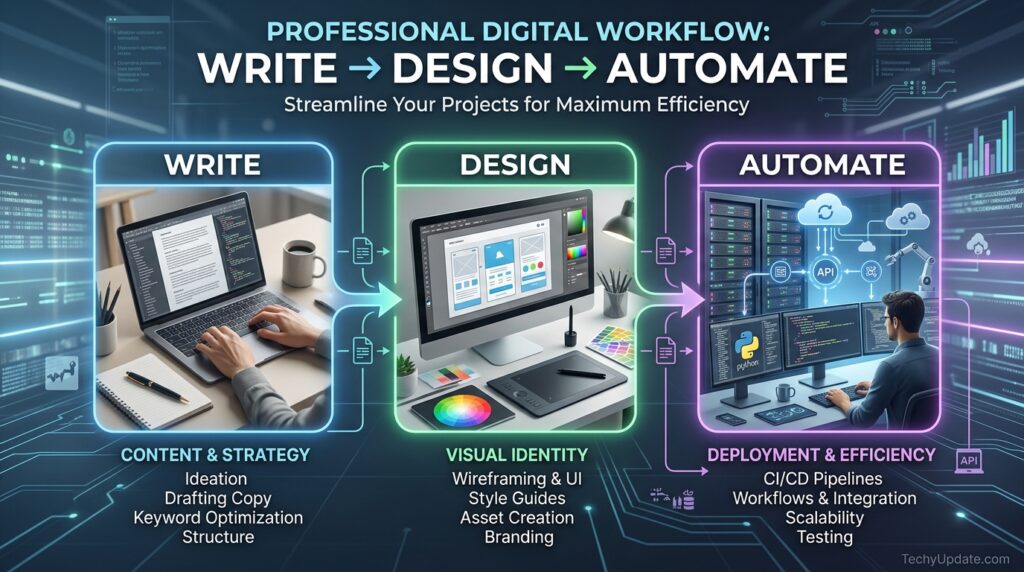
- A marketer uses Claude or ChatGPT to draft campaign copy, then Midjourney or GPT-4o for visuals.
- A developer uses Cursor or GitHub Copilot to ship features, focusing on architecture rather than typing boilerplate.
- A founder uses n8n or Zapier to connect a CRM, an inbox, and a billing system into a single automated pipeline.
- A student uses NotebookLM or Perplexity to summarize and cross-reference research papers.
- A podcaster uses ElevenLabs for voiceover and cleanup instead of booking studio time.
The 100 Best AI Tools by Category
1. General AI Chatbots & Assistants
- ChatGPT – The most versatile all-rounder, with a strong voice mode and built-in image generation.
- Claude – Best for long-form writing, careful reasoning, and working with lengthy documents.
- Google Gemini – Deepest integration across Gmail, Docs, Search, and Android.
- Microsoft Copilot – Built into Windows and Microsoft 365 for everyday office work.
- Perplexity – Research-first assistant that cites its sources.
- Meta AI – Free, fast assistant embedded across Instagram, WhatsApp, and Facebook.
- DeepSeek – A strong open-weight model popular for cost-efficient reasoning tasks.
- Mistral Le Chat – European-built assistant with a privacy-forward pitch.
- Poe – One subscription for accessing multiple leading models in one place.
- You.com – Search-plus-chat hybrid with customizable AI “modes.”
2. AI Coding Tools
- Cursor – AI-native code editor that understands your whole codebase.
- Claude Code – Terminal and IDE agent for end-to-end feature development.
- GitHub Copilot – The original AI pair programmer, now handling full features.
- Windsurf – Agentic IDE built for multi-file changes.
- Replit AI – Browser-based build-and-deploy environment for fast prototypes.
- Blackbox AI – Cross-IDE coding assistant with built-in code search.
- Tabnine – Privacy-focused code completion for regulated industries.
- Sourcegraph Cody – Codebase-aware assistant built for large enterprise repos.
- v0 by Vercel – Generates production-ready UI components from prompts.
- Bolt.new – Full-stack app generation directly in the browser.
3. AI App & Website Builders
- Lovable – Turns plain-English prompts into working web apps.
- NxCode – App builder aimed at founders who want full code ownership.
- Framer AI – Generates and edits marketing websites visually.
- Webflow AI – AI-assisted no-code website design and copy.
- Durable – One-prompt website generator for small businesses.
4. AI Image Generators
- Midjourney – Best-in-class stylized and artistic image quality.
- GPT Image 2 – High-accuracy generation and editing built into ChatGPT.
- Adobe Firefly – Commercially safe generation integrated with Creative Cloud.
- Ideogram – Strongest tool for clean, accurate text-in-image design.
- Leonardo AI – Customizable generation with fine-tuned style models.
- Google ImageFX / Nano Banana – Free, fast prompt-to-image inside Google’s ecosystem.
- Stable Diffusion / Flux – Leading open-weight image models for custom pipelines.
- Canva AI (Magic Studio) – Design-first generation built into a familiar editor.
- Getty Generative AI – Legally cleared generation for commercial and editorial use.
- Recraft – Vector and brand-asset-focused image generation.
5. AI Video Generators
- Runway – Advanced generation and editing for professional video work.
- Kling AI – High-quality short-form video clips from text or image prompts.
- Sora (OpenAI) – Coherent, narrative-style AI video generation.
- Google Veo / Flow – Native-audio video generation with consistent characters.
- HeyGen – AI avatars for training and presentation videos.
- Synthesia – Enterprise-grade avatar video for corporate training content.
- Pika – Fast, creative short-form clip generation.
- Luma AI – 3D-aware video and motion generation.
- CapCut AI – AI-assisted editing for short-form social video.
- Descript – Text-based video and podcast editing.
6. AI Voice & Audio Tools
- ElevenLabs – The most versatile voice platform: cloning, dubbing, and transcription in one.
- Suno – Full song generation from a text description.
- Udio – Studio-quality AI music composition.
- Fliki – Text-to-video with a library of thousands of natural voices.
- Murf AI – Voiceover generation built for marketing and e-learning.
- Adobe Podcast – AI-powered audio cleanup for recorded speech.
- Auphonic – Automated audio leveling and noise removal.
- Whisper (OpenAI) – Widely used open speech-to-text engine.
- Coqui TTS – Open-source text-to-speech for developers.
- Krisp – Real-time noise cancellation for calls and recordings.
7. AI Writing & Content Tools
- Jasper – Brand-voice-consistent AI copywriting for marketing teams.
- Copy.ai – Templated AI copywriting for ads and email.
- Grammarly – AI-assisted grammar, tone, and clarity editing.
- Sudowrite – Fiction-focused AI writing partner for novelists.
- Writesonic – SEO-oriented AI content generation.
- QuillBot – Paraphrasing and summarizing assistant.
- Wordtune – Sentence-level rewriting for tone and clarity.
- Notion AI – Writing and summarization built directly into your notes.
- Gamma – Turns outlines into polished presentations and documents.
- Canva Docs AI – Drafting and design in one connected workspace.
8. AI Research & Productivity Tools
- NotebookLM – Source-grounded research assistant with audio overviews.
- Otter.ai – Meeting transcription and automatic summaries.
- Fireflies.ai – Meeting notes and searchable call recordings.
- Elicit – AI-assisted literature review for academic research.
- Consensus – Finds and summarizes peer-reviewed research answers.
- Rewind AI – Personal memory search across everything you’ve seen or said.
- Reclaim AI – Automatically schedules focus time around your calendar.
- Motion – AI task and calendar planner for daily priorities.
- Superhuman – AI-assisted email triage and fast replies.
- Shortwave – AI-organized inbox with automatic summaries.
9. AI Automation & Agent Platforms
- n8n – Workflow automation platform now valued at $5.2 billion after SAP’s investment.
- Zapier – The most widely used no-code automation connector.
- Make (formerly Integromat) – Visual workflow builder for complex automations.
- Microsoft Agent 365 – Enterprise agent management and governance layer.
- Copilot Cowork – Microsoft’s persistent agentic work assistant.
- Claude Cowork – Anthropic’s agentic workspace for multi-step, tool-using tasks.
- ChatGPT Work – OpenAI’s enterprise-focused agentic work product.
- Relevance AI – No-code platform for building custom AI agents.
- Lindy – Personal AI agents for inbox, calendar, and CRM tasks.
- Gumloop – Visual agent-building tool for repeatable business workflows.
10. AI Design, Data & Specialty Tools
- Figma AI – Design assistance directly inside collaborative design files.
- Google Stitch – AI-assisted UI design and prototyping.
- Excel Copilot – Formula generation and data analysis inside spreadsheets.
- Julius AI – Conversational data analysis and chart generation.
- Tableau AI (Einstein Copilot) – Natural-language business intelligence queries.
- DataCamp AI Assistant – Guided learning for data science skills.
- GitHub Copilot for Docs – Automated technical documentation generation.
- Descript Overdub – Voice-cloned corrections for recorded narration.
- Runway Aleph – In-context video editing driven by text instructions.
- Adobe Sensei – AI features embedded across the Creative Cloud suite.
11. Free & Open-Source Standouts
- Meta Spark – Open-weight model family gaining traction with developers.
- DeepSeek V4 – Free, capable open-weight reasoning model.
- Google AI Studio – Free developer sandbox for Gemini models.
- Hugging Face Spaces – Free hosting for community AI demos and models.
- LM Studio – Run open-weight AI models locally on your own machine.
Pros & Cons Table
| Category | Pros | Cons |
|---|---|---|
| General chatbots | Extremely versatile, low learning curve | Can hallucinate facts without verification |
| Coding assistants | Major time savings on boilerplate and debugging | Still needs human review for architecture and security |
| Image/video generators | Fast, professional-looking output | Licensing and originality questions persist |
| Voice/audio tools | Near-human quality, huge language coverage | Cloning raises consent and deepfake concerns |
| Automation/agent platforms | Removes repetitive manual work | Setup and governance take real time upfront |
Pricing Overview
Most individual AI tools now cluster around $15–$30/month for a solid paid tier, with free plans covering light, casual use. Free tiers from GitHub Copilot, Google Stitch, ChatGPT, Claude, and Gemini deliver real value without paying anything, while AI video and audio tools like ElevenLabs and HeyGen offer free tiers with limited generation, enough to judge quality before upgrading. Enterprise agent platforms (Microsoft Agent 365, Claude Cowork, ChatGPT Work) are typically priced per seat and scale with usage.
Performance Analysis
No tool wins every category. ChatGPT is generally considered the strongest all-rounder with the best voice mode, while Claude tends to edge out the others for long-form writing, reasoning, and execution-heavy tasks, and Perplexity is favored for research because it cites its sources. For code, Cursor and Claude Code are where most real development work now happens, and for images, Midjourney continues to produce the best stylized visual output even as generation shifts into other apps as a feature.
Who Should Use These Tools
- Solo founders and small teams who need to move fast without hiring specialists
- Developers who want to spend more time on logic and less on repetitive code
- Marketers, writers, and designers producing high-volume content
- Students and researchers who need to process large amounts of information quickly
- Operations teams looking to automate repetitive, multi-app workflows
Who Should Avoid Them
- Anyone needing fully verified, liability-sensitive output (legal filings, medical diagnoses) without human review
- Teams with strict data-residency requirements that haven’t vetted a tool’s compliance posture
- Users looking for a “set and forget” solution — most tools still need oversight and iteration
Best Alternatives
If budget is the deciding factor, free-forever tools like Google Gemini (Basic), Microsoft Copilot, and DeepSeek deliver strong performance without a subscription. If openness matters more than convenience, Stable Diffusion, Flux, and Meta Spark offer open-weight alternatives you can run and customize yourself.
Comparison Table
| Tool | Best For | Free Tier | Starting Price |
|---|---|---|---|
| ChatGPT | All-round assistant | Yes | ~$20/mo |
| Claude | Writing & reasoning | Yes | ~$20/mo |
| Gemini | Google Workspace users | Yes | ~$20/mo |
| Cursor | AI coding | Limited | ~$20/mo |
| Midjourney | Stylized images | No | ~$10/mo |
| ElevenLabs | Voice & audio | Yes | ~$5/mo |
| n8n | Automation | Yes (self-host) | ~$20/mo |
Expert Tips
- Pick the job first, then the tool — most people over-collect apps and under-use each one.
- Pair a general assistant (ChatGPT or Claude) with one specialist tool per category rather than juggling ten.
- Test free tiers before committing; 2026’s free plans are strong enough to judge real quality.
- For anything agentic, start with a narrow, low-risk workflow before automating anything customer-facing.
Common Mistakes
- Treating AI output as final rather than a strong first draft
- Ignoring data privacy settings on tools that touch sensitive business information
- Subscribing to five overlapping tools instead of mastering two
- Skipping human review on AI-generated code before shipping to production
Read more: ElevenLabs Review
FAQs
What is the single best AI tool in 2026?
There isn’t one — ChatGPT leads in versatility, Claude in writing and reasoning, and Cursor in coding.
Are free AI tools good enough for everyday use?
Yes. Free tiers from ChatGPT, Claude, Gemini, and several image and voice tools are genuinely usable for casual and light professional work.
Which AI tool is best for coding?
Cursor and Claude Code currently lead in end-to-end feature development, with GitHub Copilot close behind.
Which AI tool is best for images?
Midjourney remains the top choice for stylized, artistic image quality.
What’s the best AI tool for research?
Perplexity, thanks to its source citations, plus NotebookLM for source-grounded summarization.
Is Midjourney or GPT Image 2 better?
Midjourney leads in artistic style; GPT Image 2 leads in prompt accuracy and editing within a tool you likely already use.
What are AI agents, and why do they matter in 2026?
Agents complete multi-step tasks with limited supervision rather than just answering single prompts—the defining shift in 2026’s tool landscape.
Which AI tool is best for automation?
n8n and Zapier lead in connecting apps into automated workflows.
Is ElevenLabs safe to use for voice cloning?
It includes safeguards, but always get consent before cloning anyone’s voice, and disclose AI-generated audio where relevant.
How much should I expect to pay for AI tools?
Most paid individual plans land between $15–$30/month; free tiers cover light use across nearly every category.
Final Verdict
The best AI tools of 2026 aren’t the ones with the flashiest launch — they’re the ones that quietly become part of your daily workflow. Start with one general assistant, add a specialist tool for your highest-friction task, and expand only when you hit a real limitation.