

Updated : Updated See what changed ↓
Adobe Firefly has both free and paid options, but the amount of AI generation you can access depends on the plan and the type of feature you use. The free version provides limited daily generations, while paid Firefly plans provide monthly generative credits and additional access to premium AI features. Adobe currently offers Firefly Standard, Pro, Pro Plus and Premium plans, with UK individual pricing ranging from £9.98 to £200.40 per month including VAT at the time of writing.
Visit the official Adobe Firefly website →
What's new in Adobe Firefly
Adobe Firefly adds over 10 AI partner models
Adobe Firefly now works with more than ten third‑party AI models, expanding its generative toolkit for creators.
- Who gets it: Creative professionals and teams who already use Firefly or need a single hub for multiple AI services.
- What’s added: Compatibility with models such as OpenAI’s GPT image generator, Google Gemini 2.5, Runway Gen‑4, Topaz Labs’ Astra and Bloom, Black Forest Labs’ Flux 1.1 and Flux.1 Kontext, ElevenLabs, Ideogram and others.
- How it works: Users can invoke these partner models directly inside Firefly for image, video, audio and text‑to‑image tasks, then refine results without leaving the platform.
- Cost: The update is included in existing Firefly subscriptions; pricing details remain unchanged.
- Where to find it: Accessible through the Firefly interface and integrated with Firefly Foundry and Boards.
For anyone choosing Adobe Firefly, the broader model support means more creative flexibility and less tool‑hopping, while still benefiting from Adobe’s commercial‑safe, ethically trained core model.
Sources:
The important distinction is that Firefly credits are not simply a fixed number of images. Adobe uses generative credits across AI image, video and audio features, and the number of credits required can vary depending on the feature, model, output and resolution. Standard generations generally use fewer credits, while premium AI features can consume more.
That makes Firefly pricing slightly more complicated than a simple “number of images per month” comparison.
This guide explains the current Adobe Firefly pricing structure, what you get with the free version, how monthly credits work, what happens when you run out, whether unused credits roll over, and what Adobe says about commercial use. It also compares the paid plans so you can determine which option makes sense for occasional image creation, professional design work or high-volume AI content production.
Read more: How to Use Adobe Firefly for AI Image Generation and Editing
Table of Contents
Is Adobe Firefly Free?
Yes. Adobe Firefly has a free option that provides limited daily generations across supported image, video and audio capabilities. Adobe says the free experience includes access to selected models, with daily limits that refresh rather than requiring an immediate paid subscription.
The important point is that free Firefly access is limited. Adobe does not present the free plan as an unlimited image-generation service.
The exact experience can also depend on which models and features are available at the time you use Firefly. Adobe’s current pricing page describes free daily generations across image, video and audio, including access to selected models.
For someone who only needs occasional AI images, the free option can be a practical way to test Firefly before paying.
How Much Does Adobe Firefly Cost?
For individual users in the UK, Adobe currently lists four paid Firefly plans:
| Plan | Current UK Price | Monthly Generative Credits |
|---|---|---|
| Firefly Free | Free | Limited daily generations |
| Firefly Standard | £9.98/mo incl. VAT | 2,000 |
| Firefly Pro | £19.99/mo incl. VAT | 4,000 |
| Firefly Pro Plus | £47.99/mo incl. VAT | 10,000 |
| Firefly Premium | £200.40/mo incl. VAT | 50,000 |
Adobe is currently displaying promotional pricing on some plans. For example, Firefly Pro Plus is shown at £33.58/month including VAT for the first year under a limited-time offer, compared with its regular £47.99/month price. Firefly Premium is similarly displayed at £140.20/month including VAT for the first year compared with its regular £200.40/month price. Adobe says the current promotional offer ends October 21, 2026.
Because Adobe can change prices and promotional terms, treat these figures as a current snapshot rather than permanent pricing.
Adobe Firefly Free Plan
The free plan is designed for people who want to try Firefly without committing to a subscription.
Adobe currently describes Firefly Free as providing limited free daily generations across supported image, video and audio features. The available models are selected rather than providing unrestricted access to every Firefly capability.
What the Free Plan Is Good For
The free option makes sense if you:
- Generate images occasionally
- Want to learn Firefly
- Need to test different prompts
- Create personal concepts
- Want to evaluate Firefly before subscribing
- Do not regularly produce large amounts of AI content
The main limitation is generation capacity. If you create many variations every day or regularly work with premium video and other resource-intensive features, the free allowance can become restrictive.
Adobe Firefly Standard
Firefly Standard costs £9.98 per month including VAT in the UK and includes 2,000 monthly generative credits. Adobe also lists unlimited access to standard image features such as Generative Fill and access to premium features using the included credits.
Adobe gives an example of the plan’s capacity as up to 20 five-second video generations or up to six minutes of audio/video translation, although actual credit consumption varies according to the feature and model.
This plan is a reasonable starting point for users who have moved beyond occasional experimentation but do not need a large monthly AI-production allowance.
Best for: Individual creators, bloggers, marketers and occasional professional use.
Adobe Firefly Pro
Firefly Pro costs £19.99 per month including VAT in the UK and provides 4,000 monthly generative credits. It also includes Adobe Express Premium and full Photoshop access on the web and mobile according to Adobe’s current plan comparison.
Adobe currently also lists a promotional first-year benefit involving unlimited generations on selected models. The exact models covered by promotional unlimited generation can change, so users should check the current offer before subscribing.
Firefly Pro is more attractive if Firefly is part of a broader creative workflow rather than being used only as an image generator.
Best for: Professional creators, designers, marketers and users who also need Adobe creative applications.
Adobe Firefly Pro Plus
Firefly Pro Plus provides 10,000 monthly generative credits.
Its regular UK price is currently £47.99 per month including VAT. Adobe is showing a first-year promotional price of £33.58 per month including VAT, with the promotion currently scheduled to end October 21, 2026.
Adobe also lists access to higher-capacity AI generation and selected unlimited-generation promotional benefits.
The plan becomes more relevant when AI generation is part of a frequent content workflow rather than an occasional design task.
Best for: High-volume creators, marketing teams and professionals producing substantial amounts of AI content.
Adobe Firefly Premium
Firefly Premium is designed for substantially higher AI-generation requirements.
It includes 50,000 monthly generative credits. Adobe’s current regular UK individual price is £200.40 per month including VAT, while a limited first-year promotional price is currently £140.20 per month including VAT.
Adobe also lists extensive unlimited-generation access for selected models and resolutions during the current promotional period.
This is not a typical plan for someone who occasionally generates a few blog images. Its value becomes easier to justify when AI generation is being used at significant scale.
Best for: High-volume creative production, agencies and professionals with substantial AI-generation needs.
How Do Adobe Firefly Generative Credits Work?

Generative credits are Adobe’s usage system for many AI-powered creation features.
They can be used across Firefly and supported Creative Cloud applications such as Photoshop, Illustrator and Premiere, depending on the plan. Adobe explains that most standard generative features use one credit per generation, although some standard features can require more. Premium features generally consume more credits because they require additional computing resources.
The cost of a generation can therefore depend on factors such as:
- AI model
- Feature being used
- Output type
- Resolution
- File size
- Generation duration
For example, a five-second video generation and a simple image generation should not be treated as equivalent credit-consuming operations.
This is why 2,000 credits does not automatically mean 2,000 images.
Read more: What Is Adobe Firefly? AI Image Features, Styles, and Use Cases
Do Firefly Credits Roll Over?
Generally, no.
Adobe states that monthly generative credit allotments reset each month and unused credits do not roll over to the next month. The product description also states that credits are allocated per user and cannot be pooled or shared across multiple users.
This means a user with 2,000 monthly credits should not assume that unused credits will accumulate into a larger balance over several months.
If you consistently use only a small percentage of your allowance, a lower-cost plan may make more sense.
What Happens When You Run Out of Firefly Credits?
When you reach your monthly credit limit, your options depend on your plan.
Adobe says paid Creative Cloud and Firefly users can purchase additional credit add-ons, while eligible Firefly subscribers can also upgrade to higher Firefly plans. Free users can move to a paid plan if they need additional capacity.
Adobe currently lists these credit add-ons in the UK:
| Credit Add-On | Current UK Price |
|---|---|
| 2,000 credits | £9.98/mo incl. VAT |
| 7,000 credits | £28.99/mo incl. VAT |
| 10,000 credits | £47.99/mo incl. VAT |
| 50,000 credits | £200.40/mo incl. VAT |
These add-ons can be useful when your normal subscription is sufficient most months but you occasionally have a larger production workload.
Standard vs Premium Firefly Generative Features
One of the most important things to understand about Firefly pricing is the difference between standard and premium generative features.
Standard features generally consume fewer credits. Adobe says most standard generative features use one credit per generation, although some can require more. Users with qualifying Creative Cloud Pro or Firefly plans can have unlimited access to standard generations.
Premium features require more processing and therefore use more credits.
The exact credit cost can depend on the selected AI model, output and other generation settings.
For frequent Firefly users, this distinction can be more important than the headline number of monthly credits.
Are Firefly Generations Unlimited?
Sometimes, but the word unlimited needs context.
Adobe currently offers promotional unlimited-generation access on selected models for certain individual plans. The company says the special offer can cover qualifying Firefly Pro, Pro Plus and Premium plans, among others, for the first year. After the first year, users return to credit consumption.
Unlimited access also does not mean every Firefly operation is unlimited forever.
The models, resolutions, features and promotional period matter.
Before choosing a plan specifically because of an unlimited-generation offer, check Adobe’s current terms and the models included in the promotion.

Can You Use Adobe Firefly Images Commercially?
Yes, generally.
Adobe states that Firefly-generated outputs from features without the beta label can be used in commercial projects. For beta features, Adobe says commercial use is also allowed unless the product specifically states otherwise.
However, commercial use does not mean that every possible use is automatically risk-free.
Adobe’s business guidance says Firefly outputs cannot be used illegally, including in ways that infringe or violate the rights of others.
That means businesses should still use normal legal and editorial judgment.
For example, generating an original marketing background is different from intentionally requesting an image designed to imitate a protected brand asset or reproduce someone else’s copyrighted work.
Is Firefly Commercially Safe?
Adobe has designed Firefly around commercially oriented generative AI workflows, and Adobe says current Firefly generative AI models were trained using licensed content, such as Adobe Stock, along with public-domain content.
That is an important distinction for businesses evaluating AI image tools.
However, “commercially safe” should not be interpreted as an absolute guarantee that every generated result can never raise an intellectual-property issue.
Outputs can also lack uniqueness. Adobe’s product documentation notes that generative outputs may not be unique and that other users can potentially generate the same or similar content.
For commercial campaigns, logos, trademarks, recognizable people and other sensitive assets, businesses should still review generated material before publication.
Do Free Firefly Images Have Commercial-Use Restrictions?
Adobe’s commercial-use guidance is based primarily on whether the feature is beta rather than simply whether you are using the free or paid version.
Adobe says outputs from non-beta Firefly features can be used commercially, while beta outputs can also be used commercially unless explicitly restricted by the product.
Therefore, do not assume that paying for a Firefly plan automatically changes the fundamental commercial-use permission.
The specific feature and its terms matter.
What Is the Best Firefly Plan?
There is no single best Firefly plan for everyone.
Best for occasional users: Firefly Free
Choose the free option if you mainly want to experiment, create occasional images or learn how Firefly works.
Best low-cost paid option: Firefly Standard
Standard is a logical choice if you need more consistent AI creation without paying for a high-volume plan.
Best for professional Adobe users: Firefly Pro
Pro becomes more compelling if you want Firefly alongside Photoshop and Adobe Express and need a larger monthly generation allowance.
Best for high-volume creators: Firefly Pro Plus
Pro Plus is designed for users who generate substantially more AI content each month.
Best for large-scale generation: Firefly Premium
Premium is aimed at very high usage and is difficult to justify for casual users because of its much higher price.
Adobe Firefly Pricing Comparison
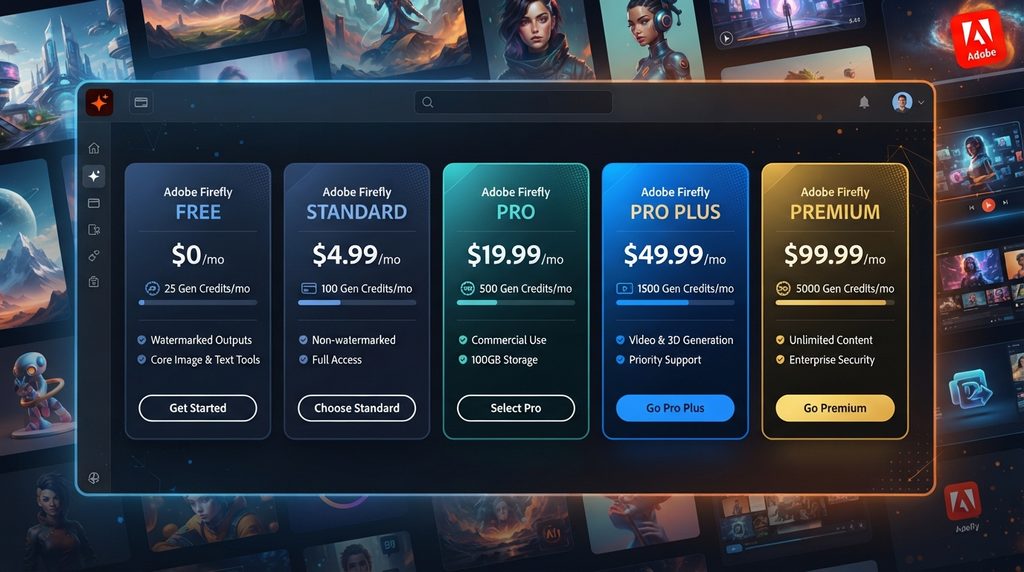
| Plan | Price in UK | Credits | Best For |
|---|---|---|---|
| Free | Free | Limited daily generations | Testing and occasional use |
| Standard | £9.98/mo | 2,000/month | Regular individual use |
| Pro | £19.99/mo | 4,000/month | Professional creators |
| Pro Plus | £47.99/mo regular | 10,000/month | High-volume creation |
| Premium | £200.40/mo regular | 50,000/month | Very high-volume production |
Prices above reflect Adobe’s current UK individual pricing and can change. Some plans currently have promotional first-year pricing.
How to Choose a Firefly Plan
Start with your actual generation requirements rather than choosing the plan with the biggest credit number.
If you generate a few images each week, the free plan may be enough.
If you regularly create website graphics, social media assets and marketing visuals, Firefly Standard can provide a more practical monthly allowance.
If Photoshop and Adobe Express are already important to your workflow, Firefly Pro may offer broader value than Firefly alone.
For teams producing large amounts of video, audio and image content, Pro Plus or Premium can make more sense.
The most important question is not “How many credits do I get?”
It is:
“Which Firefly features will I actually use, and how many credits will those features consume?”
Firefly Credit Add-Ons vs Upgrading
If you only occasionally exceed your monthly allocation, an add-on can be more economical than permanently moving to a higher subscription.
Adobe currently offers 2,000, 7,000, 10,000 and 50,000-credit add-ons in the UK.
However, if you exceed your allowance every month, repeatedly purchasing add-ons may indicate that your base plan is too small.
A simple rule is:
Occasional overage → consider an add-on.
Regular overage → compare the next subscription tier.
What About Adobe Firefly for Teams?
Adobe also provides Firefly plans specifically for business users.
Current UK team pricing lists Firefly Pro for teams at £16.66 per license per month excluding VAT, Firefly Pro Plus for teams at £39.99 per license per month excluding VAT, and Firefly Premium for teams at £167 per license per month excluding VAT, with annual contracts billed monthly.
Business plans also include administrative features and 24/7 support.
For organizations, the per-license pricing and account-management features make team plans different from simply buying multiple individual subscriptions.
Firefly Pricing: What Users Should Watch
Promotional pricing
Adobe currently advertises limited-time discounts on selected plans. A promotional price should not be treated as the permanent subscription cost.
Model availability
Not every AI model is necessarily available under every plan or promotion.
Credit consumption
The number of credits required varies between standard and premium features and can depend on the model and output.
Unused credits
Monthly credits generally reset rather than accumulating indefinitely.
Beta features
Commercial-use rules can differ for specific beta features, so check the feature’s terms before using it for an important commercial project.
Partner models
Firefly can provide access to AI models from Adobe and partners, and usage rules or credit consumption can vary depending on the selected model.
Read more: Adobe Firefly Prompts: How to Create Better AI Images
Pros & Cons Table
| Pros | Cons |
|---|---|
| Free access is available | Free access has daily generation limits |
| Multiple paid plans support different usage levels | Pricing can be difficult to compare using credits alone |
| Monthly credits support image, video and audio workflows | Premium features can consume credits quickly |
| Commercial use is generally permitted for eligible Firefly outputs | Specific beta features can have different conditions |
| Adobe integrates Firefly with Creative Cloud workflows | High-volume plans can become expensive |
| Credit add-ons are available when additional capacity is needed | Unused monthly credits do not roll over |
| Some current plans include promotional unlimited generation on selected models | Promotional terms and supported models can change |
Comparison Table
| Factor | Firefly Free | Firefly Standard | Firefly Pro | Firefly Pro Plus | Firefly Premium |
|---|---|---|---|---|---|
| Price | Free | £9.98/mo | £19.99/mo | £47.99/mo regular | £200.40/mo regular |
| Generative credits | Limited daily generations | 2,000/mo | 4,000/mo | 10,000/mo | 50,000/mo |
| Best for | Testing | Regular users | Professionals | High-volume users | Large-scale production |
| Standard image features | Limited | Included | Included | Included | Included |
| Premium features | Limited | Credit-based | Credit-based | Higher capacity | Highest capacity |
| Adobe apps | Limited | Selected benefits | Photoshop web/mobile + Express Premium | Broader Firefly benefits | Highest Firefly capacity |
| Commercial use | Generally permitted for eligible outputs | Generally permitted | Generally permitted | Generally permitted | Generally permitted |
| High-volume generation | No | Moderate | High | Very high | Highest |
Pricing and feature availability can change; the table reflects Adobe’s current UK individual plans as checked in September 2026.
Alternatives
Midjourney
What it is: An AI image-generation platform focused heavily on visual creation.
Main strength: Strong creative image generation and stylistic exploration.
Main limitation: It does not provide the same native Adobe Creative Cloud ecosystem.
Best for: Users primarily interested in AI-generated artwork and visual experimentation.
ChatGPT Image Generation
What it is: Image generation integrated into ChatGPT.
Main strength: Natural-language interaction and the ability to work through image ideas conversationally.
Main limitation: Its workflow and pricing model differ from Adobe’s Firefly credit ecosystem.
Best for: Users who want image generation as part of a broader conversational AI workflow.
Google Gemini
What it is: Google’s multimodal AI assistant with image-generation capabilities.
Main strength: Integration with Google’s wider AI ecosystem.
Main limitation: Its creative workflow is different from Adobe’s design-focused Creative Cloud environment.
Best for: Users already working heavily within Google’s ecosystem.
FAQs
Is Adobe Firefly free?
Answer: Yes. Adobe provides a free Firefly option with limited daily generations across supported image, video and audio capabilities.
How much does Adobe Firefly cost?
Answer: In the UK, current individual paid plans start at £9.98 per month including VAT for Firefly Standard and go up to £200.40 per month including VAT for Firefly Premium at regular pricing.
How many free Firefly credits do I get?
Answer: Adobe currently describes the free plan in terms of limited daily generations rather than a fixed monthly credit allowance. The daily limits refresh.
Do Adobe Firefly credits expire?
Answer: Monthly generative credits reset each month, and unused monthly credits do not roll over to the next month.
Can I use Adobe Firefly images commercially?
Answer: Generally yes. Adobe says outputs from Firefly features without the beta label can be used in commercial projects. Beta outputs can also be used commercially unless the product specifically says otherwise.
What happens when I use all my Firefly credits?
Answer: Your monthly credits reset at the next billing period, or you can purchase additional credits or upgrade to a higher plan depending on your subscription.
Which Adobe Firefly plan is best for beginners?
Answer: Firefly Free is the easiest starting point because there is no subscription commitment. If you need regular generation, Firefly Standard is the lowest-cost paid Firefly plan currently listed by Adobe in the UK.
Does Firefly Premium mean unlimited AI generation?
Answer: Not universally. Adobe currently provides unlimited generation on selected models and features under certain promotional plans, but users return to credit-based usage after the applicable promotional period.
Quick Take
Main point: Adobe Firefly has a free tier plus four paid individual plans, with monthly credit allowances ranging from 2,000 to 50,000.
Best use case: Firefly is particularly useful for people who want AI generation integrated with Adobe’s creative ecosystem.
Main advantage: Commercial-use support, Adobe integration and multiple usage tiers make Firefly suitable for both casual and professional workflows.
Main limitation: Credits do not represent a fixed number of images because consumption varies by feature, model and output.
Best starting point: Try Firefly Free first. Move to Standard or Pro when daily limits or regular production needs make the free option insufficient.
Conclusion
Adobe Firefly’s pricing makes the most sense when you look beyond the headline credit number. The free version is useful for experimentation, while Standard and Pro are more practical for regular individual creators. Pro Plus and Premium are aimed at substantially heavier production workloads.
For most users, there is little reason to jump directly to the most expensive plan. Start with the free version, measure how often you generate content and identify which AI features consume your credits.
Commercial use is also an important advantage: Adobe says eligible Firefly outputs can generally be used in commercial projects, although users should still check the conditions attached to specific beta features and review important commercial content before publishing.
The most important takeaway is simple: choose Firefly based on the features and models you actually use, not just the number of credits advertised.
Author Bio
TechyUpdate Editorial Team covers practical technology, AI tools, apps, software and digital productivity, with a focus on clear, useful and independently researched guides.
1 Comment
Pingback: What Is Adobe Firefly? AI Image Features & Uses