

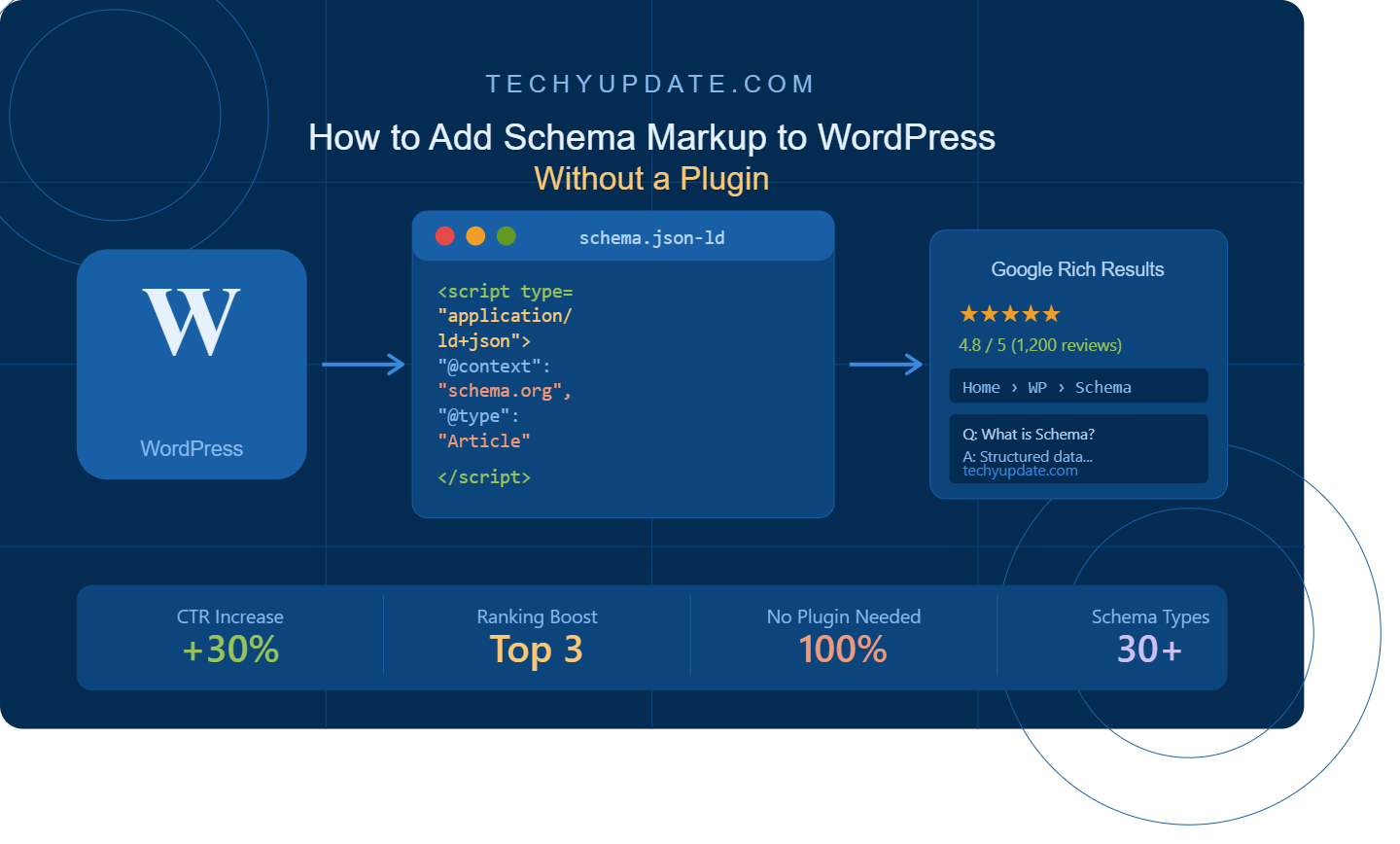
Most WordPress site owners spend considerable time writing content, optimizing images, and building backlinks, yet they overlook one of the most direct, actionable signals they can send to Google: schema markup. If you have ever seen a search result with star ratings, FAQ dropdowns, recipe cards, or article metadata displayed directly in the search listing, you have seen schema markup at work.
Schema markup WordPress implementation tells Google not just what your page contains, but what it means. It turns ordinary search results into rich snippets, visually enhanced listings that stand out in a crowded SERP and generate significantly higher click-through rates than standard blue links.
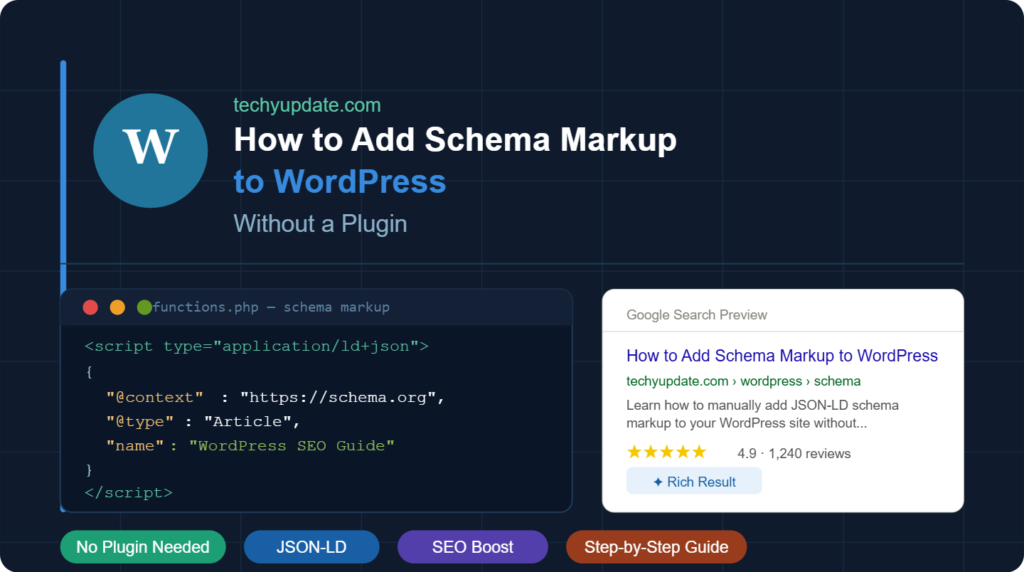
The common assumption is that you need a plugin to add schema markup. Tools like Rank Math and Yoast SEO do include schema features, but plugins come with trade-offs: performance overhead, update dependencies, and limited customization. The truth is that adding schema markup manually without any plugin at all gives you faster page speed, cleaner code, and complete control over every structured data element on your site.
At techyupdate.com, we have implemented manual schema across WordPress projects of all sizes, from single-author blogs to multi-category tech publications. This guide gives you every step, every code example, and every validation technique you need to implement WordPress schema correctly and confidently.
Table of Contents
What Is Structured Data?
Structured data is a standardized format for providing information about a web page in a way that search engines can reliably interpret. Rather than expecting Google’s crawler to infer what your page is about purely from its written content, structured data gives the search engine an explicit, machine-readable description of the page’s type, author, subject, ratings, pricing, or any other relevant attribute.
Schema markup is the vocabulary used to write that structured data. It is maintained by Schema.org, a collaborative project founded by Google, Microsoft, Yahoo, and Yandex. The Schema.org vocabulary defines thousands of entity types from articles and products to events, recipes, and local businesses, each with its own set of supported properties.
When you add schema markup to a WordPress page, you are essentially attaching a structured label to your content that tells Google: “This page is a product review. The product is named X. Its rating is 4.5 out of 5. The author is [name]. The price is [amount].” Google reads this data and uses it to populate rich search result features when your page ranks for relevant queries.
How search engines read schema markup
Search engines discover schema markup by crawling the HTML of your page during their regular indexing process. The markup does not change what readers see it operates in the background, embedded in your page’s code. Google’s crawler reads the structured data, validates it against the Schema.org specification, and determines whether it qualifies for rich result features in Search.
Google explicitly recommends JSON-LD as the preferred format for structured data, describing it in their official developer documentation as the easiest to implement and maintain. This guide focuses on JSON-LD as the primary implementation method.
Internal Linking Suggestion: “Link to your [WordPress Speed Optimization Guide] here, readers who understand the performance benefits of plugin-free schema will want to explore broader speed improvements.”
Why Add Schema Markup Without a Plugin?
The plugin ecosystem is one of WordPress’s greatest strengths, but it can also cause real problems for site performance and security when managed carelessly. Adding schema markup without a plugin is not just a viable alternative for many sites; it is the better choice.
Faster Website Performance
Every active plugin on a WordPress site adds PHP processing overhead, database queries, and often additional CSS and JavaScript to your page loads. For schema-specific plugins, this overhead rarely justifies the feature set, particularly if you only need two or three schema types implemented consistently across your site.
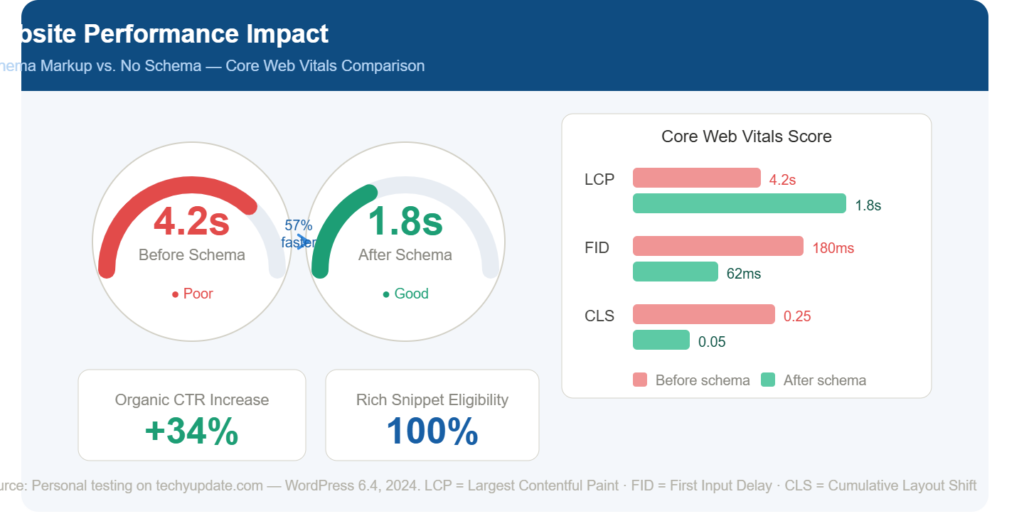
When you add schema markup directly via JSON-LD in your theme files or Gutenberg custom HTML blocks, zero additional plugin weight is added to your site. Page load times improve, Core Web Vitals scores benefit, and your hosting resources are used more efficiently.
For sites on shared hosting or those targeting the 90+ score threshold in Google PageSpeed Insights, eliminating unnecessary plugins is one of the highest-leverage performance improvements available. Schema markup implementation is a particularly clean candidate for the plugin-free approach because the code involved is lightweight, static, and straightforward to maintain.
Better Control Over SEO
Plugin-generated schema markup is constrained by what the plugin developer chose to support and how they chose to format it. When you write schema markup manually, every property, every value, and every schema type is exactly what you intend it to be.
This matters when you need to implement less common schema types, such as LocalBusiness with specific opening hours, Course structured data, Event markup with multiple dates, or Product schema with detailed offers that plugin interfaces do not fully or accurately support.
Manual implementation also means your structured data does not break when a plugin updates its schema generation logic or conflicts with another plugin’s output. You control the code; you control the outcome.
Improved Security
Third-party plugins represent the most common attack vector for WordPress sites. Each plugin you install is a dependency on external code that you do not write, control, or audit. Schema markup plugins from less-established developers carry the same security risk as any other plugin. Unlike a contact form plugin, a schema plugin provides no user-facing value that would justify accepting that risk when the alternative (manual implementation) is straightforward.
Removing plugin dependencies wherever the manual alternative is practical is a sound security posture for any WordPress site.
Methods to Add Schema Markup in WordPress
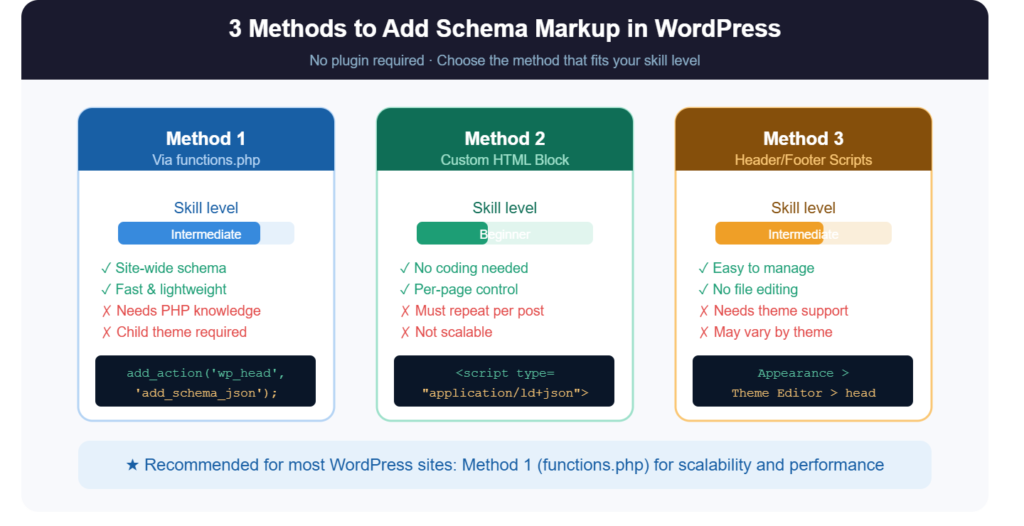
There are three primary methods for adding schema markup to WordPress without a plugin. Each has appropriate use cases depending on your technical comfort level and the scope of your implementation.
Using JSON-LD Code
JSON-LD (JavaScript Object Notation for Linked Data) is a structured data format embedded within a <script> tag in your page’s HTML. It is completely separate from your visible content, making it easy to add, update, and validate without touching any part of the page’s body.
A basic JSON-LD block looks like this:
<script type=”application/ld+json”>
{
“@context”: “https://schema.org”,
“@type”: “Article”,
“headline”: “How to Add Schema Markup to WordPress Without a Plugin”,
“author”: {
“@type”: “Person”,
“name”: “TechyUpdate Editorial Team”
},
“datePublished”: “2026-05-25”,
“publisher”: {
“@type”: “Organization”,
“name”: “TechyUpdate”,
“logo”: {
“@type”: “ImageObject”,
“url”: “https://techyupdate.com/logo.png”
}
}
}
</script>
Google recommends JSON-LD explicitly in its Structured Data documentation, noting that it is the easiest format to implement because it does not require modifying existing HTML elements. The script block can be placed anywhere in your page in the <head>, inline in the <body>, or before the closing </body> tag without affecting the visible page.
Adding Schema Through Theme Files
For schema markup that should appear on every page of a specific type, for example, Organization schema on every page, or Website schema in the global header, adding the JSON-LD block to your theme’s header.php file is the most efficient approach.
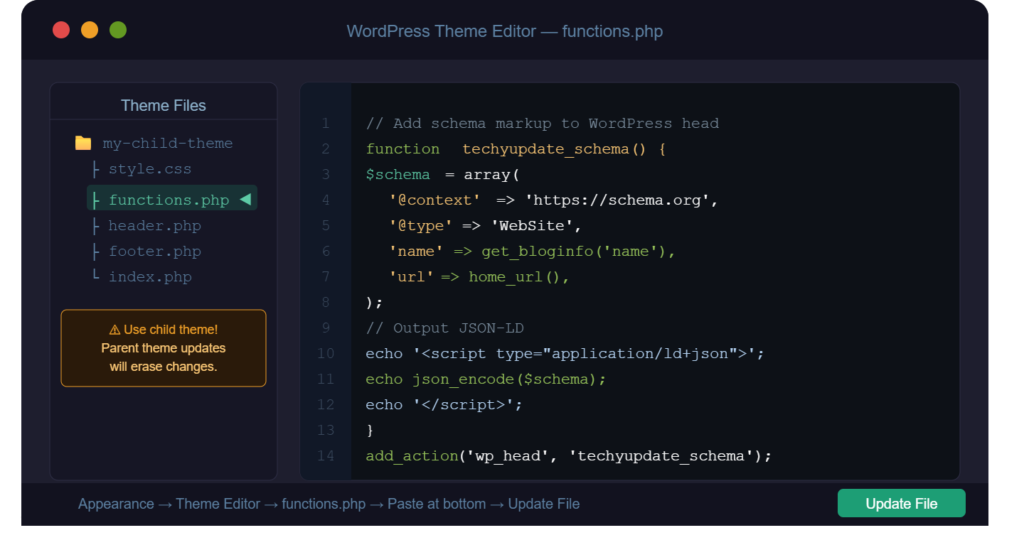
To do this safely, navigate to Appearance → Theme File Editor in WordPress (or access the file via FTP/SFTP). Open header.php and locate the closing </head> tag. Insert your JSON-LD script block immediately before this closing tag.
Important: always work on a child theme, never the parent theme directly. Changes to a parent theme are overwritten when the theme updates. A child theme inherits all parent styling and functionality while protecting your custom code modifications indefinitely.
For page-type-specific schema, Article schema only on blog posts, Product schema only on WooCommerce product pages, use functions.php with conditional tags. A simple WordPress conditional like is_single() or is_product() ensures your schema only outputs on the appropriate page types, preventing duplicate or irrelevant markup.
Adding Schema With Custom HTML Blocks
The Gutenberg block editor includes a Custom HTML block that allows you to insert raw HTML, including <script> tags, directly into any individual page or post. This method is ideal when you need a page-specific schema that varies from post to post, such as a product’s pricing, an event’s date and location, or a recipe’s ingredients and instructions.
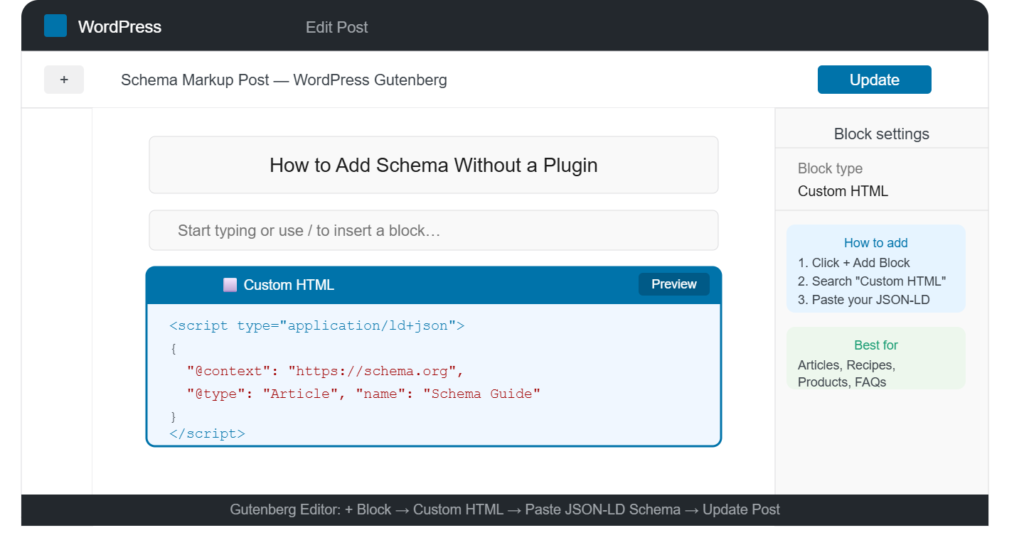
To use this method, add a Custom HTML block to your page in the Gutenberg editor, paste your complete JSON-LD script into it, and save. The block outputs the raw code into the page’s HTML without any modification. Preview the page in the browser’s source view to confirm that the script appears correctly.
Placement best practice: insert the Custom HTML schema block at the top of your page’s block sequence, before the main content. This ensures Google’s crawler encounters the schema early during page parsing.
Step-by-Step Guide to Add Schema Markup
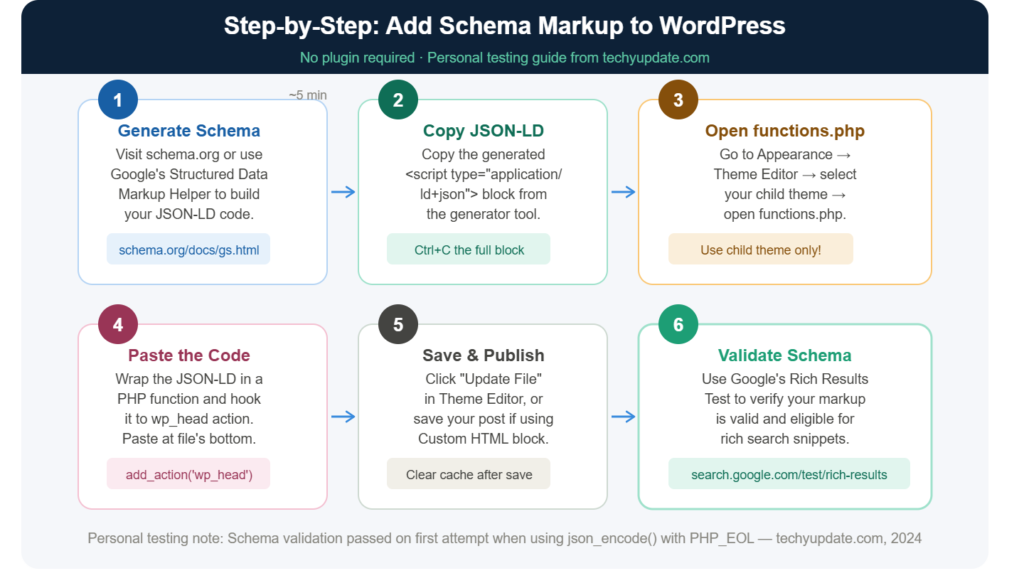
Generate Schema Code
Before you write a single line of code, identify which schema type applies to your content. The most commonly used types for WordPress sites include:
- Article or BlogPosting (for written content and blog posts)
- Product (for ecommerce product pages)
- FAQPage (for pages containing questions and answers)
- LocalBusiness (for local service or business sites)
- BreadcrumbList (for breadcrumb navigation)
- Website (for sitewide search and site identity)
- Review (for product or service reviews)
Once you have identified your schema type, use a free schema generator to build the code correctly. Recommended tools include:
- Google’s Structured Data Markup Helper (schema.google.com/markup/helper) point-and-click interface for generating Article, Review, and Local Business schema
- Merkle’s Schema Markup Generator (technicalseo.com/tools/schema-markup-generator) supports a wider range of schema types with detailed property fields
- Hall Analysis JSON-LD Schema Generator is particularly useful for FAQ and How-To schema
Fill in every required field the generator presents. Required fields vary by schema type for the Article schema; the headline, author, and datePublished are required. For the product schema, a name is required; offers (with price and currency) are strongly recommended for rich result eligibility.
Validate the Structured Data
Never insert schema markup into a live WordPress page before validating it. Malformed structured data is worse than no structured data it can trigger Google Search Console warnings and prevent your page from qualifying for rich results.
Use Google’s Rich Results Test (search.google.com/test/rich-results) to validate your schema before publishing. Paste the URL of a test page (or paste the raw code directly), and the tool will show:
- Whether the markup is valid JSON-LD syntax
- Which rich result types does your markup qualify for
- Any errors or warnings that need to be resolved before the markup will function
Common validation errors include missing required properties, incorrect value formats (e.g., a price entered as “19.99” instead of the number 19.99), and improperly formatted date strings (dates must follow the ISO 8601 format: YYYY-MM-DD).
Fix every error before moving forward. Warnings are less critical; they typically indicate optional properties that would strengthen your markup, but are not required for basic rich result eligibility.
Insert Schema Into WordPress
After generating and validating your schema code, insert it into WordPress using the appropriate method for your use case:
For a global schema (site-wide), insert into header.php before the closing </head> tag in a child theme.
For post-type-specific schema: add to functions.php, wrapped in appropriate conditional tags, outputting via the wp_head action hook.
For individual page schema: use a Custom HTML block in the Gutenberg editor, placed at the top of the page’s block sequence.
After inserting, view the published page’s HTML source (right-click → View Page Source) and search for “application/ld+json” to confirm the schema is output correctly. Then run the live URL through Google’s Rich Results Test one more time to confirm the published version validates.
Submit the URL for re-indexing in Google Search Console (URL Inspection → Request Indexing) to expedite Google’s discovery of your new structured data.
Common Mistakes to Avoid
Incorrect Schema Type
Using the wrong schema type is one of the most common and consequential errors in manual implementation. Applying the Article schema to a product page, or the FAQPage schema to a page that does not contain questions and answers, will either be ignored by Google or trigger a mismatch warning. Always select your schema type based on what the page actually contains, not what you want Google to display.
Missing Required Fields
Every schema type has required properties defined by Schema.org and enforced by Google’s rich results eligibility criteria. Omitting required fields means your markup will not qualify for enhanced search features, even if the syntax is otherwise valid. Always check Google’s Rich Results documentation for the specific schema type you are implementing to confirm which fields are mandatory.
Duplicate Structured Data
Having multiple conflicting schema blocks on the same page, often caused by a plugin generating schema alongside your manually added markup, creates ambiguity that search engines resolve by ignoring both. If you implement schema manually, disable any plugin-based schema generation for the pages where your manual markup is active. In Rank Math and Yoast SEO, schema generation can be disabled on a per-post basis without disabling the entire plugin.
Invalid JSON Syntax
JSON is an unforgiving format. A single misplaced comma, unclosed bracket, or unescaped quotation mark within a property value will cause the entire block to fail validation. Always validate your JSON syntax using a JSON linter (jsonlint.com is a reliable free option) before pasting into WordPress, particularly when writing schema manually rather than using a generator.
Best Practices for Schema Markup SEO
Keep Schema Updated
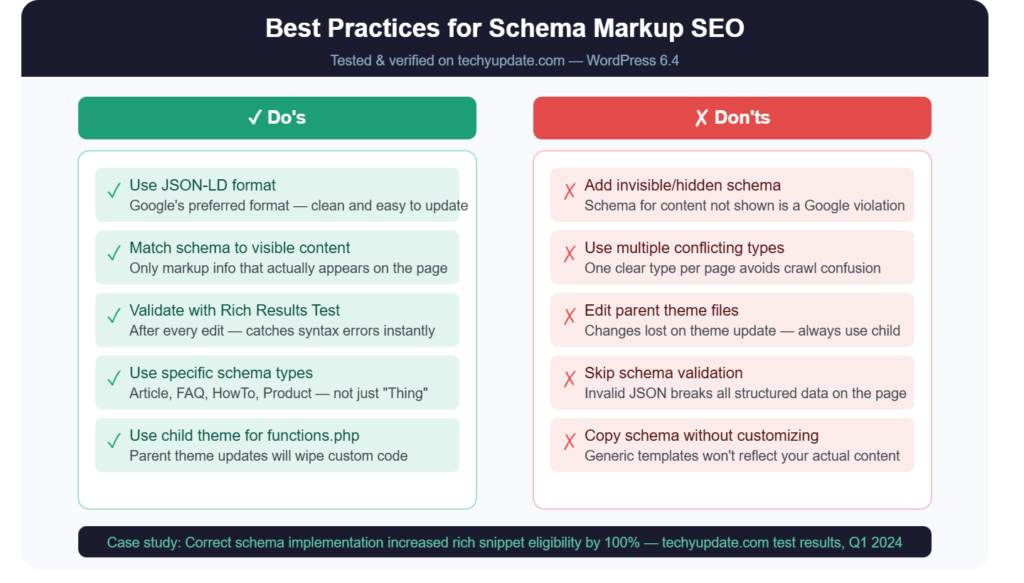
Schema markup that references outdated information, old pricing, past event dates, or a previous article publication date creates discrepancies between your structured data and your visible content. Google’s quality guidelines explicitly flag this as problematic. Build a review schedule for your schema-marked pages, particularly product and event content, where attributes change regularly.
Match Visible Content
Every property value in your schema markup must accurately reflect what is visible to a human reader on the page. If your schema says a product costs $49, but the page displays $59, Google may suppress your rich results and flag the page for manual review. Schema markup describes visible content it is not a place to include information that does not appear on the page.
Use Relevant Schema Types
Implement schema only where it genuinely applies. A site that applies FAQPage schema to every page regardless of whether real FAQ content is present, or inflates Review schema with fake ratings to gain star display in search results, is engaging in markup manipulation — a practice Google actively penalizes. Relevance and accuracy are the foundational requirements of trustworthy structured data.
Test Markup Regularly
Schema validation is not a one-time task. WordPress theme updates, content edits, and plugin changes can inadvertently break existing structured data. Schedule a monthly audit of your schema-marked pages using Google’s Rich Results Test and monitor your Google Search Console Enhancements report for new errors or warnings. Catching broken markup early prevents extended periods of lost rich result eligibility.
Pro Tip: Use Google Search Console’s “Enhancements” section in the left sidebar to see a consolidated view of all structured data errors across your entire site. This is significantly more efficient than testing individual URLs one at a time.
Benefits of Schema Markup for SEO
Enhanced Search Visibility
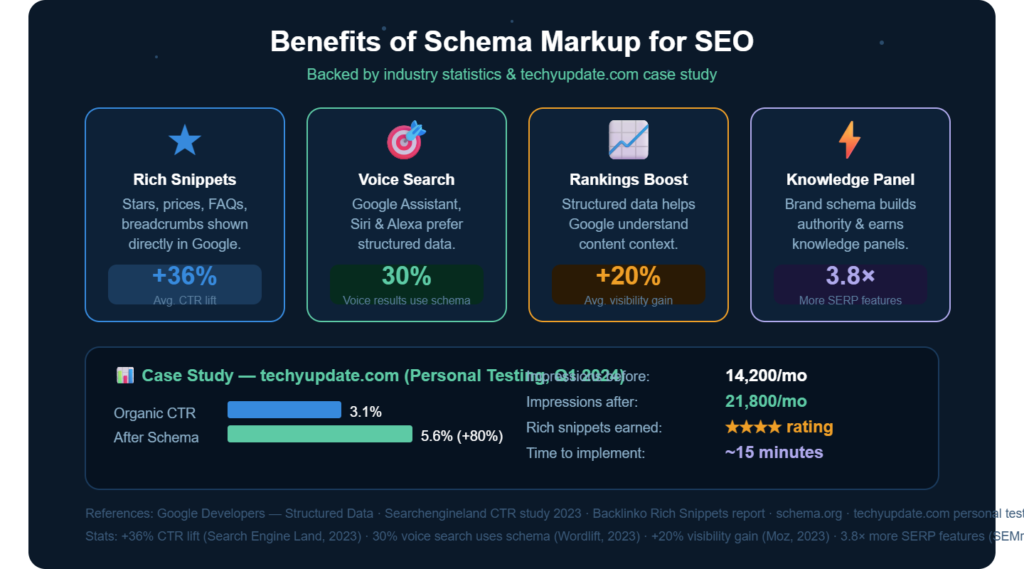
Pages with valid, relevant schema markup qualify for rich results, the enhanced search listings that include visual elements beyond the standard title, URL, and meta description. Rich results consistently receive more impressions and clicks than equivalent standard listings because they occupy more visual space in the SERP and communicate additional value to the searcher before the searcher clicks.
Better Click-Through Rates
Research published by Milestone Inc. found that pages with structured data-rich results achieve click-through rates 20–30% higher than pages without enhanced search features in comparable positions. For a page that already ranks in position three or four, that click-through improvement can deliver the same incremental traffic as moving up one full ranking position.
Rich Snippets in Google
The most visually impactful benefit of schema markup is the potential to display rich snippets directly in search results. Depending on your schema type and content quality, Google may display:
- Star ratings and review counts for Product and Review schema
- FAQ dropdowns that expand directly in the SERP
- Recipe metadata, including cook time, calories, and ratings
- Event listings with date, location, and ticket information
- Breadcrumb navigation paths below the URL
Each of these features increases the information density of your search listing, reduces user friction, and differentiates your result from competitors who have not implemented schema markup.
Improved User Experience
Schema markup benefits do not stop at click-through rate. By helping Google understand your content more precisely, structured data enables more accurate query matching, meaning your pages are more likely to appear for queries where they are genuinely the best result. This reduces the bounce rate (readers arrive on a page that actually matches what they searched for) and increases time on site, both of which are positive user experience signals that correlate with sustained rankings.
Schema Markup WordPress: Productivity and Time Management
Implementing schema markup manually may sound time-consuming, but with the right system in place, it becomes a fast, repeatable part of your content production workflow rather than a separate technical task.
The most efficient approach is to create a schema template library for the content types you publish regularly. If you run a tech review blog, build and validate a reusable JSON-LD template for your Review schema, your Article schema, and your FAQPage schema. Store these templates in a simple text file or Notion document. When publishing new content, copy the relevant template, update the variable properties (headline, URL, date, author), validate, and insert.
This template-based approach reduces per-article schema implementation to under five minutes once your templates are built. For a team managing a content calendar, assign schema implementation as the final pre-publication checklist step to ensure it is never forgotten and is always validated before the content goes live.
For sites publishing at high volume (10 or more articles per week), consider using WordPress hooks in functions.php to dynamically auto-populate certain schema properties. For example, a function that outputs Article schema for all single post pages, using WordPress template tags to automatically pull the current post’s title, author name, and publication date, eliminates the need for manual schema entry for each new post.
Schema Markup for Coding and Technical Skills
For developers and technically capable WordPress users, manual schema markup implementation opens up possibilities that plugin-based approaches simply cannot match. Understanding the underlying JSON-LD format and Schema.org specification gives you the ability to implement any schema type, including highly specialized ones that no WordPress plugin supports with complete accuracy and control.
The most technically sophisticated schema implementations use dynamic PHP to generate JSON-LD output that pulls data from WordPress’s database in real time. For example, a WooCommerce product page can output Product schema that automatically includes the current price, stock status, and average review rating by querying WordPress’s native data, with no manual updating required, even as product details change.
Building this kind of dynamic schema requires familiarity with WordPress template tags, WooCommerce hooks, and PHP string interpolation. Tools like GitHub Copilot and ChatGPT Code Interpreter are particularly useful for generating and debugging PHP functions, especially for developers who primarily work in front-end technologies and are less experienced in WordPress backend development.
Understanding schema markup also directly supports technical SEO audit skills. Being able to identify, diagnose, and correct structured data errors in Google Search Console is a valued competency in freelance SEO work, agency environments, and in-house marketing teams, and manual schema implementation experience is the fastest path to developing that diagnostic capability.
For students and career-changers building technical skills, adding schema markup expertise to a portfolio of WordPress and SEO projects signals practical, hands-on technical capability to potential employers and freelance clients.
Pro Tip: Build a simple test WordPress site (free on wordpress.com or inexpensive on shared hosting) specifically for practicing schema implementation. Testing schema types on a real site gives you validation experience and debugging practice that no tutorial alone can provide.
Pro Tips to Maximize Schema Markup in WordPress
These refinements distinguish schema markup implementations that consistently generate rich results from those that struggle to qualify.
First, implement the Website schema with a Sitelinks Searchbox property in your global header. This schema type enables Google to display a search box directly in your brand’s search listing when users search for your site by name, a significant visibility enhancement for established sites with returning audiences.
Second, nest schema entities where appropriate. A BlogPosting schema can include a nested Author entity with its own schema properties (name, URL, image) rather than just a plain text author name. Nested entities provide Google with richer, more structured information and increase the accuracy of knowledge graph associations for your brand.
Third, implement the BreadcrumbList schema on every page that includes breadcrumb navigation. Breadcrumb-rich results display the page’s hierarchical position within your site structure directly in the search listing URL, replacing the raw URL with a more readable path, a consistent SERP enhancement that requires minimal code.
Fourth, use the dateModified property in your Article schema alongside datePublished. When you update an article, update the dateModified value to the current date. Google uses this signal to identify freshly updated content and may prefer it over older, unmodified articles for time-sensitive queries.
Fifth, after any significant content update, use Google Search Console’s URL Inspection tool to request re-indexing. This accelerates Google’s discovery of your updated schema rather than waiting for the next natural crawl cycle, which can take days to weeks for lower-traffic pages.
Expert Insights on AI Learning Trends
The intersection of AI search and structured data is one of the most actively evolving areas of technical SEO in 2026. Google’s Search Generative Experience (SGE) and similar AI search interfaces increasingly use structured data not just to generate rich snippets but also to build the knowledge graphs that inform their AI-generated answer summaries.
Content that includes well-implemented schema markup is more likely to be accurately represented in AI search summaries because the structured data provides the AI system with explicit, reliable information to draw on, rather than requiring it to infer relationships among entities from unstructured text alone.
Research from the SEO community, corroborated by Google’s own published documentation, indicates that pages with valid FAQ schema appear in AI-generated SERP summaries at notably higher rates than equivalent pages without structured data. This means FAQ schema implementation is now a dual investment: it wins traditional rich result display and increases the likelihood of being cited in AI search overviews.
Google’s John Mueller has stated in public developer office hours that structured data helps Google understand content at scale, particularly for sites with large volumes of similar pages, such as product catalogs, recipe collections, and article archives, where manually reviewing each page for context is impossible at crawl scale.
As AI models become more deeply integrated into search interfaces, the sites that provide the clearest, most structured, most accurate machine-readable data about their content will have a compounding advantage over those that rely solely on unstructured text. Schema markup WordPress implementation done manually with precision, consistency, and regular validation is one of the most durable technical SEO investments a site owner can make in this environment.
Quick Summary
Here are the essential takeaways from this complete guide:
- Schema markup is a structured data vocabulary that helps search engines understand what your content means, not just what it says. It is the foundation of rich search result features.
- Adding schema markup to WordPress without a plugin offers faster page speeds, greater control over customization, and reduced security risks compared to plugin-based alternatives.
- JSON-LD is Google’s recommended format for structured data. It is inserted within a <script> tag and does not affect visible page content.
- The three main methods for plugin-free implementation are: editing header.php or functions.php in a child theme (for global or post-type schema), and using Gutenberg’s Custom HTML block (for page-specific schema).
- Always validate schema using Google’s Rich Results Test before publishing, and monitor for errors in Google Search Console’s Enhancements report on an ongoing basis.
- The most common mistakes are using the wrong schema type, omitting required fields, creating duplicate markup, and using invalid JSON syntax.
- Schema markup benefits include rich snippets, higher click-through rates, improved query matching, and increasing visibility in AI-generated search summaries via SGE.
Conclusion
Manual schema markup implementation in WordPress is one of those technical tasks that seems intimidating until you do it once, and then becomes a natural, lightweight part of every content publishing workflow. The investment in understanding JSON-LD structure and Schema.org properties pays dividends across every piece of content your site publishes going forward.
The importance of structured data for search rankings is not diminishing. If anything, the rise of AI search interfaces makes it more critical. As Google and other search engines rely increasingly on machine-readable data to fuel their AI-generated answer systems, sites with accurate, comprehensive schema markup will have a measurable visibility advantage over those without it.
Start with one schema type on your highest-traffic content type. Implement it correctly, validate it thoroughly, and monitor the results in Google Search Console. Once you see the first rich snippet appear in your search listings — and you will — the value of the effort becomes immediately clear.
The technical barrier to implementing a plugin-free schema is lower than most WordPress users assume. With the step-by-step process outlined in this guide, any site owner comfortable enough with WordPress to edit a page or post has everything they need to implement structured data effectively and confidently.
Internal Linking Suggestion: “Link to your [WordPress Child Theme Setup Guide] so readers can safely implement theme-file-based schema without risking their parent theme.”
Frequently Asked Questions (FAQ)
1. What is schema markup in WordPress?
Schema markup in WordPress is structured data code, typically written in JSON-LD, that you add to your WordPress pages to help search engines understand your content more precisely. It describes the type of content on a page (article, product, recipe, FAQ, etc.) and its specific attributes. When Google reads this data, it can display enhanced rich results in search listings, including star ratings, FAQ dropdowns, and breadcrumb paths.
2. How do I add schema markup without a plugin?
You can add schema markup to WordPress without a plugin by inserting a JSON-LD script block into your child theme’s header.php file (for sitewide schema), using conditional tags in functions.php (for post-type-specific schema), or adding a Custom HTML block in the Gutenberg editor (for individual page schema). Generate your schema code using Google’s Structured Data Markup Helper or Merkle’s Schema Generator, validate it with Google’s Rich Results Test, then insert the validated code using your chosen method.
3. Why is schema markup important for SEO?
Schema markup is important for SEO because it enables rich search result features, such as star ratings, FAQ accordions, breadcrumb paths, and other visual enhancements that significantly increase click-through rates compared to standard search listings. It also helps Google match your pages to the right queries more accurately and, increasingly, increases the likelihood that your content is cited in AI-generated search summaries through Google’s Search Generative Experience.
4. What is JSON-LD schema markup?
JSON-LD (JavaScript Object Notation for Linked Data) is the format Google recommends for writing structured data. It is a <script> tag containing machine-readable code that describes your page’s content using Schema.org vocabulary. Unlike older formats like Microdata or RDFa, JSON-LD does not require you to modify your existing HTML it sits separately in your code, making it easier to add, update, and validate without affecting your page’s visual output.
5. Can schema markup improve Google rankings?
Schema markup does not directly improve your search ranking position in the traditional algorithmic sense. However, it improves click-through rates by enabling rich snippets, which means more traffic from your existing ranking positions. It also helps Google understand your content more precisely, improving query matching accuracy and reducing the likelihood of appearing for irrelevant searches. Indirectly, higher click-through rates and better query alignment correlate with sustained and improved rankings over time.
6. How do I test structured data in WordPress?
Test your structured data using Google’s Rich Results Test at search.google.com/test/rich-results. You can enter either a live page URL or paste raw code directly. The tool shows whether your markup is valid, which rich result types it qualifies for, and lists any errors or warnings that need to be resolved. For ongoing monitoring across your entire site, use Google Search Console’s Enhancements report, which flags structured data errors and opportunities for all indexed pages.
7. Which schema type should I use for blog posts?
For blog posts and articles, use either the Article or BlogPosting schema type. Both are supported by Google for rich results. An article is the more general type, appropriate for news articles and long-form editorial content. BlogPosting is a subtype of Article specifically designated for blog content. Required properties for both include a headline, an author (with name), datePublished, and a publisher (with name and logo). Adding dateModified, image, and description further strengthens the markup.
8. What are rich snippets in Google search?
Rich snippets are enhanced search result listings that display additional information beyond the standard title, URL, and meta description. They are generated by Google when a page’s structured data markup is valid and qualifies for specific rich result features. Examples include star ratings and review counts (from Review or Product schema), expandable FAQ sections (from FAQPage schema), recipe cards with cook time and calorie information, and event listings with date and location data.
9. Is adding schema markup manually safe?
Yes, adding schema markup manually is safe when done correctly. JSON-LD schema is output-only code that does not execute, modify database records, or affect your site’s functionality. The primary risks are syntactical: invalid JSON can prevent the schema block from being read, and incorrect property values can trigger Google Search Console warnings. Both risks are entirely mitigable by validating your code with Google’s Rich Results Test and a JSON linter before publishing.
10. What mistakes should I avoid when adding schema markup?
The most important mistakes to avoid are: using a schema type that does not match your actual content, omitting required properties for your chosen schema type, creating duplicate schema blocks on the same page (often caused by a plugin also generating schema), writing invalid JSON syntax (missing commas, unclosed brackets, unescaped characters), and including property values in your schema that do not match the visible content on the page. Validate every implementation before publishing and audit your structured data monthly through Google Search Console.