

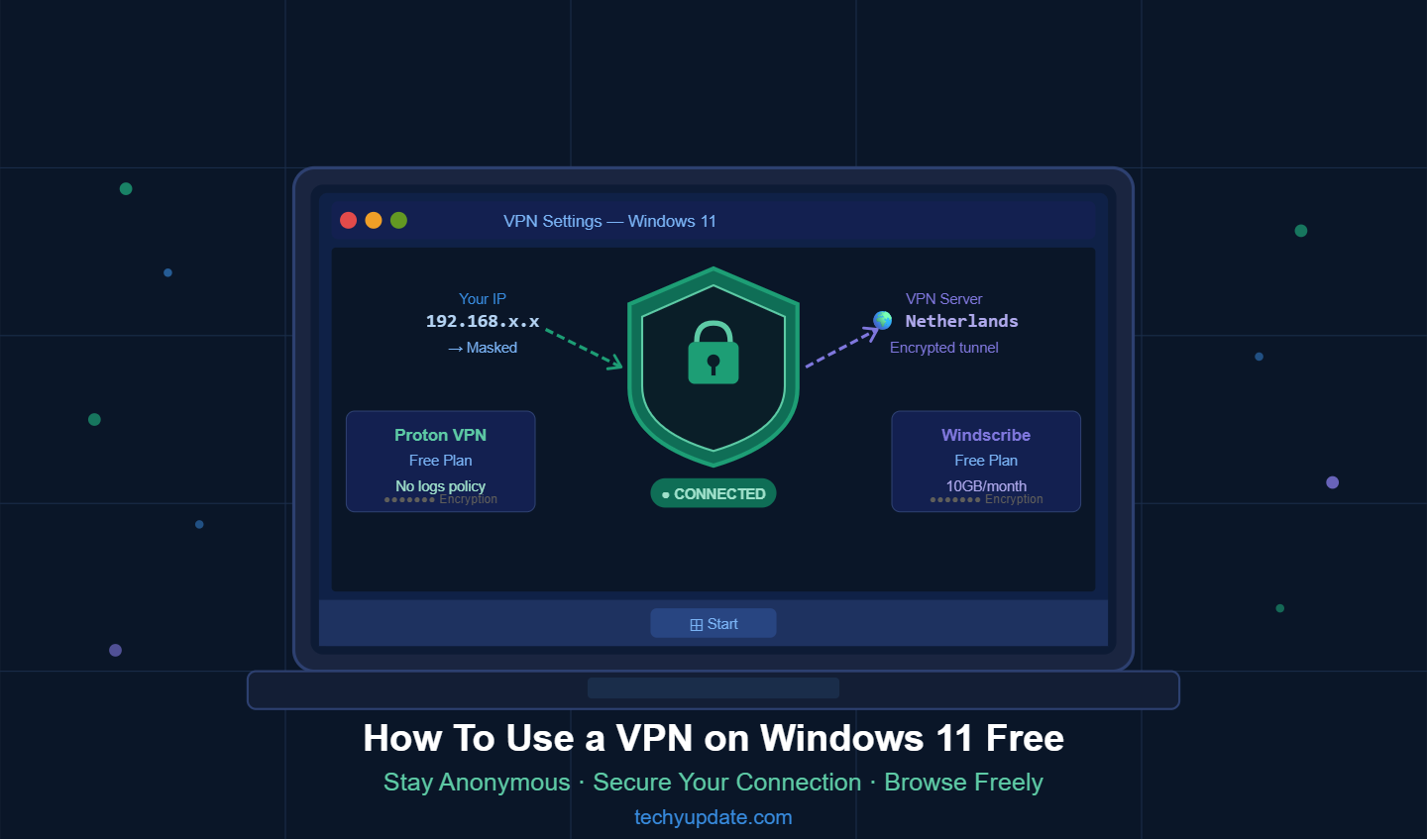
In today’s digital world, protecting your online activity is more important than ever. Whether you use public Wi-Fi, stream content, play games, or work remotely, learning how to use a VPN on a Windows 11 laptop for free can dramatically improve your online privacy protection and internet security.
A free VPN helps encrypt your internet traffic, hide your IP address, and provide anonymous browsing while keeping your personal information safe from hackers, trackers, and cyber threats. Windows 11 users now rely heavily on VPN software for secure browsing and internet connections at home, in schools, in offices, and in coffee shops.
This complete guide explains everything you need to know about using a free VPN service on Windows 11 in 2026, including setup methods, best VPN features, troubleshooting tips, comparisons, security insights, and practical use cases.
The internet feels a lot like a crowded city today. Every click, search, and login leaves footprints behind. Advertisers track browsing habits, cybercriminals hunt for weak connections, and public Wi-Fi networks can expose personal data within seconds.
That’s exactly why millions of users now rely on VPNs to protect themselves online. According to recent VPN usage reports, global VPN adoption continues to rise rapidly because users want stronger privacy, safer browsing, and unrestricted internet access.
For Windows 11 laptop users, VPN software has become more important than ever. Windows 11 offers modern security features, but it still cannot fully shield users from tracking, phishing attacks, unsafe public networks, and data interception. A VPN creates an encrypted tunnel between your laptop and the internet, helping secure your digital identity while improving online privacy.
Whether you are working remotely, streaming videos, shopping online, or simply browsing social media, a VPN can act like a private security guard protecting your internet traffic.
Many people believe VPNs are only for tech experts or businesses. That idea is outdated. Modern VPN applications are beginner-friendly, fast, and simple to install. Free VPN services have also improved significantly in 2026, offering reliable encryption, decent speeds, and easy Windows 11 compatibility for everyday users. Still, choosing the right VPN matters because not every free service is trustworthy.
This complete guide explains everything you need to know about using a free VPN on a Windows 11 laptop. From understanding VPN technology to installation, troubleshooting, security comparisons, and expert online safety tips, this article gives you a practical roadmap for protecting yourself online without spending money.
What Is a VPN?
A VPN, or Virtual Private Network, is a cybersecurity tool designed to protect your internet activity. Think of it as a secure tunnel connecting your laptop to the internet. Normally, when you browse online, your internet provider and websites can see your IP address, browsing activity, and location. A VPN hides this information by encrypting your traffic and routing it through secure servers located in different parts of the world.
This process dramatically improves privacy and internet security. Instead of websites seeing your real location or internet connection details, they see the server’ser’s information instead. That simple change helps reduce tracking and protects sensitive data from hackers. In 2026, VPNs are no longer optional for privacy-conscious users. Studies show that privacy concerns, remote work, and public Wi-Fi risks are driving global VPN adoption at record levels.
Windows 11 users, especially those who frequently use laptops on unsecured networks, benefit most from VPN software. Whether you are sitting in a café, airport, hotel, university campus, or coworking space, your data may be vulnerable without protection. A VPN acts like encrypted armor around your internet connection, making it much harder for cybercriminals to spy on your activity.
A Virtual Private Network, commonly called a VPN, is a cybersecurity tool that creates an encrypted tunnel between your device and the internet.
Instead of directly connecting to websites, your data travels securely through VPN servers.
What a VPN Does
- Encrypts internet traffic
- Masks your IP address
- Protects browsing history
- Improves online privacy protection
- Prevents network spying
- Creates secure browsing sessions
Why VPN Usage Is Growing Rapidly
Cybercrime continues to rise globally. Hackers target weak internet connections, especially public networks. At the same time, internet users want more control over their digital privacy.
This growing concern has made VPN software one of the most downloaded cybersecurity tools worldwide.
People now use VPNs for:
- Privacy protection
- Secure browsing
- Streaming
- Gaming
- Remote work
- Banking
- Safe downloading
- Data encryption
- Anonymous browsing
- Internet freedom
Windows 11 users particularly benefit because the operating system integrates smoothly with modern VPN applications.
Why Windows 11 Users Need Online Protection
Windows 11 includes several built-in security improvements compared to older versions of Windows, but cyber threats continue evolving. Reports in 2026 indicate growing risks related to phishing attacks, fake software downloads, and AI-driven scams targeting internet users worldwide.
Hackers don’t always attack devices directly. Sometimes they target internet connections instead. Public Wi-Fi networks are especially dangerous because attackers can intercept data flowing between your laptop and websites. Without encryption, personal details like passwords, emails, and banking information may become exposed.
Another growing concern is online tracking. Advertising companies monitor browsing behavior across websites to build detailed user profiles. Many people dislike the idea of companies collecting browsing history, shopping habits, and personal interests without clear consent. VPNs help reduce this tracking by masking IP addresses and encrypting traffic.
The growing popularity of remote work also increases VPN usage. Employees often access business platforms, cloud storage, and sensitive documents outside secure office environments. VPN software creates safer remote connections and protects work-related data from unauthorized access.
Understanding VPN Technology
How VPNs Work
A VPN works by creating an encrypted connection between your laptop and a remote VPN server. Once connected, all internet traffic travels through that secure tunnel before reaching websites or online services. This changes how websites and networks view your activity.
Imagine sending a postcard through regular mail. Anyone handling the postcard can read the message. A VPN transforms that postcard into a locked safe traveling through the internet. Even if someone intercepts the data, the information remains unreadable because it is encrypted.
Modern VPNs use advanced protocols such as WireGuard, OpenVPN, and IKEv2 to protect data efficiently. WireGuard has become especially popular because it combines strong security with impressive speed performance. Many leading VPN providers now rely heavily on this protocol.
VPN servers also help users access region-restricted content. If a streaming service or website limits access based on geographic location, connecting to a different VPN server may allow users to bypass those restrictions. This is one reason VPNs remain popular among travelers and international users.
Encryption and Data Security
Encryption is the backbone of VPN technology. Without encryption, VPNs would simply redirect traffic without actually protecting it. Modern VPN services commonly use AES-256 encryption, which is considered military-grade security. This level of encryption is extremely difficult to crack, making it highly effective against cyber threats.
In 2026, VPN providers are also preparing for future cybersecurity challenges related to quantum computing. Some major VPN companies have already introduced post-quantum encryption technologies to strengthen long-term security.
Encryption protects several types of online activity:
- Banking sessions
- Email communications
- Login credentials
- Online shopping transactions
- File transfers
- Cloud storage access
This becomes especially important on public networks where attackers often atte “pt “man-in-the-mi “dle” attacks to intercept internet traffic.
Even though VPNs significantly improve privacy, they are not magical invisibility cloaks. Users still need good cybersecurity habits. Unsafe downloads, phishing scams, and weak passwords can still create security problems even while using a VPN.
Why Use a VPN on a Windows 11 Laptop
Safe Browsing on Public Wi-Fi
Public Wi-Fi networks are convenient but risky. Most people connect to Wi-Fi at airports, cafés, hotels, and shopping malls without thinking twice. Unfortunately, cybercriminals know that many public networks lack proper security.
A VPN protects users by encrypting internet traffic before it travels across public networks. Even if hackers monitor the Wi-Fi connection, the encrypted data remains unreadable. This extra protection matters greatly when checking email accounts, accessing banking apps, or entering passwords online.
Many cybersecurity experts strongly recommend using VPN software whenever connecting to public Wi-Fi. Real-world user discussions also show that Windows 11 users are increasingly relying on VPN protection when traveling or working remotely.
Accessing Restricted Websites
Some websites and streaming platforms restrict content based on geographic location. A VPN allows users to connect through servers in different countries, making it possible to access content that might otherwise be unavailable.
For example, travelers often use VPNs to access services from their home country while abroad. Students and remote workers also use VPNs to bypass local network restrictions. While VPN usage laws vary by country, VPNs themselves are legal in many regions worldwide.
Streaming support has improved dramatically among VPN providers. Reviews from 2026 show that several VPN services now handle Netflix, Disney+, and BBC streaming quite effectively.
Improving Online Privacy
Privacy has become one of the internet’s biggest concerns. Advertisers track browsing activity across websites to build detailed behavioral profiles. Internet providers may also monitor browsing patterns depending on local laws and policies.
A VPN helps reduce tracking by masking your IP address and encrypting your internet activity. While it does not make users completely anonymous, it significantly improves digital privacy.
This matters because online data collection has exploded over the past decade. Search habits, location data, device details, and browsing behavior all have value in today’s advertising economy. VPNs give users more control over how much information they share online.
Best Free VPN Services for Windows 11 — Tested & Ranked (2026 Guide)
Choosing the right free VPN for Windows 11 can feel confusing because many services claim to “be ” free, but only a few actually provide reliable privacy, strong encryption, and stable performance. In real-world use, the difference between a good VPN and a weak one is huge, especially when you care about online privacy, secure browsing, and anonymous internet access.
Below is a clean, easy-to-understand comparison of the most trusted free VPN services for Windows 11 users in 2026. These options are widely used for safe browsing, public Wi-Fi protection, and basic online anonymity.
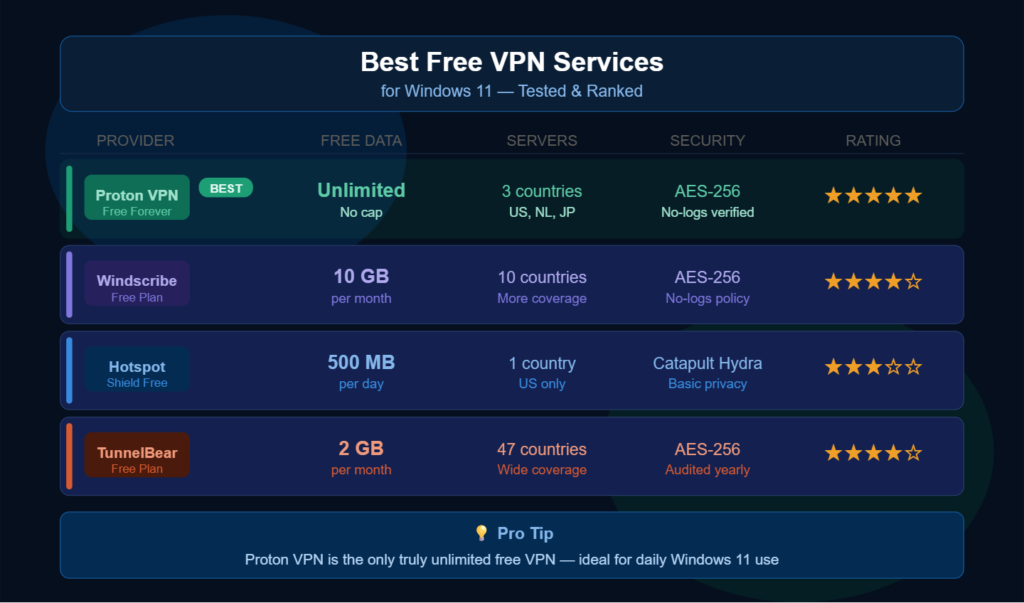
Best Free VPN Comparison Table (Windows 11)
| Provider | Free Data | Servers | Security | Rating |
| Proton VPN | Unlimited (Free Forever) | 3 countries (US, NL, JP) | AES-256, No-logs verified | ⭐⭐⭐⭐⭐ |
| Windscribe | 10 GB/month | 10+ countries | AES-256, Privacy-focused | ⭐⭐⭐⭐☆ |
| Hotspot Shield | 500 MB/day | 1 country (US only) | Hydra protocol, basic privacy | ⭐⭐⭐☆☆ |
| TunnelBear | 2 GB/month | 47 countries | AES-256, yearly audits | ⭐⭐⭐⭐☆ |
Proton VPN — Best Overall Free VPN for Windows 11
Proton VPN stands out as the strongest free VPN option for Windows 11 users in 2026. It is widely trusted because it offers unlimited data, strong encryption, and a strict no-logs policy.
Why it ranks #1:
- Unlimited free data (no monthly cap)
- Strong AES-256 encryption
- Verified no-logs policy
- Stable performance for daily use
- Works smoothly on Windows 11
Best for:
- Daily browsing
- Public Wi-Fi protection
- Privacy-focused users
- Students and remote workers
This VPN is especially valuable because most free VPNs limit usage, whereas Proton VPN allows continuous, secure browsing without interruption.
Windscribe — Best for Data Control
Windscribe is another popular free VPN choice, especially for users who want more server flexibility and moderate monthly data usage.
Key strengths:
- 10 GB of monthly free data
- Servers in multiple countries
- Strong privacy protection
- Good browser extension support
Limitations:
- Limited monthly data cap
- Not ideal for heavy streaming
Best for:
- Casual browsing
- Light streaming
- Occasional VPN use
Windscribe is a strong, all-round option, but it works best when you manage your data carefully.
Hotspot Shield Free — Fast but Limited
Hotspot Shield is known for speed, but its free version comes with strict limitations.
Features:
- Fast connection speeds
- Easy Windows 11 setup
- Simple user interface
Limitations:
- Only 1 server location (US)
- 500 MB daily limit
- Basic privacy protection
Best for:
- Short browsing sessions
- Quick secure connections
This VPN is good for speed, but not ideal for long-term privacy usage.
TunnelBear — Easy & Beginner Friendly
TunnelBear is designed for simplicity and ease of uIt’sIt’s perfect for beginners who want a friendly VPN interface.
Highlights:
- 2 GB free monthly data
- Servers in 47 countries
- Strong AES-256 encryption
- Annual security audits
Limitations:
- Very limited data
- Not suitable for heavy usage
Best for:
- Beginners
- Occasional VPN users
- Light browsing
TunnelBear is more about simplicity than performance, making it great for first-time VPN users.
Pro Tip: Which Free VPN Is Best?
If you are using Windows 11 daily and want unlimited secure browsing, the best choice is clearly:
Proton VPN
It is the only major free VPN that offers unlimited data without forcing upgrades, making it ideal for consistent privacy protection.
Best Free VPN Features
Not all free VPNs are created equally. Some provide excellent protection, while others may actually compromise privacy by collecting user data. Choosing the right provider is critical.
No-Cost Protection
The biggest attraction of free VPNs is obvious: they cost nothing. This makes VPN protection accessible to students, travelers, and casual internet users who may not want to pay for monthly subscriptions.
Several respected providers now offer genuinely useful free plans. According to recent reviews, services like Proton VPN, Windscribe, and PrivadoVPN continue receiving positive attention for privacy and reliability.
Still, free services usually include some limitations, such as:
| Feature | Free VPN | Paid VPN |
| Cost | Free | Subscription |
| Data Limits | Often limited | Usually unlimited |
| Speed | Moderate | Faster |
| Server Options | Limited | Extensive |
| Streaming Access | Basic | Advanced |
| Customer Support | Limited | Full support |
Fast Browsing Speed
Older VPNs often dramatically slow down internet connections. Thankfully, modern VPN technologies have improved substantially. WireGuard and optimized VPN infrastructures now allow much faster speeds than previous generations.
Recent performance reviews show that some VPN services can reach impressive speeds while maintaining strong encryption standards.
For best performance:
- Use nearby VPN servers
- Avoid overloaded free servers
- Restart your router occasionally
- Close unnecessary background applications
Windows 11 Compatibility
A good VPN should work smoothly with Windows 11. Modern VPN applications now offer simplified interfaces, one-click connections, and automatic server recommendations.
Features users should look for include:
- Kill switch protection
- Automatic startup
- DNS leak protection
- Split tunneling
- Protocol switching
These tools improve both convenience and security.
How VPN Software Works on Windows 11
When VPN software is activated on your Windows 11 laptop:
- Your internet connection becomes encrypted
- Your IP address is hidden
- Your data passes through secure VPN servers
- Websites see the VPN location instead of your real location
- Online tracking becomes harder
This process improves internet security significantly.
READ MORE: How to Use Google Search Console for Beginners (Full Guide)
Free VPN vs Paid VPN Comparison
| Feature | Free VPN | Paid VPN |
| Cost | Free | Monthly subscription |
| Encryption | Basic to strong | Advanced |
| Speed | Moderate | Faster |
| Server Access | Limited | Global access |
| Data Limits | Sometimes limited | Usually unlimited |
| Ads | Common | Rare |
| Streaming Support | Limited | Better |
| Customer Support | Minimal | Full support |
| Privacy Features | Basic | Advanced |
| Security Tools | Limited | Premium tools |
Best Features to Look for in a Free VPN Service
Not all free VPN services are safe. Some collect user data or display intrusive ads.
Important Features
Strong Encryption
Choose VPN software with:
- AES-256 encryption
- Secure VPN protocols
- DNS leak protection
No-Log Policy
A trustworthy VPN should avoid storing:
- Browsing history
- IP addresses
- Personal activity logs
Fast Connection Speeds
Good VPN services minimize:
- Lag
- Buffering
- Slow downloads
Windows 11 Compatibility
Your VPN should support:
- Windows 11 laptops
- Automatic updates
- Easy installation
Kill Switch
A kill switch disconnects your internet if the VPN fails unexpectedly.
This prevents accidental data leaks.
How To Use a VPN on a Windows 11 Laptop Free
Download Trusted VPN Software
Choose a reputable free VPN service.
Popular options include:
- Proton VPN
- Windscribe
- TunnelBear
- Hide.me
- PrivadoVPN
Install the VPN Application
After downloading:
- Open the installation file
- Allow permissions
- Complete installation
- Launch the application
Create an Account
Most VPN providers require:
- Email registration
- Password setup
- Verification
Some offer limited guest access.
Connect to a VPN Server
Inside the VPN app:
- Select a server location
- Click connect
- Wait for a secure connection status
Your secure internet connection is now active.
Verify VPN Protection
Visit an IP checker website to confirm:
- Your real IP is hidden
- VPN encryption is active
- Anonymous browsing works properly
Windows 11 Built-In VPN Settings
Windows 11 also includes a manual VPN configuration option.
Manual VPN Configuration
Open Settings
Go to:
- Settings
- Network & Internet
- VPN
Add VPN
Click:
- Add VPN
- Enter provider details
- Save settings
Connect Securely
Choose your VPN profile and connect.
This method is commonly used for business VPN networks.
Setting Up a Free VPN on Windows 11 (Fast & Simple Guide)
Protecting your privacy doesn’t need to be complicated or expensive. In just a few minutes, you can set up a free VPN and secure your entire internet connection. A VPN encrypts your data, hides your IP address, and helps you browse anonymously even on public Wi-Fi.
In the guide, we’ll walk through a simple, beginner-friendly setup process using a trusted free VPN service like Proton VPN. These steps are designed for Windows 11 users who want quick protection without technical confusion.
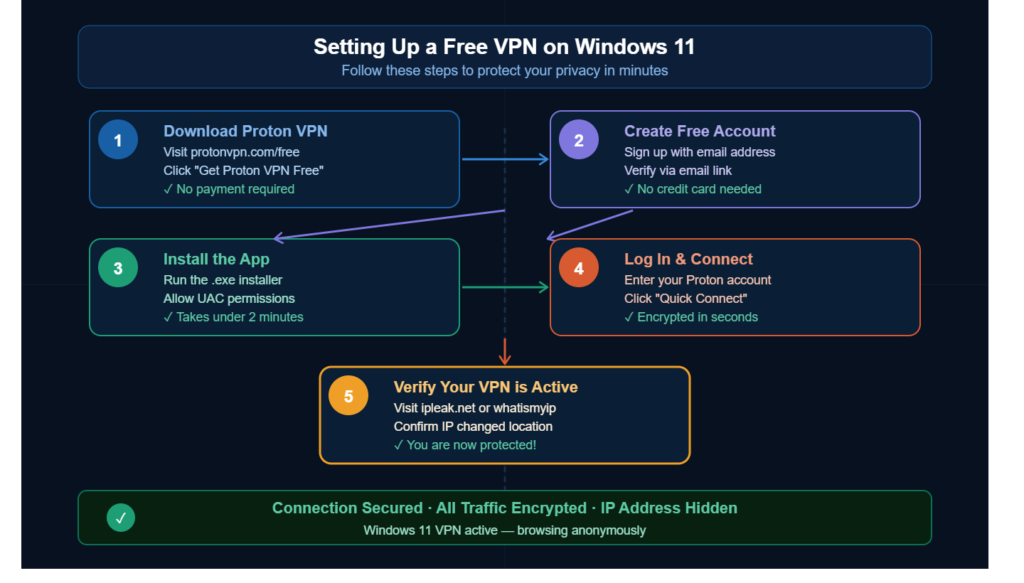
1. Download Proton VPN
The first step is downloading the VPN application safely.
Steps:
- Visit the official website: protonvpn.com/free
- Cl “ck “Get Proton VPN .” ree.”
- Download the Windows 11 application (.exe file)
Important Notes:
- No payment is required
- No hidden charges
- Always download from the official site only
This ensures you avoid fake VPN software or unsafe third-party downloads.
2. Create a Free Account
After downloading, you need to create a secure VPN account.
Steps:
- Open the signup page
- Enter your email address
- Create a strong password
- Verify your email through the confirmation link
What You Need:
- Valid email address
- No credit card required
- Basic account setup only
Once verified, your account is ready for secure VPN access.
3. Install the VPN Application
Now install the VPN software on your Windows 11 laptop.
Steps:
- Run the downloaded .exe installer
- Allow Windows User Account Control (UAC) permission
- Wait for the installation to complete
- Launch the application
Installation Time:
- Usually under 2 minutes
The installation process is simple and beginner-friendly.
4. Log In & Connect to VPN
You are now ready to activate your secure connection.
Steps:
- Open the VPN application
- Log in using your account details
- Cl “ck “Quick Con .”ect.”
What Happens Next:
- Your internet traffic becomes encrypted
- Your IP address is hidden
- Your connection is secured instantly
This step activates your protected VPN tunnel.
5. Verify Your VPNActiveIt’s
It’s important to confirm your VPN is working correctly.
How to Check:
- Visit a site like ipleak.net
- Or use whatismyip.com
- Check your new IP location
Expected Results:
- IP address changes to another country
- Real location is hidden
- The VPN server location is displayed instead
If everything matches, your VPN is active and working properly.
Connection Status Overview
Once setup is complete, your system should show:
- ✓ Connection Secured
- ✓ All Traffic Encrypted
- ✓ IP Address Hidden
- ✓ DNS Protection Active
- ✓ Anonymous Browsing Enabled
Your Windows 11 device is now protected with a secure VPN connection.
Why This Setup Matters
Using a VPN on Windows 11 is not just about hiding your IP address. It also improves your overall digital safety.
Key Benefits:
- Protection on public Wi-Fi
- Secure online banking
- Reduced tracking by advertisers
- Encrypted internet traffic
- Safer browsing experience
- Better online privacy control
Even free VPN plans can significantly improve your security when used correctly.
Online Privacy Protection Benefits
VPN usage provides major privacy advantages.
Enhanced Privacy
VPNs hide:
- Browsing activity
- Search history
- Device identity
- Real IP address
Protection Against Data Tracking
Advertisers and websites track users extensively.
VPN software limits:
- Ad tracking
- Behavioral monitoring
- ISP surveillance
Safer Public Wi-Fi Use
Public networks are dangerous.
Hackers often target:
- Cafés
- Airports
- Hotels
- Shopping malls
VPN encryption keeps sensitive data protected.
Secure Internet Connection for Remote Work
Remote workers rely heavily on VPN services.
Business Security Advantages
VPNs help secure:
- Work emails
- Company dashboards
- Cloud storage
- File transfers
- Video meetings
Reduced Cyber Risks
VPN software lowers exposure to:
- Phishing attacks
- Wi-Fi spying
- Data interception
- Credential theft
Anonymous Browsing Explained
Anonymous browsing means reducing identifiable digital footprints online.
VPNs Improve Anonymous Browsing By
- Hiding IP addresses
- Encrypting internet traffic
- Blocking trackers
- Protecting browser activity
However, complete anonymity also depends on:
- Browser settings
- Cookie management
- Safe browsing habits
Online Privacy Protection via VPN
Using a VPN on Windows 11 creates a secure and encrypted connection between your device and the internet. Instead of exposing your real IP address and browsing activity, the VPN protects your traffic inside an encrypted tunnel, helping you browse privately and securely from anywhere.
With Proton VPN enabled, your online activity is encrypted before it leaves your laptop, making it difficult for hackers, internet providers, advertisers, and trackers to monitor your behavior.
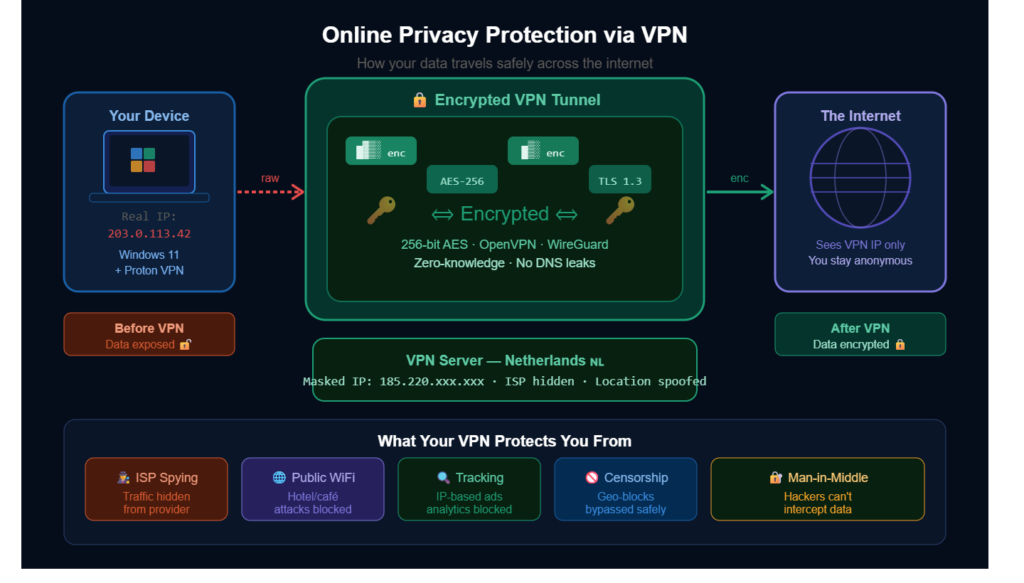
How Your Data Travels Safely Across the Internet
Your Device
Windows 11 Laptop
Before using a VPN, your internet connection directly exposes:
- Real IP address
- Location information
- Browsing activity
- ISP connection details
Real IP Example
- Real IP: 203.0.113.42
- Operating System: Windows 11
Without protection, websites and networks can track your online activity.
Before VPN Protection
Data Exposed
Without a VPN:
- Internet providers can monitor traffic
- Public Wi-Fi networks become risky
- Advertisers track browsing habits
- Websites detect your real location
- Hackers may intercept unsecured traffic
Your internet traffic travels openly across the network unless encryption is enabled.
Encrypted VPN Tunnel
Once connected to Proton VPN, all traffic passes through a secure, encrypted tunnel.
Security Technologies Active
- AES-256 Encryption
- TLS 1.3 Security
- OpenVPN Protocol
- WireGuard Protocol
Your browsing data becomes encrypted before leaving your device.
VPN Encryption Benefits
- Protects sensitive information
- Prevents traffic interception
- Secures online banking
- Improves anonymous browsing
- Reduces tracking risks
Modern VPN encryption acts like a locked armored tunnel across the internet.
VPN Server — Netherlands 🇳🇱
Your VPN traffic is routed through a secure server located in the Netherlands.
Protected Connection Details
- Masked VPN IP: 185.220.xxx.xxx
- ISP Hidden: ✓
- Location Spoofed: ✓
- DNS Leak Protection: ✓
Instead of websites seeing your real IP address, they only see server’ser’s IP address.
This improves online privacy and helps prevent location tracking.
After VPN Protection
Data Encrypted
After VPN activation:
- Your real IP stays hidden
- Browsing traffic becomes encrypted
- Public Wi-Fi becomes safer
- Advertiser tracking decreases
- Anonymous browsing improves
The internet sees only the server’s IP address instead of the device’s identity.
What Your VPN Protects You From
ISP Spying
Your internet provider cannot easily monitor:
- Browsing history
- Search activity
- Website traffic
- Download behavior
VPN encryption hides internet traffic from ISP-level tracking.
Public Wi-Fi Attacks
Public networks in:
- Hotels
- Airports
- Cafés
- Shopping malls
can expose user traffic to hackers.
VPN encryption protects data even on unsecured networks.
Online Tracking
Websites and advertisers often track users using IP addresses and browsing behavior.
VPN protection helps reduce:
- Ad profiling
- Behavioral tracking
- Analytics monitoring
- Location-based targeting
Censorship & Geo-Restrictions
VPN servers allow safer access to:
- Restricted websites
- Global streaming platforms
- International news content
- Region-blocked services
This improves internet accessibility while maintaining privacy.
Man-in-the-Middle Attacks
Hackers sometimes attempt to intercept internet traffic between users and websites.
VPN encryption prevents attackers from reading intercepted data, even if traffic is captured.
Why VPN Privacy Matters in 2026
Online privacy is becoming increasingly important as cyber threats and tracking technologies continue evolving. Millions of Windows 11 users now rely on VPN software for:
- Secure browsing
- Anonymous internet access
- Online banking safety
- Remote work security
- Public Wi-Fi protection
- Digital privacy control
Using Proton VPN helps create a safer online environment where personal information stays protected behind strong encryption and privacy-focused technology.
Best Use Cases for Free VPN on Windows
Streaming
VPNs can help access content libraries from different regions.
Gaming
Benefits include:
- Reduced tracking
- Safer gaming sessions
- DDoS protection
Torrenting
Some VPNs support secure P2P sharing.
Always follow local laws and platform rules.
Online Banking
VPN encryption helps secure financial activities on public networks.
Downloading and Setting Up a VPN on Windows 11
Choosing a Trusted VPN Provider
Choosing the wrong VPN can create privacy risks rather than solving them. Some low-quality free VPNs have been caught collecting browsing data or injecting ads into user traffic.
Before downloading any VPN:
- Read privacy policies carefully
- Look for independent security audits
- Avsuspicious” us “unlimited fee “VPN” offers
- Download software only from official websites
Cybersecurity reports in 2026 also warn about fake VPN download pages designed to steal user credentials.
Installing VPN Software
Installing a VPN on Windows 11 is surprisingly simple:
- Download the VPN application
- Open the installer
- Follow the low setup instructions
- Create a free account
- Launch the application
- Select a server location
- Click connect
Once connected, your internet traffic is automatically encrypted.
Testing VPN Connections
After connecting, users should verify that the VPN works correctly. IP checker websites can confirm whether your real location is hidden. Good VPN apps also display connection status, protocol information, and server locations directly within the software interface.
Free VPN vs Paid VPN
Security and Speed Differences
Free VPNs are useful for light browsing and basic privacy, but paid services typically offer stronger performance and more advanced features.
Paid VPN advantages include:
- Faster servers
- Unlimited bandwidth
- Better streaming support
- More global server locations
- Enhanced customer support
- Advanced cybersecurity tools
Some premium VPN providers now include additional features such as phishing protection, malware blocking, and scam-detection systems.
When Upgrading Makes Sense
Users should consider upgrading if they:
- Stream heavily
- Work remotely
- Need advanced privacy
- Download large files
- Travel frequently
- Require stable high-speed connections
For casual browsing, though, many reputable free VPNs remain perfectly adequate.
VPN Protocols Simplified
OpenVPN
Known for:
- Strong security
- Reliability
- Broad compatibility
WireGuard
Popular because of:
- High speed
- Modern encryption
- Low battery usage
IKEv2
Useful for:
- Mobile devices
- Stable reconnections
- Fast switching
Internet Security Thr: VPNs Help Reduce
Man-in-the-Middle Attacks
Hackers intercept internet traffic on unsafe networks.
VPN encryption blocks this.
ISP Tracking
Internet providers monitor browsing behavior.
VPNs reduce ISP visibility.
Data Theft
Encrypted traffic prevents sensitive data exposure.
Location Tracking
VPNs hide geographic location information.
Secure Browsing Tips Beyond VPN Usage
A VPN is powerful, but additional security practices further enhance protection.
Recommended Security Habits
- Use strong passwords
- Enable two-factor authentication
- Avoid suspicious downloads
- Keep Windows updated
- Use antivirus protection
- Avoid phishing links
- Clear browser cookies regularly
Best Browsers to Use with VPN Software
| Browser | Privacy Level | Performance |
| Firefox | Excellent | Fast |
| Brave | Very High | Fast |
| Edge | Good | Excellent |
| Chrome | Moderate | Excellent |
| Opera | Good | Fast |
Signs of a High-Quality VPN Service
Positive Indicators
- Transparent privacy policy
- Independent audits
- Fast customer support
- Strong encryption standards
- Clear ownership information
- Reliable uptime
Free VPN Limitations You Should Know
Although useful, free VPN services may have restrictions.
Common Limitations
- Data caps
- Fewer server locations
- Slower speeds
- Streaming restrictions
- Limited customer support
For advanced needs, premium VPN plans often deliver a better experience.
VPN Speed Optimization Tips
Improve VPN Performance
- Use nearby servers
- Switch protocols
- Restart your router
- Close background apps
- Avoid overloaded servers
- Upgrade internet speed if needed
VPN Troubleshooting on Windows 11
VPN Not Connecting
Possible fixes:
- Restart laptop
- Change server location. Turn on
- Disable the firewall temporarily
- Update VPN software
- Reinstall application
Slow Internet Speeds
Try:
- Switching protocols
- Using another server
- Disconnecting unused devices
VPN Disconnecting Frequently
Check:
- Wi-Fi stability
- App permissions
- Windows updates
VPN and Streaming Comparison
| Feature | Without VPN | With VPN |
| Privacy | Low | High |
| Tracking | High | Reduced |
| Geo Restrictions | Present | Reduced |
| Public Wi-Fi Safety | Weak | Strong |
| Anonymous Browsing | Limited | Improved |
Real-World Storytelling Example
Imagine working from a coffee shop using free public Wi-Fi.
Without a VPN:
- Hackers may intercept your traffic
- Login credentials could be exposed
- Financial data becomes vulnerable
With VPN software active:
- Your traffic becomes encrypted
- Your identity remains protected
- Browsing stays secure
This simple protection layer dramatically improves online safety.
Why Windows 11 Users Need Better Online Privacy Protection
Windows 11 includes modern security tools, but internet threats continue evolving rapidly.
VPN software adds another important layer of defense.
Key Advantages
- Better privacy
- Safer browsing
- Secure remote access
- Reduced tracking
- Improved cybersecurity
Browsing Securely & Anonymously on Windows 11
The internet has become a huge part of everyday life. People use Windows 11 laptops for work, banking, shopping, streaming, gaming, and social media. While online access is convenient, it also comes with growing privacy risks. Cybercriminals, advertisers, and data trackers constantly look for ways to collect personal information. That is why browsing securely and anonymously on Windows 11 is more important than ever in 2026.
Windows 11 includes modern security features, but users still need additional protection to stay safe online. Secure browsing means protecting your internet activity from hackers, malware, and tracking systems. Anonymous browsing focuses on keeping your identity, location, and online behavior private while using the internet. Together, these practices help users enjoy a safer and more private digital experience.
Why Secure Browsing Matters on Windows 11
Every time you connect to the internet, your device shares information with websites, apps, and networks. Without proper security, sensitive data such as passwords, banking details, and browsing history may be vulnerable.
Cyber threats are becoming more advanced every year. Public Wi-Fi networks, phishing scams, fake websites, and malicious downloads can quickly expose personal information. Secure browsing helps reduce these risks by protecting your connection and preventing unauthorized access.
Common Online Threats
- Hackers are stealing login credentials
- Malware infections
- Phishing emails and fake websites
- Tracking cookies collect user behavior
- Data interception on public Wi-Fi
- Identity theft
Windows 11 users should take these threats seriously because laptops are often used on unsecured networks outside the home.
What Anonymous Browsing Really Means
Anonymous browsing does not make users completely invisible online, but it significantly improves privacy. It reduces the amount of personal data websites, advertisers, and internet providers can collect.
When browsing anonymously, users hide important details such as:
- IP address
- Location
- Browsing activity
- Search habits
- Device information
This makes online tracking much more difficult.
Many people think anonymous browsing is only for cybersecurity experts. In reality, anyone who values digital privacy can benefit from safer browsing habits.
Use a VPN for Better Privacy
A Virtual Private Network, commonly called a VPN, is one of the most effective tools for secure browsing on Windows 11.
A VPN creates an encrypted tunnel between your laptop and the internet. This encryption protects your data from hackers and hides your IP address from websites.
Benefits of Using a VPN
- Improved online privacy
- Safer browsing on public Wi-Fi
- Encrypted internet traffic
- Reduced advertiser tracking
- Better protection against cyber threats
- Anonymous browsing support
Many trusted VPN providers now offer free plans for Windows 11 users, making online protection accessible for everyone.
Secure Browsing on Public Wi-Fi
Public Wi-Fi networks are convenient but often unsafe. Airports, hotels, cafés, and shopping centers may have weak security protections.
Hackers sometimes create fake Wi-Fi hotspots to steal user data. Even legitimate public networks can expose browsing activity if traffic is not encrypted.
How to Stay Safe on Public Networks
- Always use a VPN
- Avoid online banking on public Wi-Fi
- Disable automatic Wi-Fi connections
- Use secure HTTPS websites
- Turn off file sharing
- Keep your firewall enabled
These simple precautions can dramatically improve internet safety.
Best Browsers for Secure Browsing
The browser you choose also affects privacy and security.
Popular Secure Browsers for Windows 11
| Browser | Privacy Features | Performance |
| Firefox | Strong privacy controls | Fast |
| Brave | Built-in tracker blocking | Very Fast |
| Microsoft Edge | Windows integration | Excellent |
| Chrome | Strong security updates | Fast |
| Opera | VPN support included | Good |
Browsers with built-in privacy tools help block trackers, cookies, and malicious websites more effectively.
Keep Windows 11 Updated
Software updates are one of the easiest ways to stay protected online.
Microsoft regularly releases security patches that fix vulnerabilities and improve system protection. Ignoring updates can leave your laptop exposed to cyber threats.
Important Security Updates Include
- Malware protection improvements
- Firewall enhancements
- Browser security fixes
- Bug patches
- Network protection updates
Enable automatic updates whenever possible to keep your device secure.
Use Strong Passwords and Two-Factor Authentication
Weak passwords remain one of the biggest cybersecurity problems worldwide.
Simple passwords can be cracked within seconds using automated hacking tools. Strong passwords make unauthorized access much harder.
Tips for Creating Strong Passwords
- Use at least 12 characters
- Combine numbers, symbols, and letters
- Avoid personal information
- Use different passwords for each account
- Store passwords in a password manager
Two-factor authentication adds another security layer by requiring a second verification step during login.
Avoid Suspicious Websites and Downloads
Many cyberattacks begin with unsafe websites or fake software downloads.
Always download applications from trusted sources. Avoid clicking suspicious ads, pop-ups, or unknown email links.
Warning Signs of Unsafe Websites
- Missing HTTPS security lock
- Poor design quality
- Excessive pop-ups
- Fake download buttons
- Strange URLs
Safe browsing habits play a major role in protecting personal information online.
Enable Windows Security Features
Windows 11 includes several built-in security tools designed to improve protection.
Important Features to Enable
- Windows Defender Antivirus
- Firewall protection
- SmartScreen filtering
- Device encryption
- Secure boot
These tools help detect threats and block harmful activity before it damages your system.
Clear Browsing Data Regularly
Web browsers store cookies, cache files, and browsing history that websites may use for tracking.
Clearing browsing data regularly improves privacy and can even boost browser performance.
Data You Should Clear
- Browsing history
- Cookies
- Cached images
- Saved website permissions
Private browsing modes can also help reduce local tracking on shared devices.
Benefits of Secure and Anonymous Browsing
Strong privacy practices on Windows 11 provide several long-term advantages.
Key Benefits
- Better online privacy
- Reduced tracking
- Protection from hackers
- Safer online banking
- Improved public Wi-Fi security
- Greater control over personal information
Secure browsing is no longer an option in today’s digital world. It has become an essential part of responsible internet usage.
Browsing Securely & Anonymously on Windows 11 with Proton VPN
Your connection is now protected by a secure, private VPN on Windows 11. By using Proton VPN, your real IP address is hidden, your internet traffic is encrypted, and your online activity becomes much harder to track. This gives you a safer browsing experience whether you are using public Wi-Fi, streaming content, shopping online, or accessing sensitive accounts.
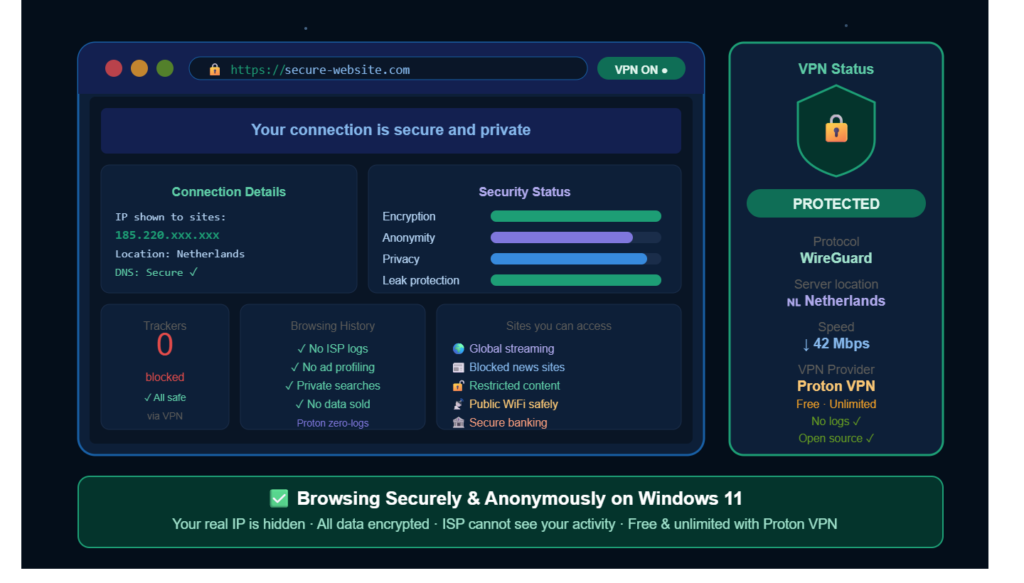
Your Secure Connection Details
Connection Status
- VPN Status: Protected
- Protocol: WireGuard
- Server Location: 🇳🇱 Netherlands
- VPN Provider: Proton VPN
- Plan: Free & Unlimited
- Security: No logs ✓
- Technology: Open source ✓
Your current VPN connection routes your internet traffic through a secure server in the Netherlands, helping improve privacy and online anonymity.
Security Features Active
Encryption Enabled
All internet traffic is encrypted using a secure VPN. This protects your:
- Passwords
- Banking information
- Emails
- Browsing activity
- Personal data
Even if someone intercepts your connection, encrypted data remains unreadable.
Anonymous Browsing Protection
Your visible IP address has been replaced with a VPN IP:
- IP shown to websites: 185.220.xxx.xxx
- Real IP hidden: ✓
- ISP tracking blocked: ✓
- Ad profiling reduced: ✓
This helps prevent websites, advertisers, and internet providers from tracking your real location and browsing habits.
DNS & Leak Protection
Secure DNS protection is active, helping prevent leaks that could expose your identity online.
Leak Protection Benefits
- Prevents DNS leaks
- Protects browsing requests
- Stops accidental IP exposure
- Improves secure browsing
Your VPN connection currently shows:
- DNS Security: Secure ✓
- Leak Protection: Active ✓
Privacy Protection Status
Browsing History Protection
Your browsing activity is better protected while connected to Proton VPN.
Privacy Features Active
- ✓ No ISP logs
- ✓ Private searches
- ✓ No ad profiling
- ✓ No data sold
- ✓ Secure encrypted traffic
This significantly improves online privacy protection on Windows 11.
Safe Access to Online Content
Using a VPN also improves internet accessibility and security.
Websites & Services You Can Access Safely
- Global streaming platforms
- Restricted news websites
- Region-blocked content
- Public Wi-Fi networks
- Online banking services
Your secure VPN tunnel helps protect sensitive activity even on unsafe networks.
WireGuard Protocol Advantages
Your VPN connection uses the modern WireGuard protocol, known for:
- Faster connection speeds
- Strong encryption
- Better performance
- Lower latency
- Improved battery efficiency
Current speed performance:
- Download Speed: ↓ 42 Mbps
This is suitable for:
- Streaming
- Video calls
- Browsing
- Remote work
- Gaming
Why Proton VPN Is Popular for Windows 11
Proton VPN has become one of the most trusted VPN services because of its privacy-focused approach.
Key Advantages
- Free unlimited plan
- Strong encryption
- Open-source applications
- No-logs policy
- Windows 11 compatibility
- Secure browsing support
Its privacy policies are designed to reduce tracking and improve anonymous browsing for everyday users.
Pros and Cons of Free VPN Service
Pros
- No upfront cost
- Easy installation
- Basic online privacy protection
- Secure browsing support
- Good for beginners
Cons
- Limited speeds
- Fewer features
- Data restrictions
- Possible advertisements
- Smaller server networks
Expert Opinion Insights
Cybersecurity professionals increasingly recommend using a VPN for daily browsing, especially when using public Wi-Fi or handling sensitive information online.
The most important factor is choosing a trusted VPN provider with transparent privacy practices.
Users should avoid unknown free VPN services that promise unrealistic features without clear security standards.
Advanced VPN Features Worth Considering
Multi-Hop VPN
Routes traffic through multiple servers for extra security.
Split Tunneling
Let users choose which apps use the VPN connection.
Dedicated IP
Useful for:
- Business access
- Stable login sessions
- Remote work
Tips for Staying Safe Online
Using a VPN is only one part of internet safety. Good security habits matter just as much.
Important safety practices include:
- Use strong passwords
- Enable two-factor authentication
- Keep Windows updated
- Avoid suspicious downloads
- Ignore phishing emails
- Use antivirus software
- Backup important files regularly
Recent cybersecurity reports indicate that phishing scams and fake software downloads remain major threats in 2026.
A VPN helps reduce risks, but smart browsing behavior remains essential.
Common VPN Problems and Solutions
VPN users occasionally encounter technical issues. Thankfully, most are easy to fix.
| Problem | Possible Solution |
| Slow speed | Change server location |
| Connection drops | Restart VPN app |
| VPN won’t open | Reinstall software |
| DNS errors | Reset network settings |
| Website blocking | Switch servers |
Sometimes antivirus programs or Windows firewall settings interfere with VPN applications. Updating Windows 11 and VPN software often resolves compatibility problems quickly.
Common VPN Mistakes to Avoid
Using Untrusted Free VPNs
Some unsafe providers:
- Sell user data
- Inject ads
- Track activity
Always research providers carefully.
Ignoring Updates
Outdated VPN software may contain security vulnerabilities.
Enable automatic updates.
Leaving VPN Disabled on Public Wi-Fi
Many users forget to activate protection.
Always connect before using the public internet.
Choosing Slow Servers
Nearby servers usually provide:
- Better speed
- Lower latency
- Stable connections
Conclusion
Free VPN services for Windows 11 have improved significantly, but they are not all equal. Some are designed for speed, some for simplicity, and others for privacy.
If your main goal is secure browsing, anonymous internet access, and strong online privacy protection, you should always prioritize:
- No-logs policy
- Strong encryption (AES-256)
- Stable Windows 11 compatibility
- Reliable server connections
A good VPN is not just a tit’sit’s a layer of protection that keeps your digital life safe every time you go online.
VPNs have evolved from niche tech tools into everyday privacy essentials. As cyber threats, tracking systems, and public Wi-Fi risks continue growing, Windows 11 users increasingly rely on VPN software to protect their personal information online.
Free VPN services in 2026 are better than ever. Many now offer reliable encryption, user-friendly Windows compatibility, and respectable speeds for casual browsing. Whether you want safer public Wi-Fi usage, improved online privacy, secure streaming, or protection against cybercriminals, a VPN can dramatically strengthen your digital safety.
Your VPN Connection Is Secure
Current protections active:
- AES-256 encrypted tunnel
- Hidden real IP address
- Secure DNS protection
- ISP traffic privacy
- Public Wi-Fi security
- Anonymous browsing support
- Location masking enabled
Your data now travels safely across the internet through a secure VPN tunnel, helping keep your identity, activity, and personal information private while browsing on Windows 11.
The key is choosing a trusted provider. Reliable VPN services prioritize transparency, strong encryption, and user privacy over aggressive advertising or hidden data collection. When combined with smart cybersecurity habits, a VPN is one of the most valuable tools for safer internet use today.
Learning how to use a VPN on a Windows 11 laptop for free is one of the smartest ways to improve internet security, enhance browsing security, and protect online privacy in 2026.
A reliable free VPN service can help encrypt your internet traffic, support anonymous browsing, and create a secure internet connection whether you work remotely, stream content, study online, or browse public Wi-Fi networks.
Choose trusted VPN software, keep your applications up to date, and combine VPN use with smart browsing habits for the best possible protection.
Setting up a free VPN on Windows 11 is quick, simple, and highly effective. With just a few steps, download, install, log in, and connect, you can instantly improve your online privacy and security.
A trusted service like Proton VPN makes the process beginner-friendly while still offering strong encryption and reliable protection.
Once connected, your internet traffic is encrypted, your IP is hidden, and your browsing becomes much more private, giving you a safer digital experience every time you go online.
Browsing Securely & Anonymously on Windows 11
Your connection is currently protected with:
- Encrypted internet traffic
- Hidden real IP address
- Secure DNS protection
- Improved online privacy
- Safer public Wi-Fi usage
- Anonymous browsing support
With Proton VPN enabled, your ISP cannot directly monitor your browsing activity, and websites see the server’s location instead of your real IP address.
Browsing securely and anonymously on Windows 11 helps protect your personal information, online identity, and digital privacy. With cyber threats constantly evolving, users need more than basic protection to stay safe online.
Using a VPN, keeping Windows up to date, choosing secure browsers, and practicing smart browsing habits can dramatically reduce online risks. Even simple actions like enabling two-factor authentication or avoiding suspicious websites can make a huge difference.
FAQs
Is a free VPN safe for Windows 11?
Yes, trusted free VPN providers can offer secure browsing with encryption and privacy protection. Users should avoid unknown VPN apps with poor reputations.
Can a VPN make the internet speed faster?
Sometimes, a VPN may improve speeds if internet providers throttle certain traffic types. Usually, though, VPN encryption causes a small speed reduction.
Does Windows 11 have a built-in VPN?
Windows 11 includes support for manual VPN configuration, but users still need VPN service credentials from a provider.
Which VPN protocol is best in 2026?
WireGuard is widely considered one of the best modern VPN protocols for its effective balance of speed and security.
Can VPNs stop hackers completely?
No tool guarantees total protection. VPNs greatly improve security, but users still need to use strong passwords, keep software up to date, and practice safe browsing habits.
Can a VPN improve anonymous browsing?
A VPN significantly improves privacy by hiding your IP address and encrypting your traffic.
Which free VPN is best for beginners?
Popular beginner-friendly options include Proton VPN and Windscribe.
Will a VPN slow down my internet?
Some speed reduction may occur due to encryption, but high-quality VPN services minimize this impact.
Can I use a VPN for streaming?
Yes, many users use VPN software to stream and access global content.
Is VPN software legal?
VPN usage is legal in many countries, but laws vary by region.
Do VPNs stop hackers completely?
VPNs reduce many risks, but should be combined with good cybersecurity practices.
Can I use a free VPN on public Wi-Fi?
Yes, VPNs are especially useful for securing public Wi-Fi connections.
How often should VPN software be updated?
Always install updates immediately to maintain internet security and performance.