

Updated : Updated See what changed ↓
If you’ve typed a prompt into an AI chatbot any time in the past three years, odds are it was ChatGPT. It sits squarely in the AI software and cloud services space built by OpenAI, a technology company, as a conversational AI assistant that people turn to for writing, research, coding help, and everyday problem-solving. What began in November 2022 as a research preview has grown into the most widely used tool of its kind in the world, handling roughly 1.1 billion queries a day across more than 500 million weekly users.
Visit the official ChatGPT website →
What's new in ChatGPT
ChatGPT adds animated GIF creation and editing
ChatGPT’s Images 2.6 update now lets users create and edit animated GIFs directly in the chat.
- Who gets it: All ChatGPT users with access to the Images feature.
- Where: Inside the ChatGPT interface on web and supported mobile apps.
- Cost: No additional charge beyond existing plan; the feature is part of the Images capability.
- How to use: Prompt the model to generate or modify a GIF, then preview and download the result.
This addition makes ChatGPT more versatile for quick visual content creation, but users needing advanced animation tools may still prefer dedicated graphics software.
Sources:
- Unite.AI: ChatGPT Adds Animated GIF Creation and Editing with Images 2.6
- Crypto Briefing: OpenAI enables GIF creation in ChatGPT with Images 2.6 update
Earlier updates
- OpenAI limits weapon‑related ChatGPT answers for under‑18 users
- OpenAI adds iCloud Mail and Calendar plugins to ChatGPT
- Impact Factory launches AI marketing plug‑in for ChatGPT
- Uber expands ChatGPT Work to 30,000 staff
For anyone specifically searching ChatGPT‘s writing capabilities, students, bloggers, marketers, and copywriters, ChatGPT is usually the first tool they try, and for good reason: it’s built on GPT-5.5, OpenAI’s current frontier large language model, which can hold a full book’s worth of text in a single 1-million-token conversation.
“ChatGPT Review 2026: Is It Worth It for Beginners?” is one of the most-searched questions among students and new AI users today. As artificial intelligence becomes a core part of education and daily productivity, beginners want to know whether tools like ChatGPT are truly useful or just hype.
In 2026, ChatGPT has evolved into a powerful assistant capable of helping with writing, studying, coding, and time management. But is it really worth using for beginners? This detailed ChatGPT Review 2026 answers that question with real-world examples, expert insights, and practical use cases.
Whether you’re a school student, a college student, or someone exploring the best AI tools for students, this guide will help you decide whether ChatGPT fits your needs.

This review matters because the ChatGPT most people remember from a year ago barely resembles the one running today. Every model from that era, GPT-4o, GPT-4.5, the entire o-series reasoning line, has been retired from the consumer app. Pricing has splintered from a single $20/month plan into seven tiers ranging from $0 to $200. And in February 2026, OpenAI made a call that changed the free-tier conversation for good: it introduced ads to the Free and Go plans.
What used to be a single free chatbot is now a stack of seven pricing tiers, a rotating lineup of models, and a growing set of agentic tools that go far beyond simple conversation.
Is ChatGPT still worth using in 2026? That’s the first natural question most readers bring here, and the short answer is yes, but which plan and for which task depend heavily on what you’re trying to do. This part walks through what ChatGPT actually does well as a writing and general-purpose AI tool in 2026, who it’s genuinely built for, where it falls short, and an honest rating based on real evaluation criteria rather than marketing copy. Part 2 covers pricing and the best alternatives, and Part 3 compares ChatGPT head-to-head against Google Gemini, the AI it’s compared against more than any other tool on the internet today.
This ChatGPT review breaks down everything you need to know in 2026: what the tool actually does, how much it costs, who it’s genuinely built for, and where it falls short compared to alternatives like Claude and Gemini. Whether you’re a student, a freelancer, or a business evaluating ChatGPT for teams, this guide will help you decide if and which plan makes sense for you.
Read More: ChatGPT Pricing 2026
Read more: ChatGPT vs Gemini 2026: Full Comparison & Verdict
Quick Verdict
What it is: ChatGPT is OpenAI’s flagship conversational AI chatbot, now running on GPT-5.5, with a 1-million-token context window, agentic coding via Codex, Deep Research, and voice. Best for: Everyday users, students, writers, and businesses that want the widest feature set and the largest ecosystem among AI assistants. Starting price: Free (ad-supported); paid plans run $8–$200/month, with Plus at $20/month as the sweet spot. Overall rating: 4.5/5. One-line recommendation: Choose ChatGPT for the broadest, all-around AI tool; choose Gemini instead if your work already lives in Google Workspace.
Table of Contents
What is ChatGPT?
ChatGPT is OpenAI’s flagship generative AI assistant, a cloud-based AI tool accessed through web, desktop, and mobile apps, built on the GPT-5.5 machine learning model. What does ChatGPT actually do? In practical terms, it applies natural language processing to nearly any text-based or creative task: drafting blog posts and marketing copy, answering research questions, debugging code, analyzing spreadsheets, summarizing long documents, generating images, or holding a real-time spoken conversation through Advanced Voice Mode.
How has ChatGPT changed since it launched? It’s worth understanding the timeline because much of what people “know” about ChatGPT is now outdated. The original November 2022 release ran on GPT-3.5 and could barely hold a few paragraphs of context. GPT-4 arrived in 2023 and dramatically improved reasoning. Through 2024 and 2025, OpenAI ran two parallel model lines: the fast “omni” multimodal models like GPT-4o, and a separate “o-series” of reasoning models (o1, o3) that paused to think before answering.
In August 2025, these two lines merged into a single GPT-5 system with an automatic router deciding how much a given prompt needs to “think.” That router-based design has continued through GPT-5.1, 5.2, 5.4, and now GPT-5.5, which became ChatGPT’s default model on May 5, 2026. If the last version of ChatGPT you tested was GPT-4o, you’re evaluating a product that no longer exists in the consumer app. GPT-4o, GPT-4.5, and the entire o-series were formally retired from ChatGPT in 2026.
For readers specifically evaluating ChatGPT for writing, the relevant distinction is between raw generation and editable generation. ChatGPT’s Canvas feature turns the chat window into a collaborative document editor. You can highlight a paragraph and ask ChatGPT to tighten just that section, adjust tone, or expand an argument, without regenerating the whole piece. That’s a meaningfully different workflow than a simple prompt-and-response chatbot, and it’s one of the reasons ChatGPT remains a default choice for long-form content work.
Beyond the core writing use case, the ecosystem wrapped around GPT-5.5 is what gives ChatGPT its reach. Codex is an autonomous coding agent that reads a codebase, writes and runs code, fixes failing tests, and submits a completed pull request. Deep Research behaves like a junior analyst: give it a research question, and it spends five to thirty minutes autonomously browsing the web, then returns a cited report genuinely useful for writers who need sourced background before drafting. Memory carries context, your preferences, ongoing projects, and your writing style across sessions, so you don’t have to re-explain yourself in every new chat.
Review Methodology
TechyUpdate does not run lab tests, benchmarks or scored rankings. Every guide is built from the tool’s own website — its product pages, pricing pages, documentation and release notes — and, for new features, from the company’s announcements and trusted news coverage, which we list as sources. Prices and plans are checked against the official pricing page, the date of the last check is shown at the top of the article, and when the tool changes we update the guide. Some links are affiliate links; they never change what we write.
Why AI Tools Are Essential for Students in 2026
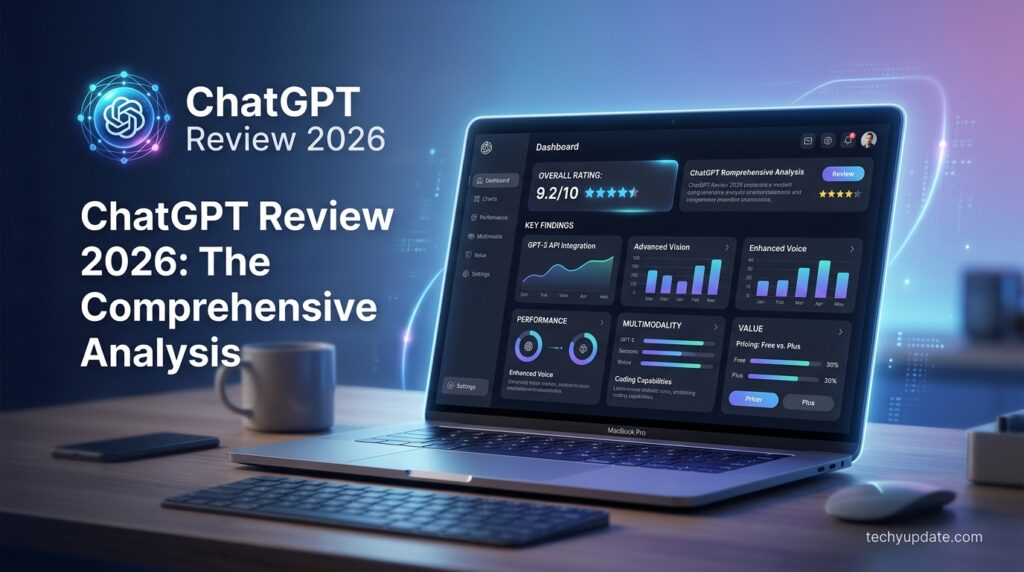
The modern education system is rapidly evolving, and tools like those discussed in this ChatGPT Review 2026: Is It Worth It for Beginners? are now essential, not optional. Students face increasing workloads, tight deadlines, and the need to process large amounts of information quickly.
ChatGPT is OpenAI’s conversational AI assistant, built on the company’s GPT family of large language models. It handles writing, coding, research, image generation, voice conversation, and increasingly, “agentic” tasks, meaning it can plan multi-step work and carry it out with less hand-holding than earlier versions required.
The current flagship model powering ChatGPT is GPT-5.5, which replaced GPT-5.3 Instant as the default model across all plans in May 2026. GPT-5.5 is built for stronger reasoning, more efficient agentic coding, and noticeably fewer hallucinated answers. OpenAI reports roughly 52% fewer hallucinated claims on high-stakes prompts covering medicine, law, and finance compared to its predecessor.
A more advanced preview generation, GPT-5.6 (branched into three tiers nicknamed Sol, Terra, and Luna), began a limited rollout in late June 2026, but it’s currently restricted to a small group of partner organizations through the API, and Codex hasn’t reached everyday ChatGPT users yet, so GPT-5.5 remains the model most people will actually experience.
AI tools simplify these challenges by offering instant assistance. With ChatGPT, students can ask questions, generate ideas, and receive explanations within seconds. This makes it one of the best AI tools for students in 2026.
Key Features
- GPT-5.5 with a 1M-token context window, OpenAI’s current frontier model, released April 23, 2026, is able to hold roughly an entire book’s worth of text in one conversation, which matters enormously for anyone drafting or editing long-form content.
- Canvas (writing/editing workspace) is a dedicated document editor in ChatGPT, built for iterative, section-by-section writing and revision rather than regenerating an entire draft from scratch each time.
- Codex (agentic coding) reads files, writes and runs code, fixes failing tests, and returns a completed pull request; available across web, desktop, CLI, and mobile Remote Control.
- Deep Research a multi-step, autonomous AI-powered productivity tool that browses the web and produces a cited report, available inside ChatGPT and via API.
- Advanced Voice Mode with real-time video spoken conversation, available on Plus and up.
- ChatGPT Images 2.0 currently leads independent image-generation leaderboards for photorealistic output; Free-tier users get Instant Mode, paid tiers unlock Thinking Mode.
- Memory & Projects persistent cross-session context, plus dedicated workspaces for ongoing writing or research projects.
- Custom GPTs & GPT Store build or install task-specific configurations to standardize a repetitive writing workflow (like a house style guide).
- 60+ enterprise connectors on Business/Enterprise tiers, including Google Drive, SharePoint, GitHub, and Notion.
Does ChatGPT still have Sora? No, and this is worth flagging clearly, since several older review articles still list it as current. Sora, OpenAI’s video-generation product, was discontinued on April 26, 2026, and is no longer part of ChatGPT or available as a standalone app.
Key Benefits
- Instant answers for academic questions
- Personalized learning support
- Faster research and summarization
- Improved writing and communication
Real-World Example
A student preparing for exams can use ChatGPT to:
- Summarize chapters
- Generate quizzes
- Explain complex concepts
Why It Matters
Understanding tools like ChatGPT ensures students stay competitive. According to insights from OpenAI and Google, AI is becoming a standard part of learning environments.
This section of the ChatGPT Review 2026 confirms that AI tools are no longer optional; they are essential.
READ MORE: How to Use ChatGPT Without a Phone Number
Best Free AI Tools for Students 2026
While this ChatGPT Review 2026: Is It Worth It for Beginners? When focusing on ChatGPT, it’s important to compare it with other tools.
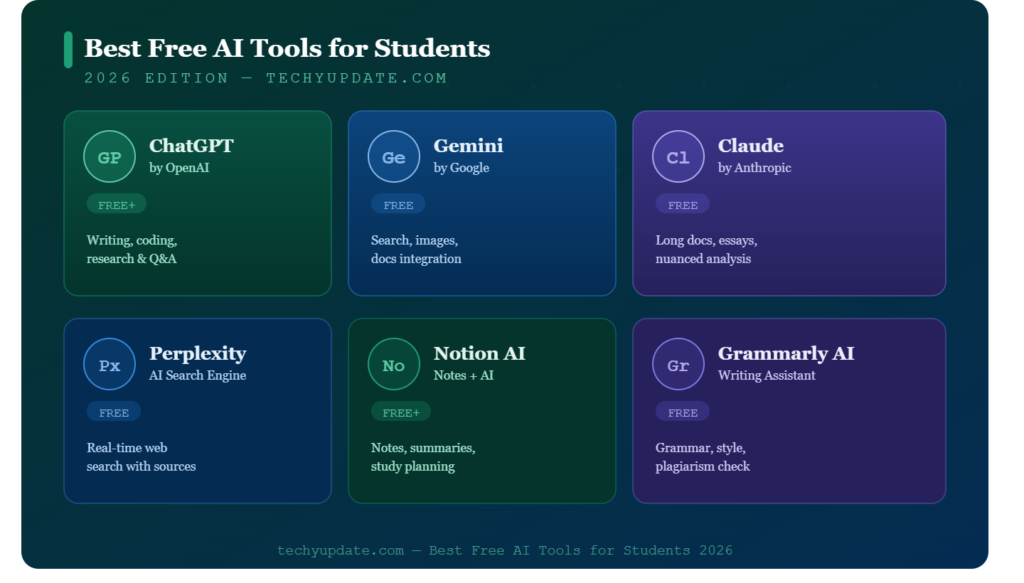
Top AI Tools
- ChatGPT – Writing, research, explanations
- Grammarly – Grammar and editing
- Notion AI – Note-taking and organization
- Canva AI – Design and presentations
- Perplexity AI – Research assistance
These are among the free AI tools for students in 2026 that complement ChatGPT.
How ChatGPT Stands Out
ChatGPT is versatile because it:
- Handles multiple tasks
- Provides conversational responses
- Supports different subjects
Example Workflow
Students can:
- Use ChatGPT for research
- Use Grammarly for editing
- Use Canva for visuals
Key Insight
The ChatGPT Review 2026 shows that while other tools are helpful, ChatGPT remains central due to its flexibility.
ChatGPT Features Breakdown for Beginners in 2026
To fully understand ChatGPT Review 2026: Is It Worth It for Beginners?, it’s important to explore the core features that make ChatGPT useful for students. In 2026, ChatGPT has evolved beyond a simple chatbot into a multi-purpose AI assistant.
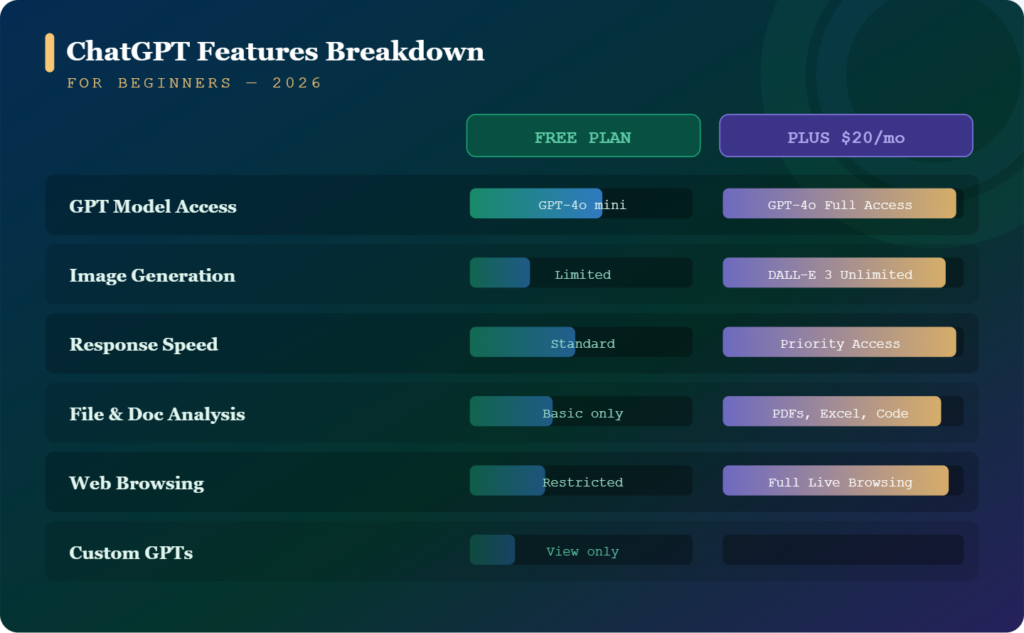
Core Features
- Natural Language Understanding
ChatGPT can understand conversational queries, making it easy for beginners to interact without technical knowledge. - Multi-Task Capability
It can handle writing, research, coding, summarization, and more in one place. - Context Awareness
ChatGPT remembers previous messages in a conversation, enabling more meaningful, connected responses. - Customization Options
Users can adjust the tone, format, and level of detail depending on their needs.
Example in Action
A student can ask:
“Explain photosynthesis in simple terms, then create quiz questions.”
ChatGPT will:
- Provide explanation
- Generate questions
- Offer examples
Why It Matters
This versatility is why ChatGPT ranks among the best AI tools for students and continues to grow in popularity in the free AI tools for students space in 2026.
How ChatGPT Handles Different Types of Writing
Is ChatGPT good at every kind of writing, or just some? This is worth breaking down by writing type, since “good at writing” means different things depending on what you’re producing.
- Blog posts and articles: Strong, especially with Canvas. You can generate a full draft, then go back and refine individual sections — tightening an intro, adding a transition, or rewriting a weak paragraph without regenerating the whole piece. Deep Research can gather sourced background first, which matters for anything requiring current facts or statistics.
- Marketing and ad copy: Strong for volume and variation, asking for five headline options or a set of social captions in different tones is one of ChatGPT’s most reliable use cases. Independent testing throughout 2026 has repeatedly found ChatGPT effective at producing relatable, example-driven marketing copy that gives writers a genuine starting point rather than generic filler.
- Creative and fiction writing: Competent but not always the strongest option. Claude is more frequently cited in blind testing for tone, nuance, and “human-sounding” prose in creative and long-form contexts, so writers prioritizing literary polish sometimes prefer to draft in Claude and edit in ChatGPT’s Canvas, or vice versa.
- Technical and documentation writing: A genuine strength, particularly when paired with Codex ChatGPT, which can explain what a piece of code does in plain language, generate accompanying documentation, and keep terminology consistent across a long technical document.
- Emails and short-form business writing: Fast and reliable; this is the lowest-effort, highest-success use case for most users, since short-form writing rarely exposes the model’s weaker long-context tendencies.
Who It’s For
Who should actually use ChatGPT? The honest answer is “almost anyone,” but the value shifts a lot depending on which persona you fall into:
- Writers, bloggers, and content marketers get the most out of Canvas, specifically the ability to edit a draft section by section, rather than regenerate the whole thing, which is what separates a genuinely useful AI writing assistant from a novelty. Combined with Deep Research for sourcing, this covers most of a content team’s day-to-day drafting workflow.
- Students and casual users typically stay on Free or Go, using ChatGPT for homework explanations, essay outlines, and quick research questions. The message caps are rarely a problem at this usage level, though the smaller context window can be limiting for longer assignments.
- Professional knowledge workers, consultants, analysts, and project managers tend to land on Plus, where Deep Research and Memory compound in value over weeks of use as the assistant builds up context on ongoing projects.
- Developers and Codex power users are the clearest case for paying $100–$200/month, since Codex’s agentic coding throughput scales directly with how much of your actual engineering workload you hand off to it.
- Small-to-midsize teams benefit from Business primarily for the admin controls and shared workspace, not necessarily for extra model capability. The underlying GPT-5.5 access is similar to Plus, but with governance layered on top.
- Regulated enterprises in healthcare, finance, and legal need an Enterprise specifically for data residency, audit logging, and custom retention, features that have no equivalent on the consumer tiers, regardless of price.
AI Tools for Writing and Content Creation
Writing is one of the strongest areas highlighted in this ChatGPT Review 2026: Is It Worth It for Beginners?.
How ChatGPT Helps
- Generates essay outlines
- Expands ideas into paragraphs
- Improves grammar and clarity
- Rewrites content
Step-by-Step Writing Use
- Enter topic
- Request outline
- Expand sections
- Edit content
Example
A student writing an essay can generate a full draft in minutes and refine it.
Benefits
- Saves time
- Reduces writer’s block
- Improves structure
Actionable Advice
- Always review AI output
- Add personal insights
- Avoid direct copying
This part of the ChatGPT Review 2026 confirms it as one of the best free AI tools for students for writing tasks.
AI Tools for Studying and Research
Another key highlight in this ChatGPT Review 2026: Is It Worth It for Beginners? is its ability to support studying.
Study Features
- Summarization
- Concept explanation
- Quiz generation
- Note creation
Study Workflow
- Input notes
- Ask for a summary
- Generate questions
Example
A student studying physics can ask:
“Explain Newton’s laws in simple terms.”
Benefits
- Faster understanding
- Better retention
- Interactive learning
Research Tips
- Verify information
- Use multiple sources
- Ask follow-up questions
This reinforces ChatGPT’s value in the free AI tools for students category for 2026.
AI Tools for Productivity and Time Management
Productivity is a major factor discussed in this ChatGPT Review 2026.
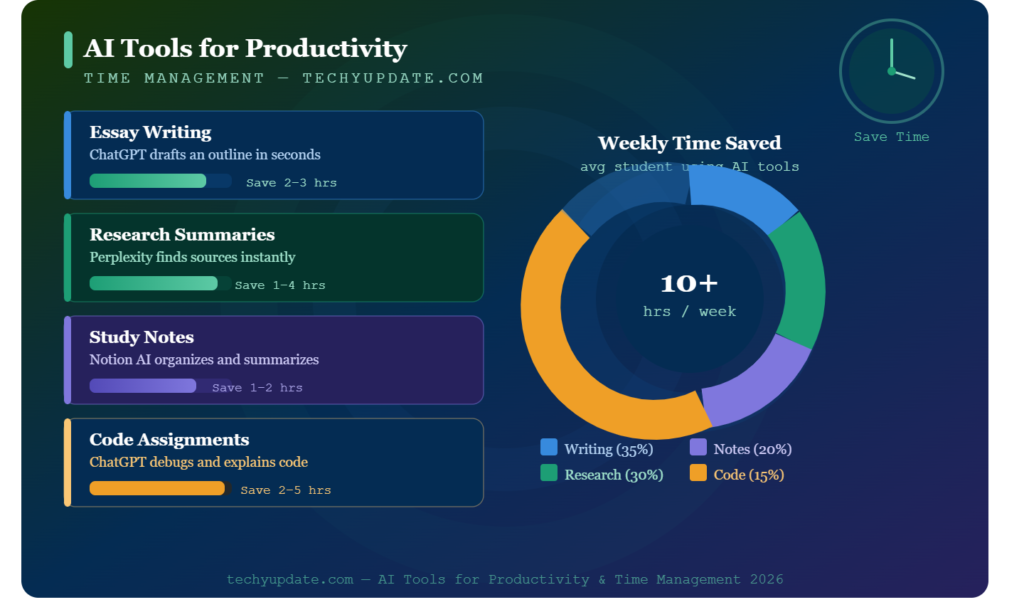
Productivity Uses
- Create study schedules
- Break tasks into steps
- Plan daily routines
Example Prompt
“Create a weekly study plan for exams.”
Benefits
- Better organization
- Reduced stress
- Improved focus
Real-Life Example
Students can manage assignments efficiently without missing deadlines.
This section confirms ChatGPT’s role as one of the best AI tools for students in time management.
AI Tools for Coding and Technical Skills
For technical learners, this ChatGPT Review 2026: Is It Worth It for Beginners? highlights strong coding support.
Coding Uses
- Debugging
- Code explanations
- Learning new languages
Example
“Explain Python loops with examples.”
Learning Process
- Learn basics
- Practice coding
- Debug errors
Benefits
- Faster learning
- Reduced confusion
- Practical understanding
This makes ChatGPT one of the free AI tools for students in technical education in 2026.
ChatGPT vs Other AI Tools for Students
To answer ChatGPT Review 2026: Is It Worth It for Beginners?, it’s essential to compare it with other tools.
Comparison Overview
| Feature | ChatGPT | Other AI Tools |
| Versatility | High | Medium |
| Ease of Use | Very Easy | Easy |
| Writing Support | Excellent | Good |
| Research Capability | Strong | Moderate |
| Coding Help | Strong | Limited |
Key Differences
- ChatGPT offers all-in-one functionality
- Other tools focus on specific tasks like grammar or design
- ChatGPT provides conversational learning
Example
A student using multiple tools may:
- Use ChatGPT for ideas
- Use Grammarly for editing
- Use Canva for visuals
Conclusion
ChatGPT remains a central among the best AI tools for students, especially for beginners who want a single tool for multiple tasks.
ChatGPT Use Cases for Different Students
This section of ChatGPT Review 2026: Is It Worth It for Beginners? highlights how different students benefit.
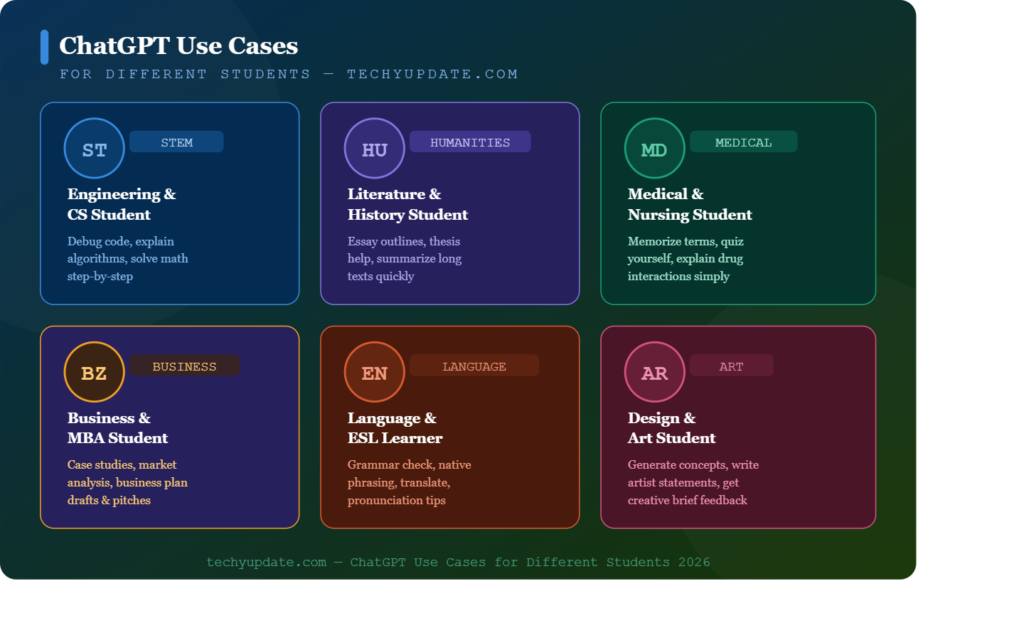
School Students
- Homework help
- Concept explanations
- Simple summaries
College Students
- Essay writing
- Research assistance
- Presentation preparation
Technical Students
- Coding support
- Debugging
- Learning new languages
Example
A college student working on a project can:
- Research topic
- Generate outline
- Write draft
- Edit content
Why It’s Useful
ChatGPT adapts to different needs, making it one of the best free AI tools for students in 2026, suitable for all education levels.
How Beginners Can Start Using ChatGPT Effectively
Understanding how to get started is key to this ChatGPT Review 2026.
Step-by-Step Beginner Guide
- Start with simple questions
- Use clear and specific prompts
- Ask for step-by-step explanations
- Refine responses with follow-ups
- Verify important information
Beginner Tips
- Avoid complex prompts initially
- Practice daily
- Experiment with different tasks
Example Prompt
“Explain gravity in simple terms for beginners.”
Outcome
Beginners quickly learn how to interact effectively, improving results over time.
ChatGPT Pricing in 2026: Every Plan Explained
This is where ChatGPT has gotten genuinely complicated. ChatGPT pricing in 2026 spans seven tiers — more than at any previous point in the product’s history.
| Plan | Price | Best For |
| Free | $0/month | Casual users, students, occasional questions |
| Go | $8/month | Budget-conscious users who want higher limits than Free |
| Plus | $20/month | Most individual professionals — the recommended entry tier |
| Pro ($100) | $100/month | Power users who don’t need the absolute maximum limits |
| Pro ($200) | $200/month | Heavy daily users running parallel or large-context workloads |
| Business | $25–30/user/month | Small to mid-sized teams needing admin controls |
| Enterprise | Custom pricing | Large organizations (typically 150+ seats) needing compliance, SSO, and data residency |
Free Plan
The ChatGPT free plan now runs on GPT-5.5 Instant and gives you roughly 10 messages per five-hour window, access to the GPT Store, and limited image generation. Since February 2026, U.S. Free users also see labeled “Sponsored” ads below responses, a first for the platform. It’s genuinely usable for light, casual tasks, but the message caps make it impractical for daily professional work.
Go $8/month
ChatGPT Go launched globally in January 2026 after debuting in India. It offers roughly 10x the message volume of Free, unlimited standard-model access, file uploads, and image creation, but it still shows ads and lacks the full suite of advanced features (no Deep Research, no Agent Mode, no Sora-era tools). Most reviewers, including this one, consider it a budget on-ramp rather than a serious professional plan.
Plus $20/month
ChatGPT Plus is the plan most individuals should actually consider. It removes ads, unlocks the full GPT-5.5 experience, Advanced Voice Mode, roughly 10 Deep Research runs per month, Agent Mode, and Custom GPT creation. Remarkably, the $20 price point has held steady since 2023, even as the feature list has grown substantially, making it, dollar for dollar, one of the strongest value propositions among AI subscriptions today.
Pro $100 and $200
OpenAI introduced a $100/month Pro tier in April 2026, sitting between Plus and the original $200 Pro plan. Both Pro tiers include the same model access (GPT-5.5 Pro), but the $100 tier offers 5x the usage limits of the Plus tier, while the $200 tier offers roughly 20x the usage limits and includes 250 Deep Research runs per month. Unless you’re running parallel heavy workloads or exhausting the $100 tier’s limits daily, most users won’t need to go beyond $100.
Business and Enterprise
ChatGPT Business costs roughly $25–30 per user per month, depending on billing frequency, and includes SOC 2 compliance, SAML SSO, an admin console, and 60+ integrations, making it a solid fit for small- to mid-sized teams. ChatGPT Enterprise is custom-priced (independent estimates suggest $40–60 per seat) and adds ISO 27001 certification, data residency across multiple regions, SCIM provisioning, and custom legal terms built for organizations with 150 or more employees and real compliance requirements.
It’s worth noting that OpenAI’s own product leadership has signaled that today’s pricing structure “may not last,” and has floated the idea of scaling back unlimited-style plans over time. If a current plan fits your budget and needs, locking it in sooner rather than later isn’t unreasonable advice.
Real Use Cases
Can ChatGPT write a full blog post? Yes, a freelance content strategist might run Deep Research on a client’s competitors first, then move into Canvas to draft and refine the final piece section by section, adjusting tone without losing the parts that already work. A solo developer might rely on Codex through the CLI for routine refactoring while reviewing pull requests from their phone via Remote Control.
A university might deploy ChatGPT Edu campus-wide, so every student has access without affecting individual budgets. A small e-commerce team might use Custom GPTs to standardize product description writing so every listing follows the same tone and structure, without a writer having to reread the brand guide each time. A marketing manager preparing a quarterly report might combine Deep Research for competitor data with Canvas to draft the executive summary, cutting a task that used to take a full day to an afternoon. Each scenario draws on a different slice of the same underlying platform, which is exactly what makes ChatGPT’s breadth its biggest practical advantage.
Is ChatGPT good for SEO content writing? For drafting and structuring, yes, Canvas and Deep Research together handle outline generation, source gathering, and iterative editing well. It won’t replace a strategist’s judgment on keyword targeting or search intent, but as a drafting and editing engine, it consistently speeds up the writing process for teams like techyupdate.com’s own editorial workflow.
What ChatGPT Isn’t Great At
No review is complete without the honest limitations, and a few come up consistently in real-world use. Does ChatGPT ever get facts wrong? Yes, like every large language model, it can produce confident-sounding but inaccurate information (a phenomenon often called “hallucination”), which is exactly why Deep Research’s citation-backed approach matters for anything fact-sensitive. It also isn’t the strongest option for pure creative fiction, where testers consistently rate Claude’s prose as more natural. And because OpenAI’s automatic model router decides which underlying model actually answers a given prompt, some users report inconsistent output quality between two seemingly identical questions, a side effect of the routing system rather than a flaw in any single model.
Real User Sentiment
Across Reddit threads, G2 reviews, and app store feedback, a consistent pattern emerges. Praise clusters around the speed of iteration. Users repeatedly note that OpenAI ships new capabilities faster than any competitor, and that Codex has become genuinely useful for daily engineering work rather than a novelty. Writers specifically praise Canvas for making editing long documents feel less like starting over.
Complaints cluster around tier confusion. Many users say it’s hard to know which model actually answered a given prompt because of OpenAI’s automatic routing system and around the February 2026 introduction of ads on Free and Go, which a vocal segment of longtime free users viewed as a moment of erosion of trust. Support responsiveness on lower tiers is also a recurring complaint, especially compared to the more hands-on onboarding some competitors offer at the Business level.
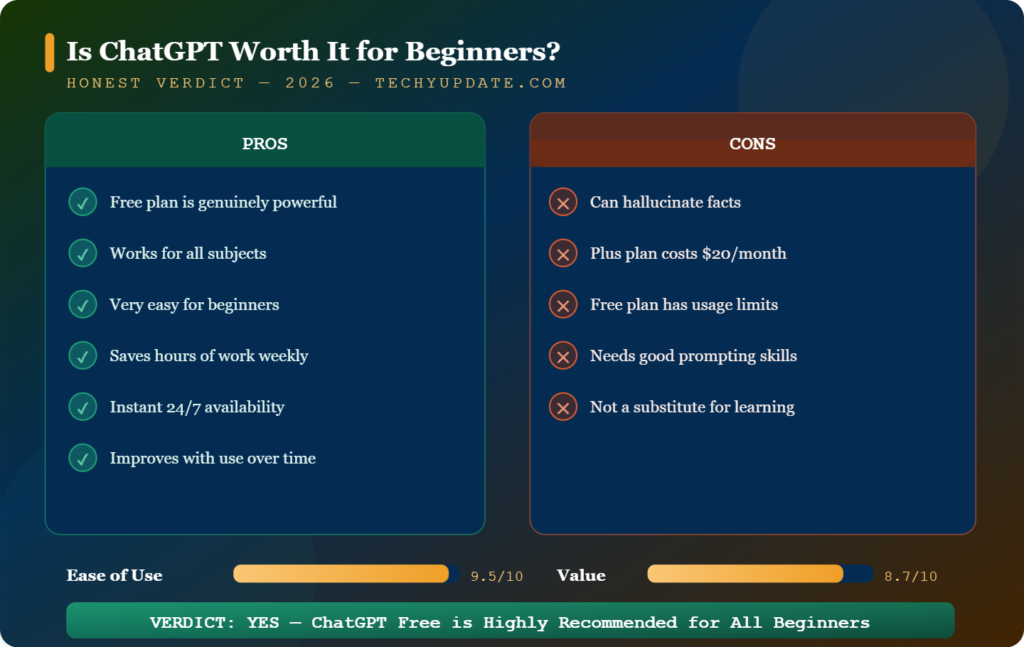
Is ChatGPT Worth It for Beginners in 2026?
Now we directly answer the core question of ChatGPT Review 2026: Is It Worth It for Beginners?.
Short Answer (Featured Snippet Style)
Yes, ChatGPT is worth it for beginners in 2026 because it simplifies learning, improves productivity, and supports a range of academic tasks.
Detailed Answer
ChatGPT offers:
- Easy interface
- Multi-purpose functionality
- Free access options
- Strong educational support
However, users must:
- Verify information
- Avoid over-reliance
- Combine with other tools
Final Verdict
For most students, ChatGPT is one of the best AI tools for students and a valuable addition to daily learning.
Pro Tips to Maximize AI Tools
Pro Tips Box
- Use clear and specific prompts
- Ask step-by-step explanations
- Combine multiple tools
- Verify outputs
Example
Instead of:
“Explain math”
Use:
“Explain algebra step by step with examples.”
Advanced Strategy
Use ChatGPT for brainstorming, then refine manually.
These tips enhance results from the tools discussed in the ChatGPT Review 2026.
Who Is ChatGPT Best For?
- Students and casual users — Free or Go covers basic homework help and everyday questions
- Freelancers and solo professionals — Plus is the clear sweet spot for writing, research, and light coding
- Developers and power users — Pro ($100 or $200) makes sense if you’re running Codex-heavy workflows or large-context analysis daily
- Small-to-mid businesses — Business plan brings admin controls without enterprise complexity
- Large, regulated organizations — Enterprise is the realistic option once compliance and data residency become non-negotiable
Pros and Cons
| Pros | Cons |
|---|---|
| Broadest feature set of any AI assistant (voice, image, code, research, writing) | Ads now appear on Free and Go tiers |
| Canvas makes iterative long-form writing genuinely usable | Model routing can be confusing — you don’t always know which model answered |
| Codex is genuinely strong for agentic coding work | Sora (video) was discontinued in April 2026 |
| 1M-token context window on GPT-5.5The | Pro tier at $200/month is expensive relative to casual use |
| Massive ecosystem — 60+ integrations at Business/Enterprise | Free tier context window (~16K tokens) is noticeably smaller than paid tiers |
Overall Rating
| Criteria | Score |
|---|---|
| Features | 4.7 / 5 |
| Pricing Fairness | 4.2 / 5 |
| Ease of Use | 4.5 / 5 |
| Support Quality | 4.0 / 5 |
| Overall | 4.5 / 5 |
ChatGPT vs Claude: A Quick Look
Since comparison is one of the most common follow-up questions after a review, it’s worth a brief mention: ChatGPT wins on breadth, offering a wider toolset, video-capable Advanced Voice Mode, leading image generation, a dedicated coding agent, and dozens of app connectors. Claude tends to win on raw context window size and long-form writing, with some independent coding benchmarks showing a narrow edge as well. If you’re deciding between the two, running both on their respective $20 entry tiers for a month before committing to a higher-priced plan is a reasonable way to test fit for your specific workflow.
Is ChatGPT Worth It in 2026?
For casual use, Free is still genuinely functional, but it just won’t hold up under daily professional demands. For most individuals doing real work, Plus at $20/month remains the strongest value tier, especially given how much the feature set has grown while the price has remained unchanged. Power users and teams have real reasons to consider Pro, Business, or Enterprise, but the sheer number of tiers means it’s worth matching your actual usage pattern, message volume, coding needs, and compliance requirements to the plan rather than defaulting to the most expensive option.
Real-World Perspective
Students often rely on ChatGPT for quick answers but must still review and validate results. This ensures learning remains effective.
Key Takeaway
ChatGPT is powerful but works best when used responsibly. This insight strengthens the conclusion of the ChatGPT Review 2026.
Common Mistakes Students Make with AI
This ChatGPT Review 2026: Is It Worth It for Beginners? also highlights common mistakes.
Common Errors
- Copying without understanding
- Using vague prompts
- Not verifying information
- Over-reliance on AI
How to Avoid
- Review content carefully
- Add your own ideas
- Cross-check facts
Key Insight
AI should assist learning, not replace it.
Expert Insights on AI Learning Trends
Experts agree that tools like ChatGPT are shaping education.
Key Trends
- Personalized AI learning
- AI integration in classrooms
- Skill-based education
Industry Insights
Organizations like OpenAI emphasize responsible AI use.
Future Outlook
AI will become a standard tool in education systems.
Impact
Students who master AI gain a competitive advantage.
Additional Practical Tips for Students
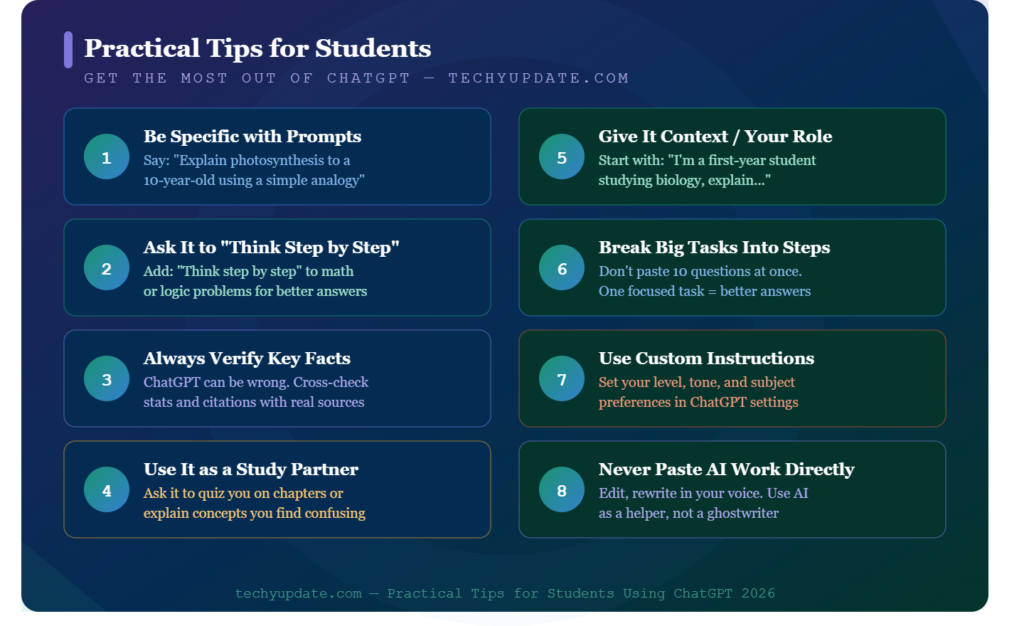
Smart Usage Tips
- Use ChatGPT for brainstorming ideas
- Break large tasks into smaller prompts
- Ask for examples to improve understanding
Study Tip
Combine ChatGPT with revision techniques:
- Flashcards
- Practice tests
- Summaries
Productivity Tip
Use ChatGPT to:
- Plan your day
- Organize assignments
- Track progress
Verdict
Is ChatGPT worth it for writing in 2026? For most writers and general users, yes. ChatGPT earns its position as the default AI writing assistant most people reach for first, not because every individual feature is best-in-class, but because no other tool covers this much ground this well, and Canvas specifically closes the gap between “AI that generates text” and “AI you can actually edit with.” If your priority is breadth writing, coding, research, voice, and image, all under one roof, ChatGPT remains the safest all-around pick heading into the second half of 2026.
Getting Started With ChatGPT
How do I start using ChatGPT? Sign-up is free and takes under a minute at chatgpt.com, no credit card required for the Free tier. New users are automatically dropped into GPT-5.5 Instant, OpenAI’s fast default model, with the option to switch to GPT-5.5 Thinking for more complex reasoning tasks on paid plans.
For writers specifically, the fastest way to evaluate whether it’s worth upgrading is to open a Canvas document, paste in an existing draft, and ask for section-specific edits that single workflow reveals more about day-to-day usefulness than dozens of one-off chat prompts ever will. If the free tier’s message caps and smaller context window start getting in the way within the first week, that’s usually the clearest signal it’s time to move to Plus.
Quick Summary
- ChatGPT Review 2026: Is It Worth It for Beginners? → Yes, for most students
- Useful for writing, studying, coding, and productivity
- Part of the best AI tools for students
- Requires responsible usage
- Works best when combined with other tools
Final Extended Conclusion
The complete ChatGPT Review 2026: Is It Worth It for Beginners? shows that ChatGPT is more than just an AI chatbot; it is a powerful learning companion. It helps students write better, study smarter, and manage time effectively.
While it has limitations, its advantages far outweigh them when used correctly. For beginners, it offers a simple entry point into the world of AI, making it one of the free AI tools for students 2026 that truly delivers value.
Students who learn how to use ChatGPT effectively will gain:
- Better academic performance
- Stronger digital skills
- Increased productivity
The future of education is AI-driven, and tools like ChatGPT are leading the way.
In this ChatGPT Review 2026, we’ve explored everything beginners and students need to know. From writing and studying to coding and productivity, ChatGPT proves incredibly versatile.
While it’s not perfect, its benefits far outweigh its limitations. If used wisely, it can significantly enhance your learning experience and daily productivity.
FAQs
ChatGPT Review?
ChatGPT is one of the most powerful AI tools in 2026. It helps users with writing, studying, coding, and daily tasks. It’s beginner-friendly, fast, and highly versatile, but users should still verify important information for accuracy.
Is ChatGPT free to use?
Yes, ChatGPT has a free tier with GPT-5.5 that offers instant access, though it has strict message limits, a smaller context window, and shows ads to US users since February 2026.
Is ChatGPT Plus worth it in 2026?
For most professionals and writers, yes, $20/month removes ads, unlocks GPT-5.5 Thinking, Canvas, Deep Research, and Codex, and the price hasn’t increased since ChatGPT first launched paid plans.
What’s the difference between ChatGPT Pro ($100) and Pro ($200)?
Both include GPT-5.5 Pro access; Pro $100 offers 5x Plus usage limits with a temporary 10x Codex promotion, while Pro $200 offers roughly 20x limits for daily heavy users.
Does ChatGPT still have Sora video generation?
No, Sora was discontinued on April 26, 2026, and is no longer part of ChatGPT or available as a standalone app.
Best Free AI Tools for Students 2026?
The best free AI tools for students in 2026 include:
- ChatGPT (all-in-one assistant)
- Grammarly AI (writing improvement)
- Notion AI (note-taking & organization)
- QuillBot (paraphrasing & summaries)
- Canva AI (design & presentations)
ChatGPT stands out because it combines multiple features on a single platform.
ChatGPT Features Breakdown for Beginners in 2026?
ChatGPT offers:
- Writing assistance (essays, emails, blogs)
- Study help (explanations, summaries)
- Coding support (generate and debug code)
- Productivity tools (planning, scheduling)
- Conversational AI for interactive learning
It’s simple to use and adapts to different needs.
AI Tools for Writing and Content Creation?
AI tools like ChatGPT help with:
- Blog writing
- Essay creation
- Grammar correction
- Content ideas
They save time and improve writing quality, especially for beginners.
AI Tools for Studying and Research?
AI tools assist students by:
- Explaining complex topics
- Summarizing long texts
- Generating practice questions
- Helping with assignments
They make studying faster and more efficient.
AI Tools for Productivity and Time Management?
AI tools help users:
- Create study schedules
- Manage tasks
- Plan daily routines
- Stay organized
This improves efficiency and reduces stress.
AI Tools for Coding and Technical Skills?
AI tools like ChatGPT help with:
- Writing code
- Fixing errors
- Explaining programming concepts
- Learning languages like Python and JavaScript
They are great for beginners learning coding.
ChatGPT Use Cases for Different Students?
- School students: Homework help
- College students: Research and writing
- Professionals: Emails and productivity
It works for learners at all levels.
How Beginners Can Start Using ChatGPT Effectively?
Beginners should:
- Ask clear and simple questions
- Be specific in prompts
- Use follow-up questions
- Practice regularly
Better prompts lead to better results.
Is ChatGPT Worth It for Beginners in 2026?
Yes, ChatGPT is worth it because:
- It’s easy to use
- Saves time
- Helps in learning and productivity
- Offers free access
It’s one of the best starting tools for AI.
ChatGPT Pros and Cons for Beginners?
Pros:
- Easy to use
- Fast responses
- Multi-purpose
- Improves productivity
Cons:
- Can give incorrect information
- Requires internet
- Risk of over-dependence
Additional Practical Tips for Students?
- Don’t rely completely on AI
- Always verify important information
- Use it as a learning assistant
- Combine it with books and teachers
Expert Insights on AI Learning Trends?
AI in education is growing rapidly. Key trends include:
- Personalized learning
- AI tutors
- Faster research tools
- Skill-based education
AI tools like ChatGPT will become essential for students in the future.
What is ChatGPT in 2026?
ChatGPT is an AI-powered assistant that helps with writing, studying, and problem-solving. It is widely used by students and professionals.
Is ChatGPT worth it for beginners?
Yes, beginners benefit from its ease of use and versatility, making it one of the best AI tools for students.
Can ChatGPT replace studying?
No, it supports learning but does not replace understanding concepts.
Is ChatGPT free?
There is a free version, but advanced features may require a paid upgrade.
How to get better results?
Use detailed prompts, ask follow-up questions, and verify outputs.
Conclusion
ChatGPT has firmly established itself as one of the most advanced and versatile AI assistants available in 2026. What began as a conversational chatbot has evolved into a complete AI ecosystem that supports writing, coding, research, brainstorming, image generation, data analysis, and everyday productivity. With the introduction of GPT-5.5 and advanced tools like Canvas, Deep Research, Codex, and multimodal capabilities, ChatGPT offers a far more comprehensive experience than simply answering questions.
One of its greatest strengths is its flexibility. Whether you’re a student seeking study assistance, a content creator writing SEO-friendly articles, a developer writing code, or a business professional automating daily tasks, ChatGPT adapts to diverse workflows with impressive accuracy and speed. Its clean interface, regular feature updates, and expanding ecosystem make it suitable for both beginners and experienced users.
Of course, no AI platform is perfect. Users may occasionally encounter inaccurate responses, usage limits on lower-tier plans, or the need to fact-check AI-generated information. However, these limitations are becoming less significant as OpenAI continues to improve model performance, reasoning, and reliability with each update.
Overall, ChatGPT remains one of the best AI tools for individuals and businesses seeking a reliable, feature-rich assistant. Its combination of powerful language understanding, creative capabilities, coding support, and productivity features makes it a standout choice in an increasingly competitive AI market. For anyone considering an AI assistant in 2026, ChatGPT continues to deliver exceptional value, making it a worthwhile investment for both personal and professional use.