

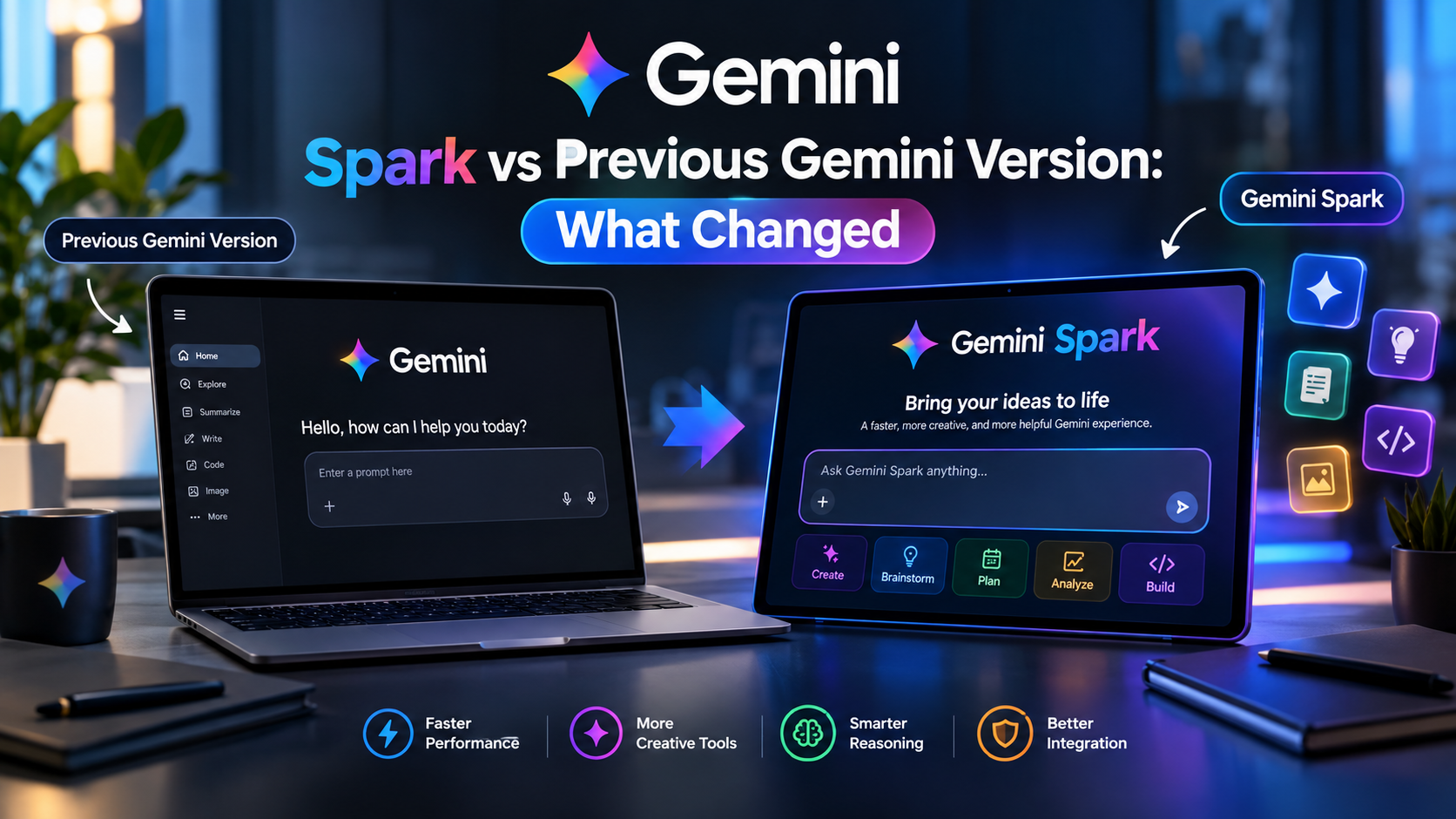
Gemini Spark represents one of the biggest changes in how Google’s Gemini experience works. The important distinction is that Gemini Spark is not simply a newer chatbot model replacing an older Gemini version. Instead, Spark adds an agentic layer that can take multi-step actions, work across connected apps, run scheduled tasks, and continue working in the background under the user’s direction.
That makes the comparison less about whether Spark gives “better answers” and more about what Gemini can actually do after you give it a goal.
The earlier Gemini experience was primarily designed around conversation: ask a question, request content, analyze a file, brainstorm an idea, or get help with a task. Spark moves the experience toward delegation and automation.
Explore More: What’s New in Gemini Spark?
Quick Answer: What Changed With Gemini Spark?
The biggest change is the shift from reactive AI assistant to proactive AI agent.
| Area | Previous Gemini Experience | Gemini Spark |
|---|---|---|
| Primary purpose | Answer and assist | Complete and manage tasks |
| Interaction | Prompt → response | Goal → multi-step execution |
| Background work | Limited | Designed to work in the background |
| Recurring tasks | More limited | Schedules and automated workflows |
| Connected apps | Primarily assistance/information | Can use connected apps to perform workflows |
| Skills | Not central to the experience | Reusable Skills can guide repeated work |
| Google Workspace | Help with content | Can perform multi-step actions |
| Web tasks | Research and answers | Can perform certain web errands |
| Desktop workflows | Limited | Spark on Mac can work with permitted local files |
| Third-party apps | More limited integration | Connected Apps and MCP support |
| Task tracking | Chat-oriented | Dedicated Spark task management |
| Agent autonomy | Relatively low | Higher, but still user-directed |
Google introduced Spark in May 2026 specifically as a 24/7 personal AI agent, describing it as a move from an assistant that answers questions toward one that can work on a user’s behalf.
Gemini Changed From Answering to Doing
This is the most important difference.
Traditional Gemini interactions generally looked like this:
You ask → Gemini processes → Gemini answers
For example:
Prompt:
“Give me five ideas for a technology newsletter.”
Gemini could generate the ideas, explain them, and potentially help draft the newsletter.
With Spark, the workflow can become much more action-oriented:
You give a goal → Spark plans the work → uses available tools → completes multiple steps → reports back
For example:
“Every Monday, review my important technology emails, summarize the major developments, create a prioritized list of topics, and prepare a brief for me.”
That is much closer to delegating work to an agent than having a conversation with a chatbot.
Google says Spark can manage tasks using information from sources such as Connected Apps, Skills, chats, websites, Personal Intelligence and location, depending on what the user has enabled.
Why this matters
The practical difference is not simply that Spark is “smarter.”
It is that Spark can potentially turn an instruction into a workflow.
That changes the role of Gemini from:
AI you consult
to:
AI you can delegate certain work to.
Spark Introduces Tasks as a First-Class Concept
The previous Gemini experience was largely organized around individual conversations.
Spark introduces a stronger concept of Tasks.
Instead of thinking only in terms of individual prompts, users can assign Gemini a larger objective.
For example:
Traditional Gemini
“Summarize these emails.”
Gemini Spark
“Every Friday, review my important emails from the week and prepare a summary of the major action items.”
The second request has:
- a goal
- multiple steps
- potentially connected information
- a schedule
- an ongoing relationship with the task
Google’s documentation describes Spark as a system for automating complex workflows and managing scheduled tasks. Users can also view and manage their Spark tasks from a dedicated Tasks area.
Skills Make Repeated Workflows More Useful
Another major change is the introduction of Skills.
A Skill essentially gives Spark reusable instructions and context for how you want a particular type of work handled.
This matters because users don’t necessarily want to repeat the same detailed prompt every time.
Imagine you regularly publish technology content.
Instead of repeatedly explaining:
- preferred structure
- research requirements
- tone
- formatting
- workflow
- output expectations
you could create a reusable Skill describing that process.
Then future tasks can reference that Skill.
Google specifically positions Skills as reusable instructions that can help tailor how Spark handles recurring activities.
Previous Gemini
You often had to recreate context through prompts.
Spark
You can build reusable instructions around recurring workflows.
That is a significant usability improvement for power users.
Schedules Turn Gemini Into an Ongoing Assistant
One of Spark’s most important additions is Schedules.
Traditional chatbot usage is usually event-driven:
You open Gemini → you ask something → Gemini responds.
Schedules introduce another pattern:
Set the condition or time → Spark performs the task when appropriate.
Google has expanded Spark’s scheduling capabilities to monitor topics involving areas such as:
- news
- finance
- sports
- local events
- weather
- shopping
and other information sources.
For example, instead of asking:
“What’s happening with this topic today?”
you could potentially create a recurring monitoring workflow.
This is one of the clearest examples of the transition from chat-based AI to agentic AI.
Gemini Spark Goes Beyond Google’s Original Chat Window
Another major change is how Spark interacts with other services.
Google has progressively added Connected Apps to Spark, including services such as:
- Google Workspace
- Google Tasks
- Google Keep
- Canva
- Dropbox
- Instacart
- OpenTable
- Zillow
- and custom applications through MCP in supported configurations.
Google announced these integrations throughout June and July 2026.
This means Spark can potentially coordinate information between different services instead of treating Gemini as an isolated chat window.
Example
A traditional AI interaction might be:
“Help me create a grocery list.”
Spark can move toward:
“Review my notes, create a grocery list, and use my connected services to help me handle the next steps.”
The value isn’t just the generated text.
The value is the workflow between applications.
Google Workspace Actions Became More Powerful
Spark also gained additional Workspace capabilities.
Google’s July updates added support for actions involving documents, spreadsheets and presentations, including editing private and shared files, reading comments, adding images, and refining documents through Canvas.
That creates an important difference.
Earlier Gemini
Gemini could help you understand or create content.
Spark
Spark can increasingly help operate on that content.
For example, instead of:
“How should I organize this spreadsheet?”
you could potentially ask Spark to perform a larger workflow involving the spreadsheet itself.
This is particularly relevant for people whose work already lives inside Google Workspace.
Spark Can Work With Your Mac
The change isn’t limited to cloud applications.
Google introduced Gemini Spark functionality into its macOS app, allowing eligible users to give Spark access to specific desktop folders and files.
Spark can perform tasks such as:
- analyzing selected folders
- renaming files
- reorganizing files
- modifying documents
- working across local files and connected applications
Google says users control which folders Spark can access through connected-folder settings.
This creates another major difference from the traditional Gemini chatbot.
Instead of only asking:
“How should I organize my Downloads folder?”
Spark can potentially perform the organization itself when given the appropriate access.
Chrome Integration Makes Spark More Action-Oriented
Google also expanded Spark into Chrome-based web workflows.
In July 2026, Google announced Chrome integration that allows Spark, with permission, to handle certain web errands using logged-in accounts and saved passwords.
Examples include researching flight options or scheduling apartment viewings.
Google says sensitive actions such as payments are handed back to the user rather than being completed autonomously.
This is an important distinction.
Previous model of AI browsing
Find information → summarize it
Spark’s agentic approach
Find information → navigate websites → perform permitted steps → ask the user when necessary
That’s a fundamentally different interaction model.
The Latest Expansion: Google Photos Workflows
Spark’s capabilities have continued expanding beyond the original launch feature set.
In September 2026, Google began rolling out Spark workflows for Google Photos, allowing eligible users to perform multi-stage tasks involving photo search, organization, editing, albums, visual stories and related workflows.
This is another example of why comparing Spark to an “older Gemini version” purely on chatbot answers misses the larger change.
The important development is tool access and task execution.
Spark Can Research, But Research Is No Longer the Whole Point
Gemini was already useful for research.
Spark adds another layer.
Google says Spark can perform complex research tasks using multiple sources and has improved its ability to retrieve and review sources in parallel.
That means a user could move from:
“Research this subject.”
toward:
“Research this subject, monitor developments, organize the findings, and keep me updated.”
The distinction is subtle but important.
Traditional AI: research is an answer.
Agentic AI: research can become an ongoing workflow.
Gemini Spark vs Previous Gemini: The Real Difference
The easiest way to understand the change is to look at the unit of work.
Previous Gemini
The basic unit was the conversation.
You asked something.
Gemini responded.
You asked another question.
Gemini responded again.
Gemini Spark
The basic unit can be the task.
You define an objective.
Spark can:
- Understand the objective
- Break it into steps
- Access permitted information
- Use connected tools
- Perform actions
- Continue working
- Follow schedules
- Ask for input when necessary
- Report the result
That is why Spark feels less like an upgraded chatbot and more like an AI workflow manager.
What Hasn’t Changed?
It’s also important not to overstate the difference.
Gemini Spark does not mean that every traditional Gemini capability has disappeared.
The Gemini ecosystem still includes conversational AI features for:
- writing
- brainstorming
- research
- learning
- image generation
- file analysis
- coding
- multimodal interaction
- voice conversations
- creative work
Spark adds another operating mode on top of that ecosystem.
So the better comparison isn’t:
Old Gemini vs completely new Gemini
It is:
Conversational Gemini + agentic Spark
Gemini Spark vs Previous Gemini: Feature-by-Feature
| Capability | Previous Gemini Experience | Spark |
|---|---|---|
| Ask questions | ✅ | ✅ |
| Generate content | ✅ | ✅ |
| Brainstorm | ✅ | ✅ |
| Research | ✅ | ✅ |
| Analyze information | ✅ | ✅ |
| Multi-step task execution | Limited | Core capability |
| Background workflows | Limited | Yes |
| Scheduled workflows | Limited | Yes |
| Reusable Skills | Not central | Yes |
| Connected Apps | Available in Gemini ecosystem | Much more central to workflows |
| Google Workspace actions | Increasingly capable | Expanded agentic actions |
| Mac file workflows | Limited | Yes, with permissions |
| Chrome web errands | Limited | Yes, in supported scenarios |
| Third-party app workflows | Limited | Expanded |
| MCP integrations | Not central | Supported for custom apps |
| Task management | Chat focused | Dedicated Spark tasks |
| Autonomous background operation | No | Yes, under user direction |
Does Gemini Spark Use a Completely New Gemini Model?
Not necessarily in the way many users assume.
Gemini Spark is primarily an agentic experience rather than simply a renamed model generation.
Google’s 2026 Gemini announcements separately introduced newer models such as Gemini 3.5 Flash, while Spark was introduced as the personal-agent layer capable of using models and tools to execute tasks.
So these concepts should not be confused:
Gemini model = the underlying AI intelligence.
Gemini app = the user-facing Gemini environment.
Gemini Spark = an agentic experience that can use AI plus tools, connected information and workflows to accomplish tasks.
That distinction makes the “Spark vs previous Gemini version” comparison much clearer.
What Does This Mean for Everyday Users?
For casual users, the difference may initially seem small.
If you only use Gemini to:
- ask questions
- rewrite emails
- summarize documents
- brainstorm ideas
- learn concepts
you may not need Spark for every interaction.
But the difference becomes much larger when your work involves repetitive digital tasks.
For example:
Content creator
Instead of manually checking several sources every morning, a Spark workflow could monitor selected topics and prepare an update.
Business user
Spark could coordinate information across email, documents and spreadsheets.
Student
A recurring research or study workflow could be automated.
Professional
Repeated reporting tasks could be turned into scheduled workflows.
Mac user
Selected folders and documents can become part of an agentic workflow.
The key benefit is therefore time saved through delegation, rather than simply better chatbot responses.
Where Gemini Spark Still Needs Human Oversight
The agentic approach also introduces new risks.
An AI that only gives you an answer can be wrong.
An AI that can take action can be wrong in a more consequential way.
Google itself warns that Spark can make mistakes and advises users to be careful with sensitive tasks. Google also recommends not entering sensitive information directly into task threads and says users should supervise actions.
This is especially important for:
- payments
- purchases
- account changes
- sensitive emails
- confidential documents
- financial information
- personal data
- irreversible actions
Agentic AI therefore creates a new rule:
The more authority you give an AI agent, the more important supervision becomes.
Privacy and Permissions Matter More With Spark
The previous Gemini experience already raised questions around data and connected services.
Spark makes permissions more important because the agent can potentially interact with more of your digital environment.
Google says Connected Apps are turned off by default in relevant contexts and users choose which connections to enable.
For custom MCP-connected applications, Google also warns that it does not control or secure third-party MCP servers, meaning users need to understand and trust the service they connect.
So Spark’s biggest strength—access to more tools and information—is also something users need to configure carefully.
Is Gemini Spark Worth Using?
Spark is especially useful if you:
- perform repetitive digital work
- use Google Workspace heavily
- need recurring research
- manage large numbers of files
- want automated workflows
- frequently switch between applications
- want AI to complete multi-step tasks
- want scheduled monitoring
Traditional Gemini may still be enough if you:
- mainly ask questions
- use AI for writing
- want quick summaries
- brainstorm occasionally
- don’t need automation
- don’t want an AI agent accessing connected services
So there isn’t a universal winner.
Spark is more valuable when the problem is “I have too much work to do,” while traditional Gemini is often enough when the problem is “I need help answering or creating something.”
Gemini Spark Availability in 2026
Availability has expanded considerably since Spark’s initial May 2026 launch.
Google initially introduced Spark to trusted testers and Google AI Ultra subscribers in the United States. It subsequently expanded access, including Google AI Pro users in the U.S.
Google’s current documentation says Spark is available on the Gemini web app, Gemini mobile app and Gemini app for Mac, with availability and subscription requirements varying by region. Google currently lists the European Economic Area, Nigeria, Switzerland and the United Kingdom among regions where Spark is unavailable.
Because Spark is still evolving rapidly, availability and capabilities can change.
Final Verdict: What Really Changed With Gemini Spark?
Gemini Spark isn’t simply “the old Gemini but faster.”
The bigger change is architectural and practical.
The traditional Gemini experience focused heavily on conversation, information and content generation.
Spark adds a more agentic layer built around:
- Tasks
- Skills
- Schedules
- Connected Apps
- Google Workspace actions
- Web browsing
- Mac workflows
- multi-step execution
- background work
- ongoing monitoring
Google has continued adding capabilities since Spark launched, including Chrome web errands, expanded Workspace actions, third-party integrations, Mac workflows and Google Photos support.
The simplest way to describe the evolution is:
Previous Gemini helped you do the work. Gemini Spark is designed to take on parts of the work itself.
That is the real change—and it is much more significant than another interface redesign or incremental chatbot upgrade.
Bottom line
If you only want an AI that answers questions, traditional Gemini may still be enough. If you want an AI that can manage multi-step workflows, use connected services, follow schedules and continue working toward a goal, Gemini Spark is the much bigger evolution.
FAQs
Is Gemini Spark a new Gemini model?
No. Spark is better understood as an agentic Gemini experience rather than simply a replacement model. Google separately develops and releases Gemini models while Spark provides an agent-oriented way to use Gemini.
What is the biggest difference between Gemini and Gemini Spark?
The biggest difference is action versus conversation. Traditional Gemini primarily responds to prompts, while Spark can manage multi-step tasks and workflows using permitted tools and connected services.
Can Gemini Spark work in the background?
Yes. Background operation is one of Spark’s defining features. Google describes it as a personal AI agent that can continue working on tasks under the user’s direction.
Can Gemini Spark automate recurring tasks?
Yes. Spark includes Schedules, allowing users to configure recurring or condition-based workflows.
Can Gemini Spark access Google Drive and Gmail?
Spark can work with supported Google services and Workspace data when the relevant connections and permissions are enabled.
Can Gemini Spark use third-party apps?
Yes. Google has expanded Spark with Connected Apps and support for custom applications through Model Context Protocol (MCP) in supported configurations.
Is Gemini Spark completely autonomous?
No. Spark is designed to operate under the user’s direction. Google also emphasizes supervision, particularly for sensitive or consequential actions.
Is Gemini Spark better than the previous Gemini?
For automation and multi-step workflows, Spark is a major improvement. For simple questions, writing, brainstorming or casual AI use, the difference may be much less important.
2 Comments
Pingback: Gemini Spark Rollout 2026: Who Has Access Right Now - TechyUpdate
Pingback: Gemini Spark on iOS vs Android: Key Differences (2026)