

If you’ve spent any time scrolling through social media lately, you’ve probably seen clips that look like they were pulled straight out of a dream: melting objects, shape-shifting characters, and surreal transformations that seem almost impossible to create without a full animation studio. A lot of that content traces back to one tool, and that’s exactly why this Pika AI review exists.
Every few months, a new AI video tool claims to be “the one that changes everything.” Pika Labs has taken a different path: instead of chasing photorealism like Runway or Sora, it has leaned into being fast, cheap, and a little weird. That bet has made it one of the most recognizable names in AI video — but recognizable isn’t the same as right for your workflow.
This review is built around one question: if you’re deciding whether to hand Pika your first ten dollars, what will you actually get? We looked at what the Pika 2.5 model and Pikaformance actually do, what the credit system really costs once you’re past the free tier, and where Pika sits next to Runway, Kling, and Luma’s Dream Machine. We also looked at where the tool falls apart, because a review that only lists strengths isn’t a review.
The short version: Pika is one of the most accessible entry points into AI video generation available right now, and its Pikaffects library is still the most original effects system in the category. Pikaformance, the audio-driven lip-sync model that shipped with Pika 2.5, extends this to talking avatars, VTuber content, and reaction clips — a genuinely useful addition for creators who don’t want to use a separate lip-sync tool. The recent move to native 1080p output and image-reference guidance for character consistency also closes some of the quality gap that used to separate Pika from pricier competitors.
None of that makes Pika the right tool for everyone. If your goal is a polished 30-second brand film with consistent characters across multiple shots, Pika will frustrate you — clips are still short, and quality swings noticeably between generations even with the same prompt. If your goal is fast, expressive, short-form content for TikTok, Reels, or YouTube Shorts, that same unpredictability is part of the appeal, and the price makes it easy to generate ten variations and keep the one that lands.
Recent Updates: Pika’s current flagship model, Pika 2.5, shipped in early 2026 with native 1080p output, sharper camera motion, and image-reference guidance for character consistency. Alongside it, Pikaformance launched as a dedicated audio-driven lip-sync model, letting a single photo talk, sing, or rap in near real time. In late 2025, Pika also shipped a standalone TikTok-style iOS app built around AI-generated feeds. Reported pricing tier names vary between sources — some list the entry paid plan as “Basic” at $8/month, others call it “Standard” — so treat the dollar figures as the reliable part and re-check the exact label on Pika.art before buying.
Pika Labs at a Glance
Pika is a browser-based AI video generation platform best known for Pikaffects (melt, explode, inflate-style effects) and Pikaformance, its audio-driven lip-sync model. It’s fast, cheap to start, and genuinely fun to use — but it’s built for short, expressive social clips, not cinematic or narrative-length video. If you need photorealism or long-form consistency, Runway or Kling are the stronger buys.
Visit the official Pika AI website →
Table of Contents
What Is Pika Labs?
Pika is an AI video platform, built by Pika Labs Inc., that turns text prompts, still images, and existing video clips into short animated videos. It runs primarily as a web app at pika.art, with credits-based generation rather than a flat unlimited subscription. The company was founded in 2023 by Stanford AI researchers Demi Guo and Chenlin Meng and has since raised roughly $135 million while growing to a large, multi-million-user base across its web and mobile products.
Core capabilities include:
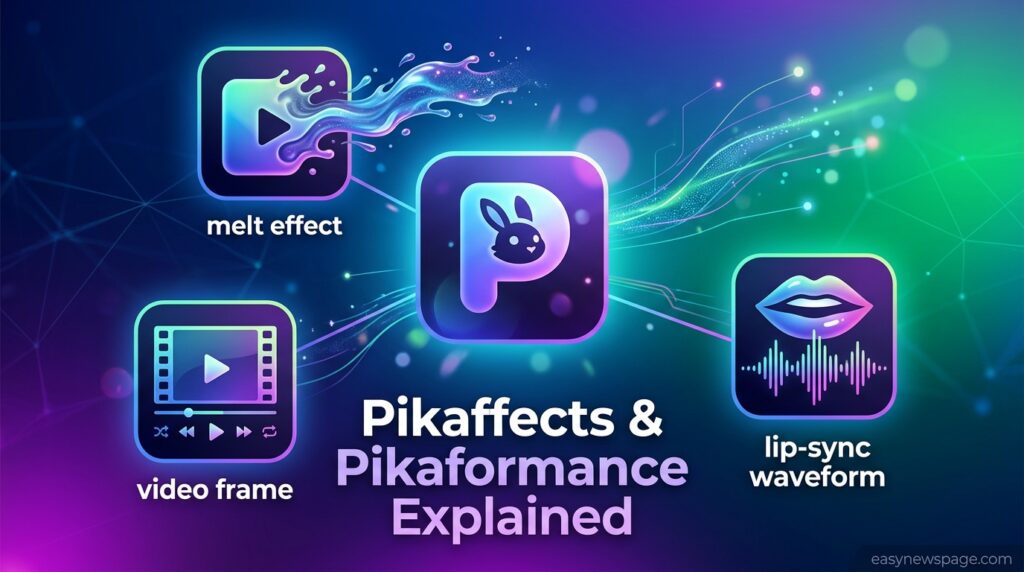
Pikaformance — audio-driven lip-sy
Text-to-video — generate a short clip from a written prompt.
Image-to-video — animate a still photo or illustration with natural motion.
Video-to-video editing — modify or restyle an existing clip.
Pikaffects — physics-bending effects like melt, explode, inflate, and crush.
Pikadditions / Pikaswaps — insert or replace objects and characters inside real footage.
Pikaframes — interpolate a smooth clip between a start and end keyframe.
Why Accurate Sourcing Matters Here
“Pika Labs” is a crowded search term with a genuine risk of intent mismatch: several unofficial sites use near-identical branding, and pricing tier names differ across sources even when the underlying dollar amounts line up. Getting the sourcing wrong here doesn’t just hurt rankings — it sends readers to the wrong product or the wrong price. This review sticks to what the official Pika product (pika.art, built by Pika Labs Inc.) actually ships, and flags every place where public sources disagree rather than papering over it, which is also what keeps this page trustworthy to both readers and AI answer engines.
Pika Agent: The Ultimate AI Video Creation Platform for Modern Content Creators
The rapid evolution of artificial intelligence has transformed the way we create digital content. Video production, once a time-consuming and expensive process, can now be completed in minutes with advanced AI-powered tools. Among the most innovative platforms driving this transformation is Pika Agent, a powerful solution that helps creators generate, edit, and enhance videos with remarkable ease.
With cutting-edge features such as Pika MCP, Pikascenes, Pikaswaps, and the official Pika Video App, creators can produce professional-quality content, participate in viral trends, and transform ordinary photos into engaging videos.
Whether you are a social media influencer, marketer, entrepreneur, educator, or video enthusiast, Pika provides the tools needed to bring creative ideas to life.
What Is Pika Agent?
Pika Agent is an advanced AI-powered video creation assistant that helps users automate video production and creative workflows. It combines intelligent AI models with intuitive editing features, enabling creators to generate compelling visual content without requiring extensive editing experience.
Unlike traditional video editing software, which often demands technical expertise, Pika Agent simplifies the process with AI-driven automation. Users can create unique videos, modify scenes, swap objects, and generate trend-based content using simple prompts, images, or selfies.
The platform empowers creators to focus on storytelling while the AI handles complex editing tasks behind the scenes.
Is It Legit?
Yes — Pika is a legitimate, well-funded product from an established AI video company, not a fly-by-night generator. That said, “legit” is worth separating from “reliable output every time.” Independent testers who ran dozens of generations consistently describe a wide gap between Pika’s best and average results: some clips look genuinely impressive, others come out glitchy or unusable, even from similar prompts. Budget for iteration, not one-shot perfection.
How Pika Agent Revolutionizes Video Creation
Modern audiences demand fresh, engaging, and visually appealing content. Pika Agent addresses this demand by providing a comprehensive ecosystem of creative tools.
Key advantages include:
- Faster content production
- Reduced editing complexity
- AI-powered visual effects
- Automated scene generation
- One-click video transformations
- Viral trend participation
- Enhanced creative flexibility
By eliminating many technical barriers, Pika Agent allows creators to generate high-quality content at scale.
Pika MCP: Make Your Agent Creative
One of the most exciting innovations within the Pika ecosystem is Pika MCP.
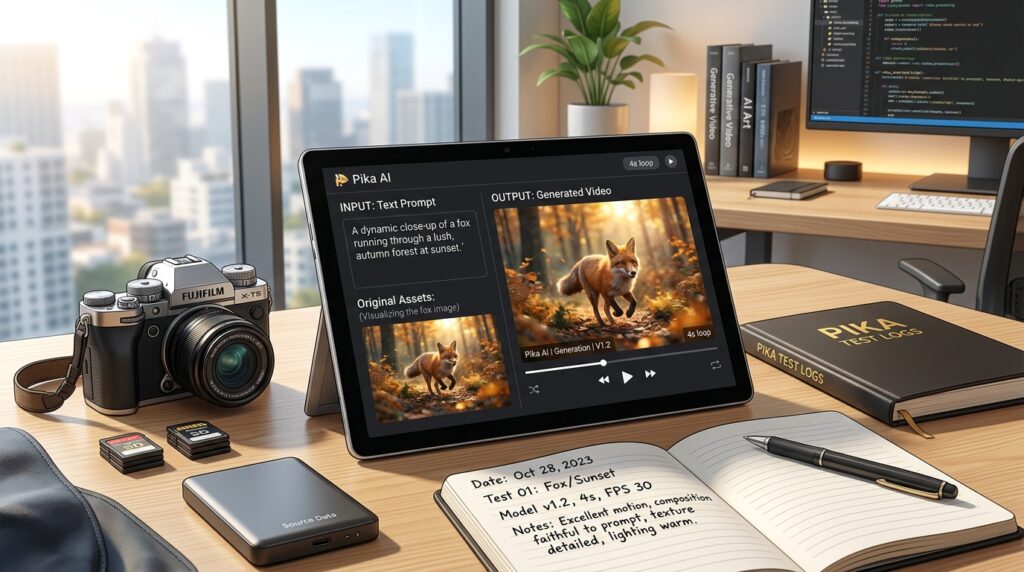
Pika MCP enables creators to make their AI agents more creative and adaptable. Instead of manually designing every aspect of a video, users can leverage automation to generate dynamic content from simple inputs.
With Pika MCP, users can:
- Create original video concepts
- Adapt existing trends
- Generate creative visual effects
- Produce engaging social media content
- Customize AI-generated outputs
The system acts as a creative partner, helping users develop unique content ideas while maintaining consistency and quality.
Create Viral Videos with Just a Selfie and Sound
One of the standout capabilities of Pika MCP is its ability to transform a simple selfie and audio clip into a fully animated video.
This feature dramatically lowers the barrier to entry for content creation. Instead of spending hours recording footage, users can simply upload:
- A selfie
- Voice recording
- Sound effect
- Music clip
The AI then generates visually engaging content optimized for modern social media platforms.
This functionality is particularly useful for:
- TikTok creators
- Instagram influencers
- YouTube Shorts creators
- Digital marketers
- Personal branding campaigns
As short-form video continues to dominate online engagement, tools like Pika MCP offer a significant competitive advantage.
Pikascenes: AI-Powered Scene Creation
Creating compelling scenes traditionally requires extensive planning, filming, and editing. Pikascenes simplifies this process with intelligent scene-generation technology.
Pikascenes allows users to:
- Generate cinematic environments
- Create immersive backgrounds
- Build storytelling sequences
- Design professional-looking scenes
- Enhance visual engagement
By leveraging advanced AI models, Pikascenes can quickly generate realistic and creative settings that align with a creator’s vision.
Whether producing promotional content, educational videos, entertainment clips, or social media campaigns, Pikascenes delivers impressive results with minimal effort.
Read More: AI Video Generator for TikTok Free
Benefits of Using Pikascenes
Enhanced Storytelling
Strong visuals help communicate messages more effectively. Pikascenes provides creators with the tools needed to craft compelling narratives.
Improved Production Efficiency
Instead of sourcing locations or creating elaborate sets, users can generate scenes digitally within minutes.
Greater Creative Freedom
Creators can experiment with multiple visual styles, themes, and concepts without high additional costs.
Pikaswaps: Intelligent Object Replacement Technology
Another revolutionary feature within the Pika ecosystem is PikaSwaps.
Pikaswaps enables users to replace objects, characters, or elements in videos with AI-powered editing technology.
This capability opens countless creative possibilities, including:
- Product replacement
- Character modifications
- Scene adjustments
- Creative visual effects
- Marketing content customization
Rather than manually masking and editing footage frame by frame, users can achieve professional-level modifications through intelligent automation.
Why Pikaswaps Matters
Content creators often need to update videos quickly to match new campaigns, trends, or branding requirements.
Pikaswaps makes this process significantly faster by:
- Reducing editing time
- Improving workflow efficiency
- Enhancing creative experimentation
- Supporting rapid content iteration
The result is greater flexibility and faster content production.
How Pika AI Works
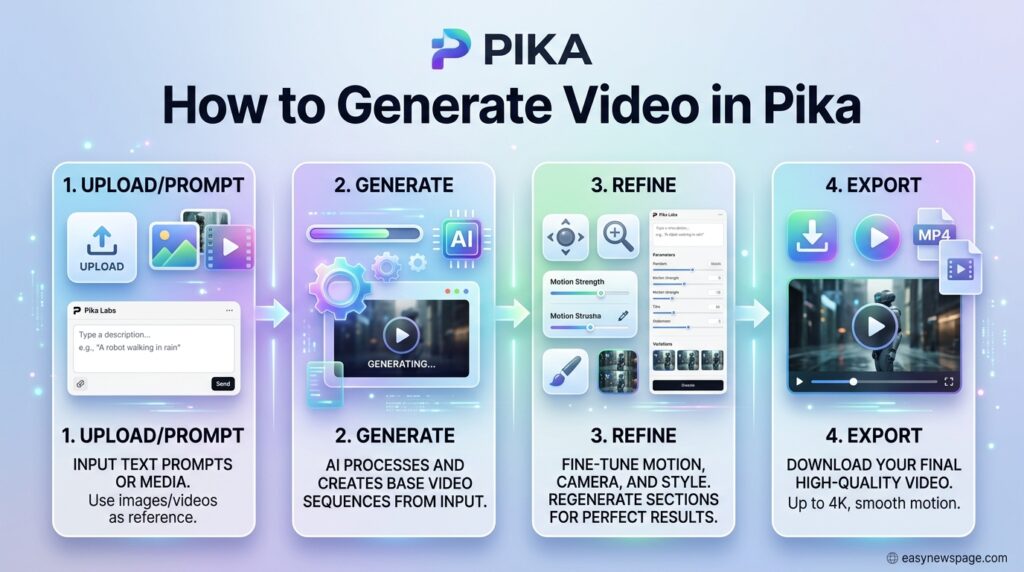
Understanding how Pika AI works under the hood helps set realistic expectations before you start creating. Like most modern AI video generator platforms, Pika AI relies on diffusion-based generative models trained on massive datasets of video and image content.
When you submit a prompt, the system predicts motion, lighting, and texture frame by frame to produce a coherent short clip.
Text-to-Video Generation
The most straightforward way to use Pika AI is text-to-video generation. You type a description, for example, “a golden retriever running through a field at sunset, cinematic lighting,” and the AI interprets that prompt to generate a matching clip. The more specific and descriptive your prompt, the more controlled the output tends to be.
Vague prompts often produce visually interesting but unpredictable results, a fact every text-to-video AI user learns through trial and error.
Image-to-Video Capabilities
Pika AI also supports image-to-video generation, where you upload a static photo, and the platform animates it. This is where the “squish it, melt it” style effects come into play, and it’s one of the more entertaining parts of the platform. Creators have used this feature to bring product photos, portraits, and illustrations to life without needing any animation software.
AI-Assisted Animation
Beyond basic generation, Pika AI offers AI-assisted animation tools that let you guide motion, camera movement, and scene transitions. This gives creators more say over the final output, rather than relying purely on random generation, which is a meaningful step toward making the platform feel like a genuine video-editing software replacement rather than just a novelty generator.
Key Features of Pika AI
The feature that made Pika famous is still Pika’s: prompt-triggered transformations (things melting, exploding, or getting crushed) that no competitor has matched with the same polish. It’s the reason Pika built a following on social media well before it was competitive on raw video quality.
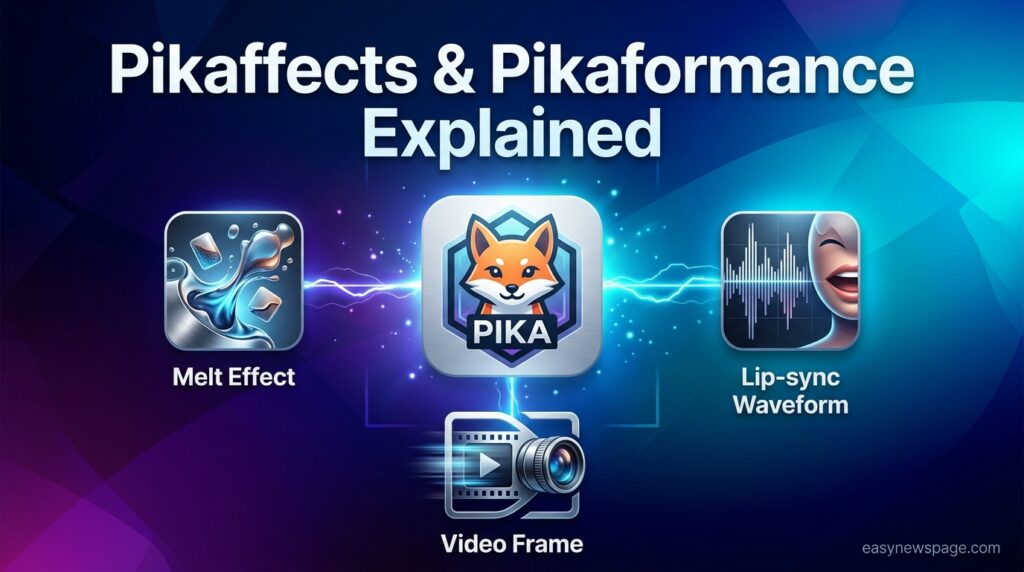
Pikaformance is the newest addition, and arguably the most practically useful. Feed it a single portrait and an audio track, and it produces a lip-synced, expressive talking video — built for VTuber content, brand mascots, AI presenters, and reaction memes. It’s a separate model from the general Pika 2.5 video engine: Pika 2.5 handles scenes, camera motion, and environments, while Pikaformance is specialized solely for face and audio performance. Used together — generate a scene, then layer a talking character into it — they cover more ground than either alone.
Pika 2.5, the current flagship model, brought native 1080p output, sharper camera motion, and image-reference guidance so a character or style can stay more consistent across separate generations — a long-standing weak point for Pika versus Runway.
Text-to-Video Generation
This remains the headline feature. Creating videos from prompts is fast; most clips are generated within a couple of minutes, and the platform offers some customization options for style, motion intensity, and aspect ratio. Quality has improved significantly compared to earlier versions of similar tools, though results can still vary depending on prompt complexity.
Image Animation
Transforming static images into videos opens up creative possibilities that go beyond standard editing. Product photographers, digital artists, and meme creators have all found niche use cases here, since the tool can add motion, distortion, or stylistic effects that would otherwise require frame-by-frame animation work.
AI Video Editing Tools
Pika AI includes built-in effects and transitions, along with motion controls that let you adjust how elements move within a scene. Tools like Pikascenes let you combine multiple visual elements into a single coherent scene, while Pikaswaps allow you to substitute objects or characters within an existing generated clip.
Templates and Presets
For creators who don’t want to start with a blank prompt, Pika AI offers ready-made templates and presets for trending formats. These act as shortcuts, letting you plug in your own image or short text to get a finished clip without crafting an elaborate prompt from scratch, a real time-saver for creators on a daily publishing schedule.
Benefits of Pika AI for Video Creators
So why are so many video creators adding Pika AI to their workflow? The benefits go beyond the novelty factor.
Faster Content Production
Traditional video production, filming, editing, and color grading can take hours or even days for a single short clip. Pika AI compresses much of that into a few minutes of prompting and rendering, making it a genuinely efficient AI video creation option for creators working on tight publishing schedules.
Cost Savings
Hiring a videographer, renting equipment, or licensing stock footage adds up quickly. Pika AI’s subscription cost is, for many independent creators, a fraction of what traditional production would cost for a similar volume of content.
Beginner-Friendly Interface
You don’t need editing experience to use Pika AI. The interface is built around simple prompt boxes and image uploads, which lowers the barrier to entry significantly compared to professional editing software.
Creative Flexibility
From surreal transformations to cinematic-style clips, Pika AI can produce a wide range of styles. This flexibility appeals to creators who want to experiment without being boxed into one visual style.
Pika Video App: Transform Any Photo into a Reality-Bending Video
The official Pika Video App introduces a new level of accessibility for creators.
Designed for simplicity and speed, the app lets users turn ordinary photos into dynamic videos with a single tap.
Popular transformations include:
- Squish effects
- Melt effects
- Cake-ify animations
- Cartoon-style edits
- Surreal visual effects
- Trend-based transformations
The app uses advanced AI processing to generate engaging visual content that captures audience attention.
One-Tap Video Creation
The one-tap functionality removes the complexity associated with traditional editing software.
Users simply:
- Upload a photo
- Choose an effect
- Generate a video
- Share across platforms
This streamlined workflow enables rapid content production while maintaining professional visual quality.
Why Content Creators Choose Pika
The success of Pika is rooted in its ability to combine creativity, automation, and usability within a single platform.
User-Friendly Experience
Even beginners can generate impressive content without extensive training.
Advanced AI Models
Powerful machine learning algorithms drive realistic animations, intelligent editing, and creative enhancements.
Speed and Efficiency
Tasks that once required hours can now be completed within minutes.
Trend Adaptability
Creators can quickly participate in emerging trends and viral challenges.
Cross-Platform Content Creation
Videos generated with Pika can be optimized for:
- TikTok
- Instagram Reels
- YouTube Shorts
- Snapchat
- Marketing campaigns
Business Applications of Pika Agent
Pika is not limited to influencers and content creators.
Businesses can leverage the platform for:
Marketing Campaigns
Create promotional videos quickly and efficiently.
Product Demonstrations
Showcase products using AI-generated scenes and effects.
Brand Storytelling
Build stronger audience connections through visually engaging narratives.
Social Media Advertising
Generate attention-grabbing advertisements optimized for modern platforms.
Customer Engagement
Enhance engagement through personalized video experiences.
The Future of AI Video Creation
Artificial intelligence continues to reshape the digital content landscape.
As AI models become increasingly sophisticated, platforms like Pika are expected to deliver:
- Higher-quality animations
- Improved realism
- Faster rendering
- Enhanced customization
- More creative automation
- Better user experiences
The integration of AI into video production is no longer a future trend; it is the present reality.
Creators who embrace these technologies gain access to powerful tools that streamline workflows, increase productivity, and unlock new creative possibilities.
Pika AI Performance Review
Numbers and feature lists only tell part of the story; actual usage reveals how a tool performs day-to-day.
Video Quality
Output quality has noticeably improved over recent platform updates. Clips with simpler motion (a person walking, an object floating) tend to look the cleanest, while complex scenes with multiple moving subjects can still show minor artifacts or warping, which remain a common limitation across most AI video generator tools right now.
Rendering Speed
Render times are generally fast, often completing within 1 to 3 minutes, depending on server load and clip complexity. During peak usage hours, queue times can stretch longer, which is worth factoring in if you’re working against a publishing deadline.
Ease of Use
The platform’s learning curve is shallow. Most first-time users can generate a usable clip in their first few attempts, though consistently polished results do require some prompt-writing practice.
Output Customization
Customization options, aspect ratio, motion strength, and style filters give creators reasonable control, though they’re not as granular as those in dedicated video editing software. This is the trade-off for speed and simplicity.
Is It Legit?
Yes — Pika is a legitimate, well-funded product from an established AI video company, not a fly-by-night generator. That said, “legit” is worth separating from “reliable output every time.” Independent testers who ran dozens of generations consistently describe a wide gap between Pika’s best and average results: some clips look genuinely impressive, others come out glitchy or unusable, even from similar prompts. Budget for iteration, not one-shot perfection.
Who It’s For / Use Cases
Pika is the strongest fit for:
- Social media creators making short-form content for TikTok, Reels, or YouTube Shorts
- Marketers prototype visual concepts before a real production or shoot
- Creators who want lip-synced talking avatars, mascots, or VTuber-style characters via Pikaformance
- Anyone who wants to experiment with AI video without committing to an expensive plan first
It’s a weaker fit for teams needing multi-shot narrative consistency, longer-form video, or dependable photorealism on the first try — that’s Runway or Kling territory.
How to Use It
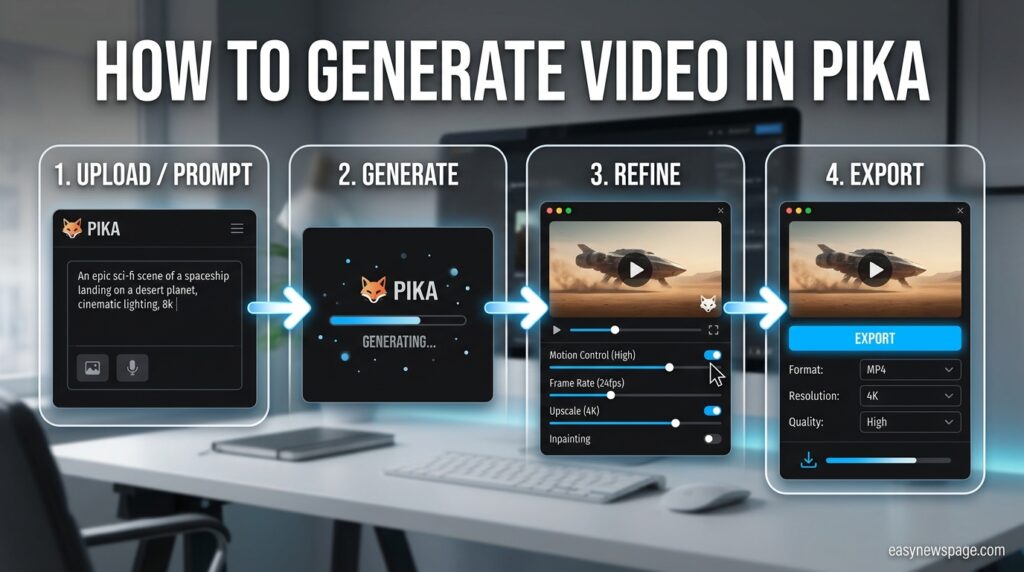
The workflow is intentionally simple: sign in with Google or Discord, choose a tool (Pikaframes, Pikaffects, Pikaswaps, Pikaformance, and similar), enter a text prompt or upload an image/audio file, and generate. Most clips render in well under two minutes. For Pikaformance specifically, shorter audio clips (5–20 seconds) with clean, front-facing source images tend to produce noticeably better lip-sync timing than long or noisy audio.
What It Isn’t Great At
- Clip length. Most generations are short — a handful of seconds per clip, extended somewhat via Pikaframes — not a substitute for a full timeline editor.
- Consistency across scenes. Even with image-reference guidance in Pika 2.5, keeping a character identical across multiple separate shots remains harder than on Runway.
- Photorealism. Pika trails Runway and Sora when the goal is realistic, cinematic footage rather than stylized or effect-driven clips.
- Output variance. The same prompt can produce a great result one time and a rough one the next.
User Sentiment
Independent hands-on reviews are broadly positive on accessibility and creativity, with testers describing Pika as an accessible, expressive platform well suited to fast, short-form output. The recurring criticism, echoed across multiple independent write-ups, is the inconsistency between Pika’s best and average generations — a pattern testers frame as a known trade-off of the platform’s speed-first design rather than an occasional bug.
Pros & Cons
| Pros | Cons |
|---|---|
| Most distinctive effects library in AI video (Pikaffects) | Output quality varies noticeably between generations |
| Pikaformance adds lip-sync/talking avatars in the same platform | Clips remain short compared to full editing suites |
| Low entry price and a genuinely usable free tier | Trails Runway/Kling on photorealism and consistency |
| Fast generation (often under two minutes per clip) | Pricing tier names are inconsistently reported across sources |
| Simple, no-editing-experience-needed interface | Weaker fit for long-form or narrative-driven projects |
Pricing Overview
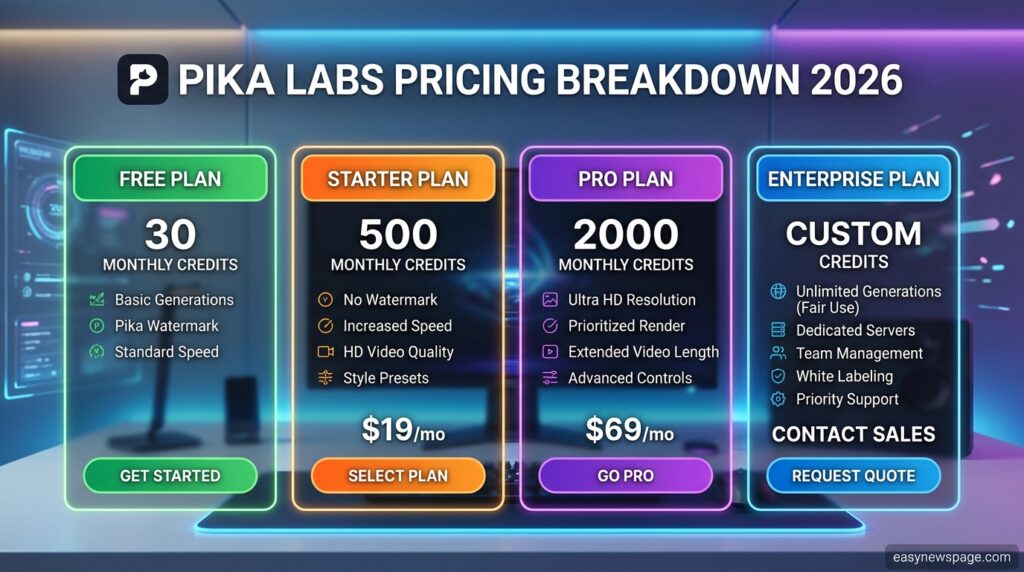
Pika uses a credit-based system across a free tier and paid plans. Reported figures across multiple 2026 sources converge on roughly these numbers, though tier names differ between “Basic/Standard/Pro/Fancy” — always verify current wording directly on Pika.Art before purchasing:
- Free — a limited monthly credit allowance, enough for genuine hands-on testing, restricted to non-commercial use.
- Entry-level paid tier (~$8/month, billed annually) — around 700 credits/month, commercial-use rights.
- Mid-tier (~$28/month annual) — around 2,300 credits/month, the most commonly recommended plan for individual professional or semi-professional use.
- Top tier (~$76/month annually) — around 6,000 credits/month plus faster processing, aimed at high-volume or production pipelines.
Monthly (non-annual) billing runs roughly 20% higher across all paid tiers. Credit costs per generation vary by resolution, duration, and which tool (a Pikaformance generation, for instance, is billed differently than a standard text-to-video clip), so actual monthly capacity depends heavily on which features you use most.
Who Should Use Pika AI?
Not every creator needs the same tool, so here’s a breakdown of who gets the most value from Pika AI.
YouTubers
For YouTubers producing short-form content, intros, or B-roll-style filler clips, Pika AI can speed up production without requiring stock footage licenses.
Social Media Creators
This is arguably Pika AI’s strongest audience. The platform’s trend-friendly tools and mobile app are built almost specifically for creators chasing viral, transformation-style formats on TikTok, Reels, and Shorts.
Marketers
Marketers experimenting with eye-catching ad creatives or product teaser clips can use Pika AI to test multiple visual concepts quickly before committing budget to traditional production.
Small Businesses
Small businesses without in-house video teams can use Pika AI to create promotional clips, social posts, and product showcases at a fraction of the cost of hiring an agency.
Top Alternatives
- Runway Gen-4 — stronger photorealism and professional filmmaking tools, higher price.
- Kling — leads on physics and motion realism.
- Luma AI Dream Machine — stronger cinematic realism for longer-form concepts.
Quick Comparison vs. Main Competitor (Runway)
| Pika | Runway | |
|---|---|---|
| Best for | Short-form, effects-driven social content | Professional, cinematic filmmaking |
| Standout feature | Pikaffects, Pikaformance lip-sync | Photorealism, editing depth |
| Entry price | Lower | Higher |
| Consistency | Variable between generations | Generally more predictable |
Quick Summary
- Pika AI is a text-to-video and image-to-video AI generator built for fast, creative video production.
- Core tools include Pikascenes, Pikaswaps, Pika Agent, Pika MCP, and a dedicated mobile app.
- Strengths: speed, ease of use, creative flexibility, and trend-friendly features.
- Weaknesses: usage limits on the free tier, premium features behind paywalls, and occasional rendering inconsistencies.
- Best suited for social media creators, YouTubers, marketers, and small businesses.
- Compares favorably against Kaiber for stylized content, while Runway and Synthesia serve different niches.
Frequently Asked Questions
What is Pika AI used for?
Pika AI is used to generate short video clips from text prompts or static images. It’s popular among social media creators, marketers, and small businesses looking to produce video content quickly without traditional filming or editing.
Is Pika AI free to use?
Pika AI offers a free plan with limited monthly generations and watermarked exports. Paid plans unlock higher limits, faster rendering, and additional editing tools, so check the official pricing page for current details.
How does Pika AI generate videos?
Pika AI uses generative AI models trained on video and image data to predict motion, lighting, and texture based on your text prompt or uploaded image, producing a short animated clip within minutes.
Is Pika AI better than Runway?
It depends on your goal. Pika AI is faster and more accessible for short, trend-driven content, while Runway offers deeper editing controls suited to more professional or cinematic production.
Can beginners use Pika AI without editing experience?
Yes. Pika AI’s interface is built around simple prompts and image uploads, making it accessible to beginners with no prior background in video editing or animation.
What is the Pika Video App?
The Pika Video App is the platform’s official mobile app, letting users turn photos into animated, transformation-style videos directly from their phone using simple one-tap effects.
Does Pika AI remove watermarks?
Watermark removal is typically a premium feature. Free plan exports usually include a watermark, while paid subscriptions allow watermark-free downloads.
How long does it take to generate a video with Pika AI?
Most clips render within 1 to 3 minutes, though times may vary depending on server demand and the complexity of your prompt or source image.
What are Pikascenes and Pikaswaps?
Pikascenes lets you combine multiple visual elements into a single generated scene, while Pikaswaps allows you to substitute objects or characters within an existing clip for more creative control.
Is Pika AI good for marketing videos?
Pika AI works well for short promotional clips, product teasers, and social ad creatives, though it’s less suited to long-form, scripted marketing content than dedicated production tools.
Conclusion
Pika earns its reputation honestly: it’s the fastest, cheapest, and most playful way to start making AI video, and Pika’s effects, plus the newer Pikaformance lip-sync model, give it a genuinely distinctive toolkit that neither Runway nor Kling fully replicates. The catch is consistency — you will get a striking clip on one attempt and a glitchy one on the next, so budget for iteration rather than expecting one-shot perfection.
If your work is short-form social content, quick concept prototyping, or talking-avatar clips, start on Pika’s free tier this week, run a dozen real generations against your own use case, and only upgrade to the mid-tier paid plan once you’ve confirmed the credit allowance actually covers your monthly output. If your deliverable instead requires cinematic realism or tight character consistency across many shots, treat Pika as a fast prototyping layer and plan to finish the job in Runway or Kling—don’t force Pika into a role it was never built for.