

Replit AI has become one of the most interesting AI coding assistant options in 2026 because it combines code generation, cloud-based development, and publishing within a single browser workspace. Instead of jumping between a local editor, terminal, hosting setup, and deployment tools, Replit AI lets you describe an idea and move toward a working app much faster, which is exactly why it matters for modern generative AI synthesis and search intent.
Replit’s own product pages say it can turn natural language into apps and websites, and its docs describe it as a fast way to go from idea to app without installation or setup.
This review breaks down what Replit AI does well, where it falls short, who it suits best, and how it compares with other coding tools. It is written for users who want a practical answer, not hype: if you are a beginner, student, freelancer, or founder, Replit AI can be a real productivity booster, but it is not a magic replacement for engineering judgment. By the end, you will know whether Replit AI deserves a place in your workflow in 2026.
Visit the official Replit AI website →
Table of Contents
Replit AI Review
Replit AI is a browser-first development platform that combines an online IDE, AI-assisted development, collaboration, hosting, and deployment in a single platform. The biggest reason people care about Replit AI is not just code completion; it is the full workflow from prompt to prototype to published app. Replit’s product pages say the agent can build apps and websites from natural language, and its docs describe the platform as a fast path from idea to app, website, dashboard, mobile experience, slide deck, video, or prototype.
In practical terms, Replit AI is strongest when you want to move quickly and avoid setup friction. It is particularly useful for AI-powered coding, rapid web application development, learning to code, and collaborative programming inside a shared cloud environment.
If your priority is shipping a simple app, testing an MVP, or teaching someone how software works, Replit AI feels more approachable than heavyweight local development stacks.
Pro Tips: Use Replit AI for prototypes, internal tools, small SaaS apps, demos, and learning projects. For large production codebases, pair it with careful review and testing.
What Replit AI is best at
- Fast project creation from prompts.
- Cloud-based coding with no local setup.
- Simple deployment and sharing.
- Useful AI assistance for beginners and small teams.
What to expect
Replit AI is not mainly a “smart autocomplete only” product. It is closer to an AI development environment with creation, editing, execution, and publishing all connected. That makes it especially relevant for 2026 search intent around generative AI synthesis, voice-search-style “how do I build an app faster,” and practical no-code or low-code workflows.
AI Coding Assistant Worth Using in 2026?
Yes, Replit AI is worth using in 2026 for the right kind of user, especially if you value speed, convenience, and a cloud development environment over deep editor customization. Replit’s pricing page shows a free Starter plan and paid Core, Pro, and Enterprise tiers, making it easy to try before paying.
The platform’s biggest appeal is that it bundles AI coding assistant features with full-stack infrastructure, built-in database, authentication, hosting, and monitoring, so you can turn an idea into something usable without managing the plumbing yourself.
That said, Replit AI is not the best answer for every developer. If you work mostly inside a local IDE, manage large production repositories, or need advanced refactoring workflows, you may prefer tools like Cursor or GitHub Copilot. A 2026 comparison source notes that Replit stands out for its cloud-based workflow and seamless deployment, while Cursor is stronger for deep project awareness, and Copilot is safer for standard IDE integration.
The short answer is simple: if you want an integrated, AI-first place to build, Replit AI is compelling. If you want the strongest editor-native assistant for complex engineering, it may not be your top pick.
Who gets the most value?
- Beginners who want fewer setup steps.
- Students who need a browser-based coding environment.
- Founders who want to validate ideas fast.
- Freelancers who build demos and client prototypes.
Replit AI
Replit AI is a cloud development platform built around natural language prompts, automated code generation, and a browser-based workspace. Replit says you can describe an app or website idea, let the agent build it automatically, and publish it right away. That makes it different from an assistant that only helps with snippets; the product aims to cover the full development lifecycle, from planning to deployment.
The growing adoption of AI coding tools comes from a simple problem: developers spend too much time on repetitive setup and boilerplate work. Replit AI reduces that friction by creating the environment, scaffolding the project, and helping with debugging and documentation.
The docs also emphasize that Replit can accelerate app creation with app generation, code suggestions, autocomplete, error detection, and debugging support.
For users searching with informational intent, the main takeaway is that Replit AI is both a coding tool and a software development platform. It is useful when you want AI to help think, write, fix, and ship code in one place.
What is Replit AI?
Replit AI is the AI layer inside Replit’s browser-first development ecosystem. It helps generate code, explain logic, and support app creation from prompts.
Why developers are adopting it
- It lowers setup overhead.
- It shortens the path from idea to working prototype.
- It works well for quick iteration.
- It supports collaboration without the headaches of a local environment.
How Replit AI Works
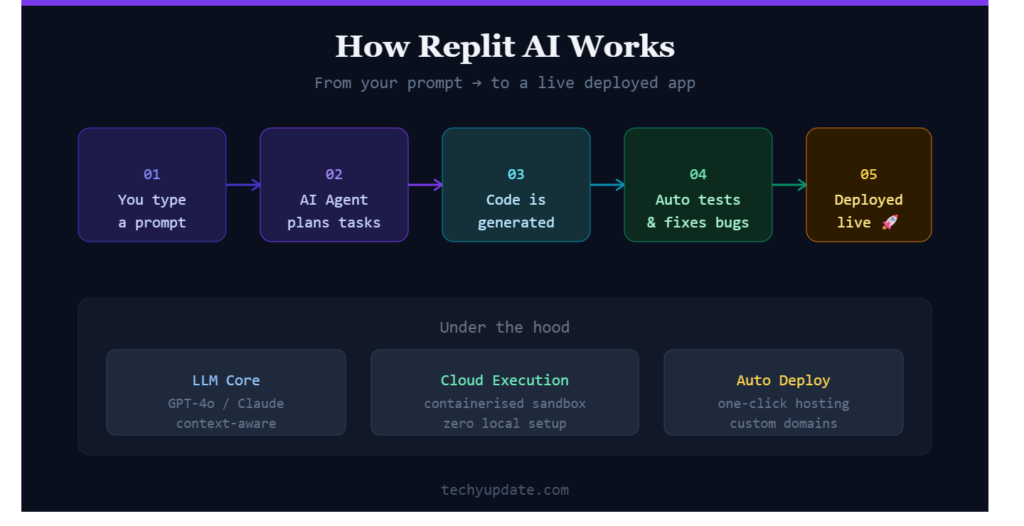
Replit AI works by combining prompt-based instructions with a managed cloud workspace. You describe what you want, and the system helps plan, generate, and refine the code while keeping the project ready to run in the browser.
Replit’s own documentation describes a flow in which users propose an idea, review a plan, let the workspace set itself up, test the app, and then publish it. That workflow is one of the clearest examples of generative AI synthesis in a product designed for end users.
The AI-assisted development model matters because it removes several manual steps. Instead of opening an editor, installing dependencies, configuring services, and setting up hosting separately, Replit AI keeps those pieces connected. The result is a smoother experience for natural language prompts, real-time code generation, and cloud-based development.
Pro Tips: The best prompts include the app goal, target user, core features, and any design preferences. Clear prompts usually produce better code and fewer follow-up corrections.
AI-powered coding assistance
Replit AI can generate starter code, suggest improvements, and help turn rough ideas into structured projects.
Natural language prompts
You can describe the app in plain English, which makes the product accessible even to non-experts.
Real-time code generation
The platform can write and update files while you monitor progress, helping you understand what is changing.
Cloud-based development environment
Everything runs in the browser, so no local setup is required. That convenience is a major reason users adopt Replit AI for fast prototyping and collaborative work.
What will you build?
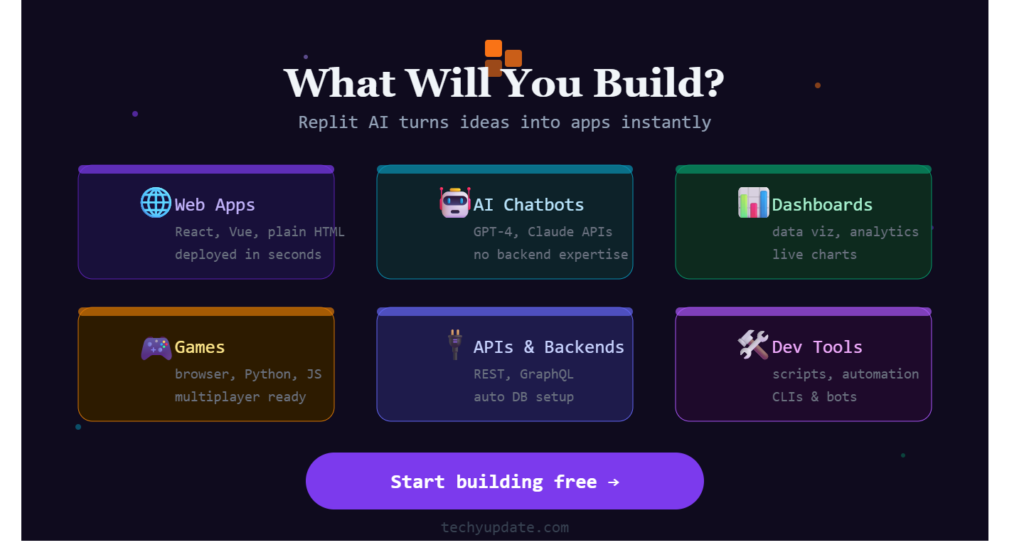
Replit’s own marketing emphasizes a broad range of use cases, from business software and AI chatbots to games, online shops, blogs, health trackers, and marketing tools. That matters because it shows the platform is not limited to one narrow coding workflow. Instead, Replit AI is positioned as a flexible creation engine capable of supporting a wide range of product ideas.
For content strategy and SEO, this section is especially useful because it matches high-intent queries like “what can Replit AI build,” “is Replit good for app development,” and “can Replit AI build websites.” The answer is yes, especially if your project is small to medium in complexity and you want a quick start. In 2026, Replit AI is attractive for landing pages, internal tools, early SaaS concepts, MVPs, and educational projects.
A practical example: a solo founder can describe a customer dashboard, generate the first version, connect a database, and publish a shareable link the same day. That is not the same as enterprise-grade engineering, but it is a very strong prototype workflow.
Good project types
- Landing pages.
- Simple dashboards.
- Internal admin tools.
- Chatbots and small automations.
- Educational demos.
Design Freely
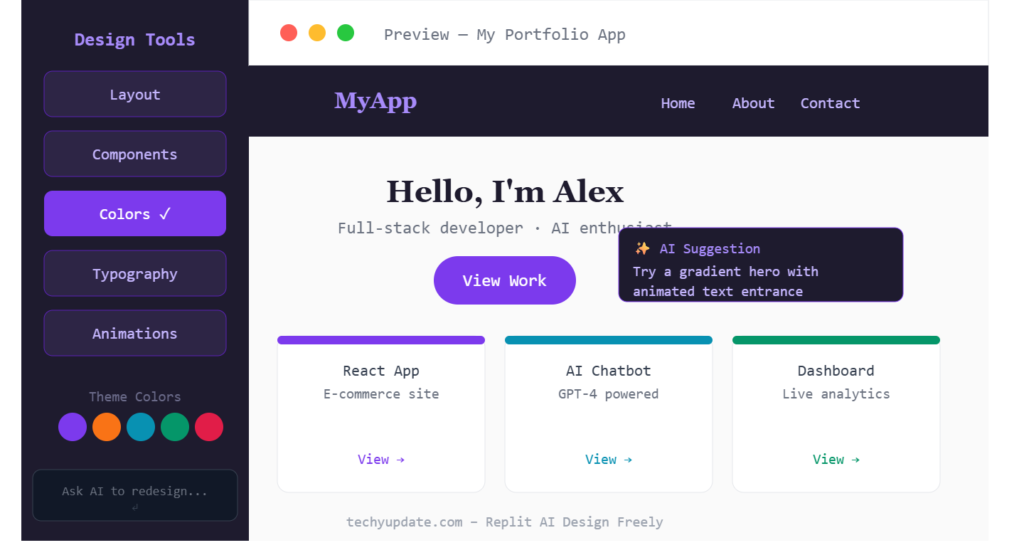
Replit has also pushed visual creation features that make the platform feel broader than a traditional coding assistant. Its docs and product pages highlight app and website creation, and the experience is designed to help users work quickly from idea to polished output. In practice, this means Replit AI is useful when you want design and development to stay close together instead of bouncing between separate tools.
The idea of an infinite canvas or visual iteration layer fits a common 2026 user need: building faster without losing control of the interface. For many users, the appeal is not just “write code for me,” but “help me shape the app visually and apply those changes immediately.” That is especially helpful for creators who are not professional developers but still care about how a product looks and feels.
This is where Replit AI can feel more approachable than developer-first tools. If you are iterating on a marketing site, portfolio, small startup app, or client mockup, a visual-and-code workflow can save time and reduce context switching.
Why this matters
- It helps non-engineers move faster.
- It shortens design-to-code feedback loops.
- It keeps small teams aligned while iterating.
- It supports rapid experimentation without heavy tooling.
Faster with Parallel Agents
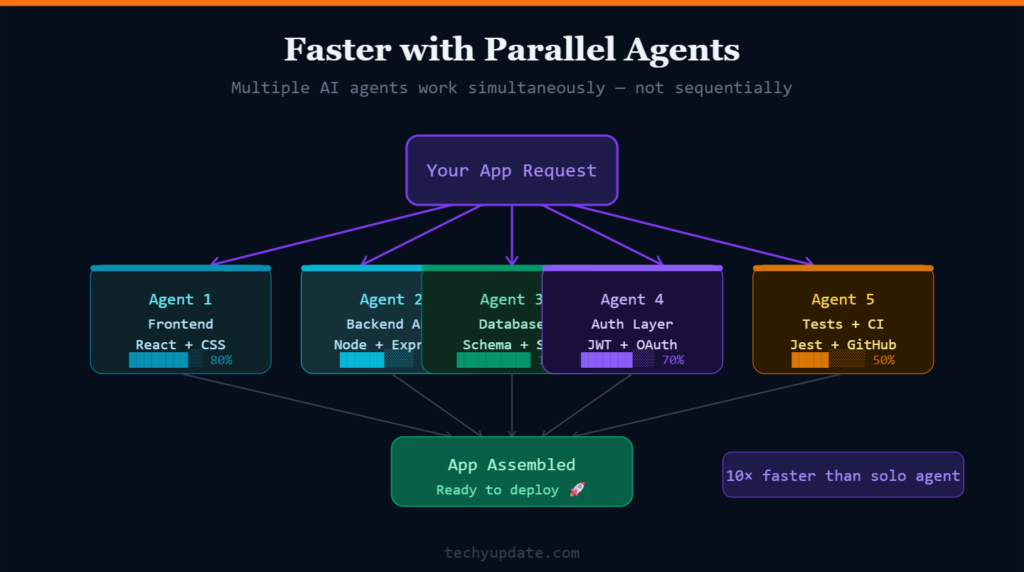
Replit’s newer workflow language emphasizes parallel agents that can handle tasks together while progress remains visible. This matters because modern app building often involves many moving parts at once: authentication, database setup, design adjustments, integrations, and deployment. Replit AI tries to coordinate that work so you do not have to juggle everything manually.
For users, the benefit is straightforward: the agent can keep execution moving while you review progress, rather than waiting for each task to finish in a rigid sequence. That is especially useful for startup-style builds and team collaboration where speed matters. Replit’s pricing page even notes parallel work with multiple agents on higher-tier plans, reflecting this workflow focus.
The downside is that more automation can also mean more need for oversight. Parallel work is powerful, but it can introduce complexity if the prompt is vague or the project architecture is unclear. As with any AI coding assistant, the output is only as good as the instructions and the review process.
Where parallel agents help
- Authentication flows.
- Database wiring.
- UI and design changes.
- Multiple feature requests in one project.
Replit AI is Replit’s browser-based AI coding assistant that turns natural language into apps, websites, and code changes inside a cloud workspace. It is best for fast prototyping, beginner-friendly app building, and teams that want to build, test, and deploy in one place.
What it does
Replit AI helps you describe a feature or app in plain English, then generates code, sets up the environment, and supports debugging and refinement. Replit positions itself as an AI-powered code editor and app builder that can handle everything from quick edits to full app creation.
Why do people use it?
- It removes local setup friction.
- It works well for quick MVPs and demos.
- It supports collaboration in a shared workspace.
- It can build and deploy from the same platform.
Main limitations
Replit AI is convenient, but it is still an AI coding assistant, so generated code should be reviewed and tested. It is also less ideal for developers who want extensive editor customization or prefer a local-first workflow.
Best fit
Replit AI is a strong choice for beginners, students, founders, freelancers, and small teams who want to move quickly from idea to working software. If you need a simple definition, it is an online coding assistant that combines AI-driven generation, development, and deployment in a single browser-based platform.
Cloud Development
Replit AI cloud development is Replit’s browser-based way to build, run, collaborate on, and ship software without installing a local dev environment. It combines an online IDE, AI-assisted coding, built-in hosting, and cloud environments, enabling users to go from idea to app quickly.
In practical terms, Replit AI cloud development is useful when you want:
- No downloads, no config, and no setup.
- Browser access from almost any device, including mobile.
- Built-in services like authentication, database, hosting, monitoring, and integrations.
- Fast prototyping with natural-language prompts.
For developers, the big advantage is workflow speed. Replit’s cloud environment is designed to reduce friction by keeping code, execution, collaboration, and deployment in one place. That makes it especially attractive for students, founders, freelancers, and teams building MVPs, demos, internal tools, or simple web apps.
Why it stands out
Replit’s cloud development model is not just “code in the browser.” It is an AI-powered system built to help you describe, generate, refine, and publish an app with minimal setup. Replit also highlights features like parallel agents, reusable artifacts, and team collaboration to keep work moving without context switching.
Best use cases
- Rapid prototypes and MVPs.
- Learning and teaching coding.
- Collaborative app building.
- Small business tools and dashboards.
- AI-assisted web app development.
Main Tradeoff
The convenience is excellent, but advanced developers may still prefer local IDEs for deep customization, control over complex architectures, or offline workflows. Replit cloud development is best when speed and simplicity matter more than full manual control.
Code Generation
Replit AI code generation turns a plain-English prompt into working code, then helps you refine, debug, and deploy it inside the Replit browser workspace. In practice, it is designed to generate full-stack app foundations quickly, not just small snippets, which is why it is popular for rapid prototyping and learning.
How it works
You describe the feature or app you want, and Replit Agent interprets the request and writes code for you. It can also set up the environment, suggest fixes, and help you test or publish the project from the same platform. Replit positions this as a no-code-needed workflow for turning ideas into apps and websites in minutes.
What is it good for
Replit AI code generation is especially useful for:
- Quick prototypes and MVPs.
- Beginner-friendly app creation.
- Browser-based development with no setup.
- Fast iteration on web apps, dashboards, and small tools.
A real example from a developer’s experience described generating an entire chatbot codebase in minutes, though the output still needed tuning and exceeded API credit limits. That reflects the main strength of Replit AI: speed. It also shows the main caution: generated code still needs review.
Limitations
The code generation is powerful but not flawless. You should expect to check logic, security, and edge cases yourself, especially for authentication, data handling, or production use. Replit AI is best treated as an accelerator, not a replacement for developer judgment.
Bottom line
If your goal is to quickly go from an idea to a working first version, Replit AI code generation is one of the most convenient options available in 2026. If your goal is strict control over a large production codebase, you will still want to pair it with careful human review.
Read More: GitHub Copilot Review
Key Features of Replit AI
Replit AI’s feature set is broader than a typical autocomplete tool. Replit’s docs highlight app generation, code suggestions, autocomplete, automated error detection, and debugging assistance, while the pricing page adds built-in database, publishing, collaboration, and platform-level features. Together, these features make Replit AI feel like a full software development platform rather than a thin assistant layer.
This matters for semantic SEO because it covers related topics users search together: code generation, debugging, hosting, collaboration, cloud development, and automated code completion. It also means Replit AI can appeal to both informational and transactional search intent, since users often research the tool before trying it.
The strongest feature is the integrated workflow. You can prompt, generate, test, share, and deploy without switching environments. That integration is valuable for beginners and fast-moving teams, even if advanced developers sometimes want more control.
AI Code Generation
Replit AI can generate code from simple prompts and help you build projects faster.
Intelligent Code Completion
It predicts next steps while you type, reducing repetitive manual coding effort.
Debugging Assistance
The platform can help spot errors and suggest troubleshooting steps.
Collaborative Development
Replit supports shared projects and collaboration features that help teams work together.
Cloud-Based Workspace
No local setup is required, and projects are accessible from anywhere with a browser.
Multiple Artifacts and shipping
Replit’s docs describe how to build websites, mobile experiences, dashboards, prototypes, and more in a single environment, which helps reduce context switching.
Support for Teams
Replit Core and Pro include collaborator access, and the product positions itself as useful for coordinated team development.
Powered by the Replit platform
Replit also offers built-in services such as authentication, database, hosting, monitoring, integrations, and enterprise controls like SSO/SAML and privacy options.
Setting Up Replit AI
Getting started with Replit AI is simpler than most local development workflows. Replit’s docs say the platform runs directly in the browser and requires no installation or setup, which is one of its biggest selling points. That simplicity lowers the barrier for beginners and helps experienced developers spin up small projects quickly.
The setup path usually begins with creating an account, choosing a language, activating AI features, and starting a new project. Because the workspace is cloud-based, you can move from idea to running code with fewer environment issues. For anyone comparing cloud development platforms, this is a major advantage over tools that require manual configuration before you can even start.
For best results, determine the project’s scope before prompting. If you know the app type, language, key features, and deployment goal, Replit AI can usually produce a cleaner first pass.
Creating a Replit account
Sign up, open the workspace, and choose a plan based on your needs. The starter plan is free, while paid plans unlock more credits and collaboration features.
Choosing a programming language
Pick the language that best matches your project, such as Python or JavaScript.
Activating AI features
Use the Agent or AI-assisted workflow to describe your app and begin generation.
Creating your first project
Start with a small scope first, then expand after testing the initial version.
Supported Programming Languages
Replit supports popular languages used across beginner, educational, and professional workflows. In a review like this, language support matters because it affects whether Replit AI can fit your current stack or only a narrow use case. The platform is especially appealing for common web and scripting languages, which aligns with its strengths in online IDE workflows and rapid app generation.
For most users, the practical question is not whether Replit supports every language under the sun, but whether it supports the languages they actually use for prototypes and lightweight production apps. In that sense, Replit AI covers a useful range. It can also help teams standardize quick experiments without requiring each contributor to install a local environment.
Commonly supported languages
- Python.
- JavaScript.
- TypeScript.
- Java.
- C++.
- HTML/CSS.
- PHP.
- Go.
Replit AI Performance Review
Replit AI performs best when the task is clearly scoped, and the user wants speed. It is strong at turning prompts into functional starter projects, creating quick iterations, and keeping the build environment simple. Its docs emphasize code suggestions, autocomplete, debugging assistance, and documentation generation, which are exactly the kinds of tasks that reduce time spent on boilerplate.
Code quality
The code quality is often good enough for prototypes, demos, and early-stage apps, but it still needs human review. AI-generated code can be structurally useful while still containing edge cases, inefficient patterns, or security gaps.
Speed and accuracy
Replit AI is fast at getting a first version running, especially in the browser. Accuracy improves when prompts are specific, and the task is not too large.
User experience
The experience is beginner-friendly and low-friction, especially for users who do not want to manage local tooling.
Learning curve
The learning curve is relatively gentle, making it attractive to students and new developers.
Productivity benefits
It shortens the time between idea and running an app, which is one of its biggest competitive advantages.
Pros of Replit AI
Replit AI has a clear set of strengths that make it appealing in 2026. The platform is designed for speed, accessibility, and collaboration, and Replit’s pricing and docs show that it bundles many practical development features into one place. For users who want an AI coding assistant that also helps with hosting and deployment, that is a meaningful advantage.
It also lowers the psychological barrier to starting. Many people never launch side projects because the local setup feels like a chore. Replit AI solves that by giving you a workspace, AI support, and a publish button in one browser tab. That simplicity is often underrated.
Main advantages
- Beginner-friendly interface.
- Fast project creation.
- Cloud accessibility from any device.
- Strong collaboration tools.
- AI-assisted debugging and documentation support.
Cons of Replit AI
Replit AI is powerful, but it has limits that matter in real-world development. The main tradeoff is that convenience can come at the cost of fine-grained control. Replit’s own pricing structure also shows that advanced use cases can become more expensive as you move beyond the free plan.
Main limitations
- Limited advanced customization compared with editor-first workflows.
- AI-generated code still needs review and testing.
- Premium features require payment.
- Performance depends on internet connectivity.
For teams with large codebases, strict architecture rules, or deep IDE habits, Replit AI may feel less flexible than alternatives. That does not make it bad; it just means it is optimized for a different kind of workflow.
Web Application Development
Replit supports web application development by combining browser-based coding, AI app generation, built-in hosting, and one-click publishing in a single workflow. For users who want to build quickly, it is one of the easiest ways to go from idea to a live web app without local setup.
What Replit gives you
Replit’s AI app builder can turn a plain-language description into a working app, including frontend, backend, database structure, and deployment steps. Its website builder page also says you can describe colors, layout, pages, and features, and then refine the results with additional prompts.
Why it works for web apps
Replit is built around a cloud IDE, so you can create, test, debug, and publish from the browser. That makes it useful for landing pages, dashboards, internal tools, ecommerce prototypes, and small SaaS products.
Best fit
It is especially strong for beginners, students, founders, and small teams who want fast iteration and minimal setup. For larger production systems, it is still wise to review the generated code carefully and validate performance, security, and architecture before launch.
Collaborative Programming
Replit collaborative programming lets multiple people work on the same project simultaneously, with live cursors, shared code execution, and in-editor chat for smoother team collaboration. It is especially useful for pair programming, group projects, and fast feedback loops because everyone can write, review, and debug in one shared cloud workspace.
How it works
Replit’s collaboration setup is built around sharing a repl with teammates, then working together in real time. The platform supports synchronous collaboration, so collaborators can see updates instantly and run code together in the same environment. Replit also positions collaboration as a core product feature, not an add-on, which is why it works well for both live teamwork and async project work.
Why teams use it
- Pair programming without screen sharing.
- Student group projects with one shared workspace.
- Fast code review and troubleshooting.
- Less setup than local-dev collaboration.
- Easy sharing for clients or stakeholders.
Best use cases
Replit collaborative programming is strongest for prototypes, educational coding, internal tools, and startup MVPs. Replit Teams extends this with more structured collaboration, project management, and shared development workflows for larger teams. If your team needs a browser-based environment where people can quickly build together, Replit is a strong fit.
Practical tip
For the best results, assign one person to steer architecture while others handle UI, logic, or testing. That keeps collaboration moving and reduces conflicting edits in the same area of the codebase.
Automated Code Completion
Replit AI automated code completion is a browser-based coding assistant that suggests context-aware code as you type, helping developers write, edit, and ship software faster inside the Replit workspace. Replit says its AI features include code completion, natural-language editing, multi-file intelligence, and instant deployment from the same environment.
What it does
Automated code completion predicts the next lines of code based on your project context, dependencies, and coding patterns, rather than just completing a single token or syntax fragment. Replit’s AI can also help explain code, suggest fixes, and make coordinated changes across multiple files, which makes it more useful than basic autocomplete alone.
For users who prefer not to use it, Replit has historically allowed autocomplete to be turned off in editor preferences, and community guidance indicates AI code completion and code intelligence can also be disabled in settings.
Why does it matter for SEO Content?
If you are writing an article about this topic for Google in 2026, the strongest angle is user intent: people usually want to know what it is, how it works, whether it helps productivity, and how to disable or customize it. Replit’s own materials emphasize natural-language coding, context-aware completions, and a faster build-to-deploy workflow, which are strong semantic themes to include.
AI-Powered Coding Platform for Fast Software Development
Replit AI is a browser-based coding platform that combines an online IDE, AI-assisted development, collaboration, hosting, and deployment in one workflow. It is designed for developers, teams, and non-technical builders who want to turn ideas into working software faster, with less setup and fewer context switches.
What Replit AI Is
Replit is an online development environment where you can write, run, and share code directly in the browser across 50+ languages. Its AI layer adds conversational coding help, code generation, debugging support, and app-building assistance inside the same workspace.
For users, that means one place to plan, build, test, deploy, and iterate on software without installing a local toolchain. For Google and AI search, the core semantic theme here is clear: AI coding assistant, cloud IDE, collaborative development platform, app generator, and one-click deployment.
Main Features
Replit AI is built around natural-language development, so users can describe an app in plain English and have the platform generate a working starting point. It also offers code explanations, intelligent autocomplete, real-time debugging assistance, and multi-step agentic workflows for tasks such as refactoring or feature creation.
Other notable capabilities include built-in database, authentication, hosting, integrations, and team collaboration. Replit also positions itself as a full app-building environment with production-grade support options for serious builders.
Why It Matters
The biggest value of Replit AI is speed. Instead of switching between editor, terminal, deployment tools, and documentation, users can stay inside one cloud workspace and move from idea to deployment quickly.
It is especially useful for beginners learning to code, founders building MVPs, and engineers prototyping features or shipping internal tools. The platform’s AI features reduce repetitive work, assist with debugging, and make software development more accessible to users with varying skill levels.
Replit AI Pricing
Replit’s pricing page shows a free Starter plan and paid Core, Pro, and Enterprise options. The free tier is useful for exploration, while paid plans increase credits, collaboration limits, and agent parallelism. That makes the pricing model feel approachable at first, but still scalable for more serious work.
Free Plan
The Starter plan is free and designed for exploration, with daily Agent credits, built-in database access, and the ability to publish a limited number of projects.
Core Plan
Core is aimed at personal projects and simple apps. It includes monthly credits, more collaborators, unlimited workspaces, and parallel agents.
Teams Plan
Replit’s Pro tier is the plan for commercial and professional builds, offering higher credits, more collaborators, and access to stronger models.
Enterprise Solutions
Enterprise adds custom controls like SSO/SAML, advanced privacy controls, single-tenant environments, VPC peering, region selection, and dedicated support.
Replit AI vs Competitors
Replit AI does not compete on exactly the same terms as Cursor or GitHub Copilot. A 2026 comparison source says Replit wins when you want the build-run-deploy loop in one environment, while Cursor is better for AI-native editor workflows, and Copilot fits standard IDE integration. Another 2026 comparison notes that Replit is strong for quick prototyping and learning, while Cursor is stronger for serious AI-assisted coding.
Replit AI vs GitHub Copilot
Copilot is usually better if you already use an IDE and want inline coding help within your normal workflow. Replit AI is better if you want the environment, runtime, and deployment all included.
Replit AI vs Cursor
Cursor is often better for deep repository awareness and complex multi-file editing. Replit AI is better for browser-based speed and integrated hosting.
Replit AI vs Tabnine
Tabnine is more traditional and autocomplete-focused. Replit AI is broader, more workflow-driven, and more beginner-friendly.
Replit AI vs Codeium
Codeium can be a strong coding assistant, but Replit AI offers a more complete app-building environment. If you want one place to build and publish, Replit AI has the edge.
Who Should Use Replit AI?
Replit AI is a strong fit for people who care about speed, learning, and low setup overhead. It is especially useful for people who want to build something tangible without getting stuck in tooling decisions. The platform’s design makes it useful for a wide range of users, but some groups will benefit more than others.
Beginner programmers
Beginners can learn by seeing code generated and edited in real time.
Students
Students can use it for coursework, side projects, and experimentation.
Freelancers
Freelancers can build quick client demos, prototypes, and internal tools.
Startup founders
Founders can validate ideas fast and launch a shareable first version.
Professional developers
Experienced developers can use it for prototypes, demos, and quick experiments, though they may prefer another tool for large-scale production engineering.
Best Practices for Using Replit AI
The best way to get value from Replit AI is to treat it like a strong assistant, not an autopilot. Clear prompting, code review, and testing make a big difference in the quality of the output. Replit’s docs show that the platform is designed to move from prompt to published app quickly, but that does not remove the need for judgment.
Write clear prompts
Explain the app’s goal, features, audience, and design preferences.
Review the generated code
Check for logic issues, security concerns, and missing edge cases.
Test applications thoroughly
Run the app, click through flows, and test failures before publishing.
Follow coding standards
Keep naming, structure, and formatting consistent to ensure the project remains maintainable.
Use AI as an assistant, not a replacement
The best results come when you guide the AI and verify its output.
Common Mistakes
Many Replit AI frustrations stem from workflow mistakes rather than the product itself. The most common issue is asking for too much at once, which can lead to messy output or incomplete features. Another common mistake is treating AI-generated code as production-ready without review.
Mistakes to avoid
- Vague prompts with no scope.
- Skipping testing after generation.
- Building large features before validating the basics.
- Assuming the AI knows your architecture rules.
- Ignoring performance or security checks.
Expert Insights
From an SEO and product perspective, Replit AI is strongest when the user intent is “build now, refine later.” That is why it performs well in search results for topics such as prompt-to-app workflows, browser-based coding, and AI-assisted development. The platform’s biggest strategic advantage is the ability to combine AI, execution, and deployment in one place.
For content creators and teams, that means Replit AI is not just a coding tool; it is a story about acceleration. The platform fits the 2026 trend toward agentic software creation, where users describe outcomes and let AI handle more of the repetitive work. But real-world trust still comes from the human layer: testing, refactoring, and validating what the AI creates.
Final Verdict
Replit AI is a genuinely useful AI coding assistant for fast prototyping, beginner-friendly app creation, and cloud-based development. Its biggest strengths are simplicity, speed, collaboration, and the ability to move from prompt to published app without a complicated setup.
The limitations are equally real: advanced developers may want more control, and AI-generated output still needs review. Even so, for students, founders, freelancers, and teams that value quick shipping, Replit AI is one of the most practical tools in 2026.
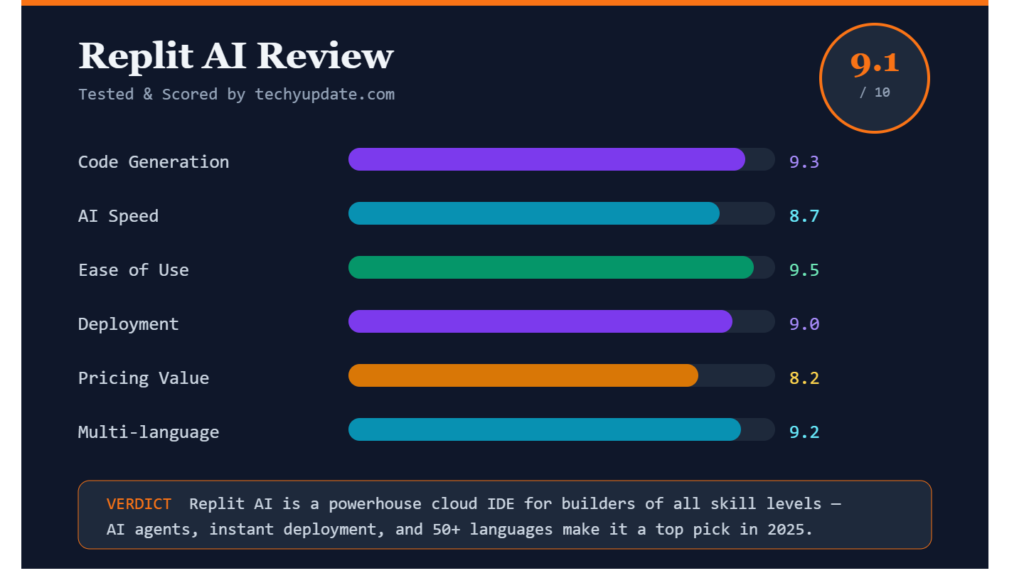
Overall performance rating: 8.5/10. It is especially strong for rapid app building, but less ideal for deep editor-native engineering workflows. Is Replit AI worth using in 2026? Yes, if your goal is to build and publish faster with minimal friction.
Quick Summary
Replit AI is a browser-based AI coding assistant that helps you build apps, websites, and prototypes faster. It stands out for its natural-language workflow, cloud development environment, built-in infrastructure, and easy publishing process.
It is best for beginners, students, founders, freelancers, and small teams who want quick results. It is less ideal for developers who need highly customized local workflows or advanced multi-file refactoring. In short: Replit AI is a strong choice when speed and simplicity matter most.
FAQ
What is Replit AI?
Replit AI is an AI coding assistant built into the Replit platform. It helps you generate code, build apps, debug problems, and publish projects from a browser-based workspace. It is designed to speed up software development without requiring local setup.
Is Replit AI good for beginners?
Yes, Replit AI is one of the more beginner-friendly AI coding tools. It removes much of the setup burden and lets new users build in the browser. That makes it easier to learn by doing instead of spending time configuring tools.
Can Replit AI build a full app?
Yes, Replit AI can help build full apps, especially prototypes, simple products, and small to medium projects. It works well for web apps, dashboards, and demos. For larger systems, you should still review the architecture carefully.
Does Replit AI replace developers?
No, it does not replace developers. It accelerates repetitive work and helps with generation, debugging, and setup, but humans still need to design, test, and validate the final product. Think of it as a productivity multiplier, not a full replacement.
Is Replit AI free?
Replit offers a free Starter plan with daily Agent credits and limited publishing, plus paid Core, Pro, and Enterprise plans. The free tier is enough to explore the platform and test small projects before upgrading.
How does Replit AI compare with GitHub Copilot?
GitHub Copilot is usually better for inline coding inside an existing IDE. Replit AI is better when you want the full build environment, execution, collaboration, and hosting in one place. They solve similar problems but serve different workflows.
Is Replit AI suitable for teams?
Yes, especially for small teams, startups, and collaborative prototype work. Replit’s plans include collaborator access and team-oriented features, making shared development easier. For large enterprise engineering teams, it depends on your security and workflow needs.
What are the main drawbacks of Replit AI?
The main drawbacks are limited advanced customization, dependency on internet access, and the need to manually review AI-generated code. It is excellent for speed, but less ideal when you need deep control over complex production systems.