

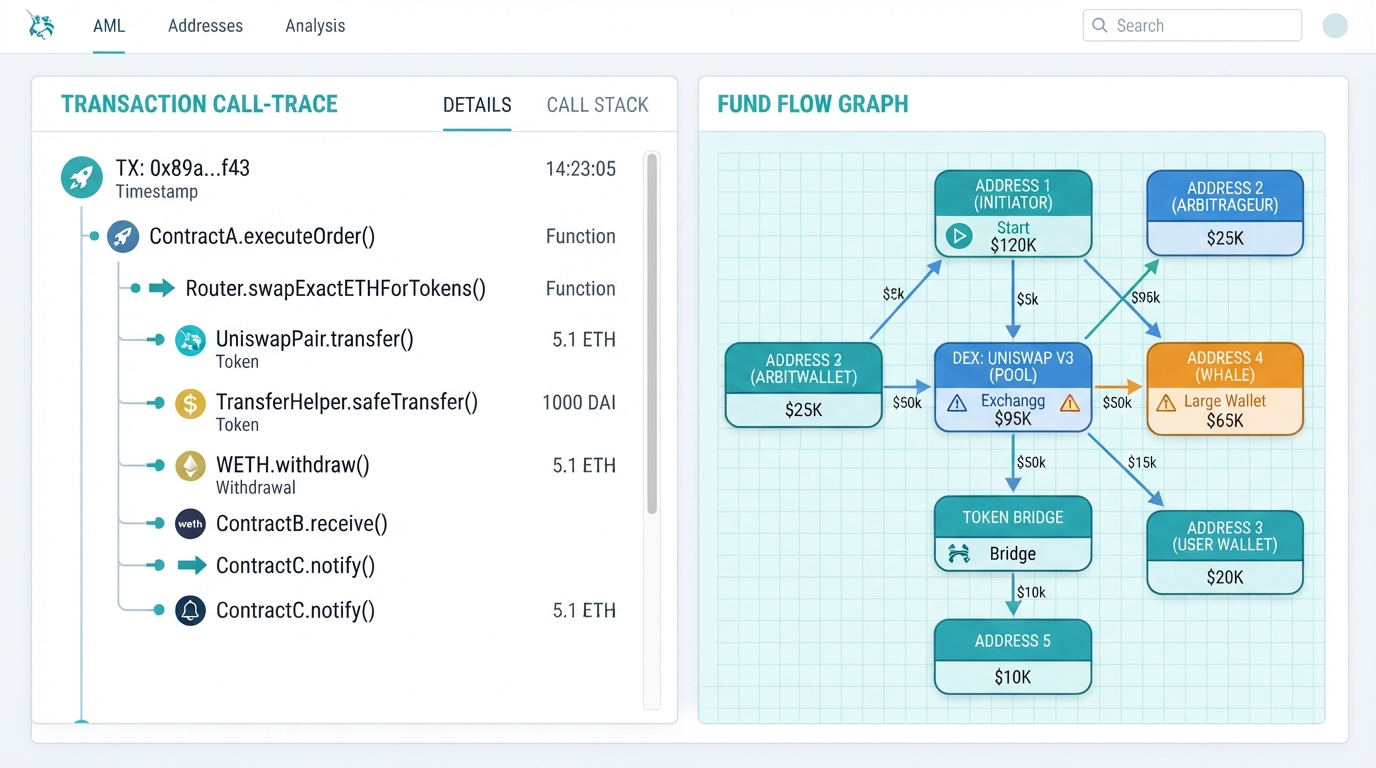
If you want to know how to use BlockSec, start by recognizing that it is a blockchain security company, not a price-charting site. Its research tools sit in two places: Phalcon Explorer, which dissects individual transactions, and MetaSleuth, which maps wallet-to-wallet fund flows as visual graphs.
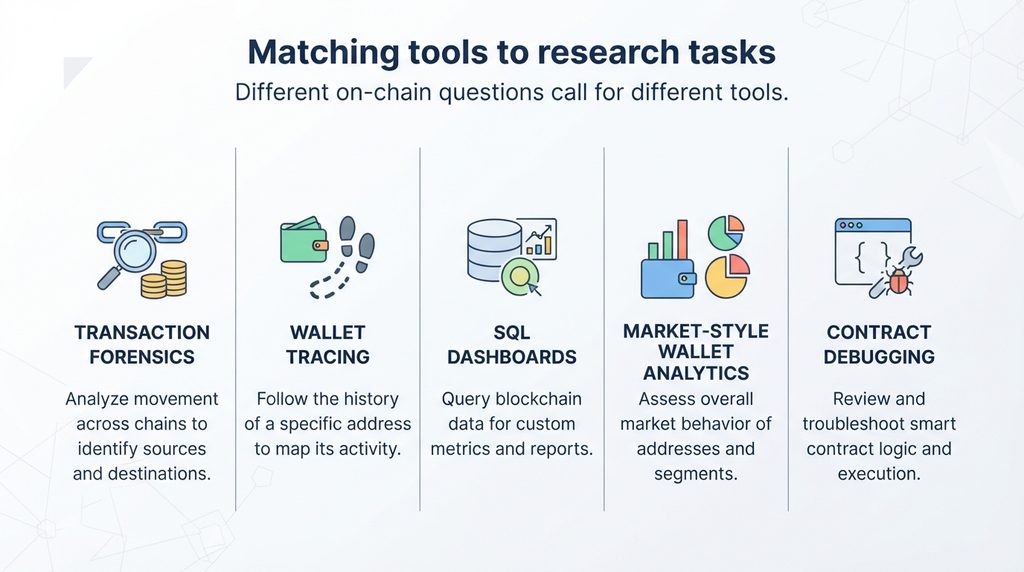
Quick answer: Use Phalcon Explorer when you have a transaction hash and want to see what the transaction did. Use MetaSleuth when you have a wallet address and want to see where funds came from and went. For market candles, token screeners or SQL dashboards, pair BlockSec with a different tool.
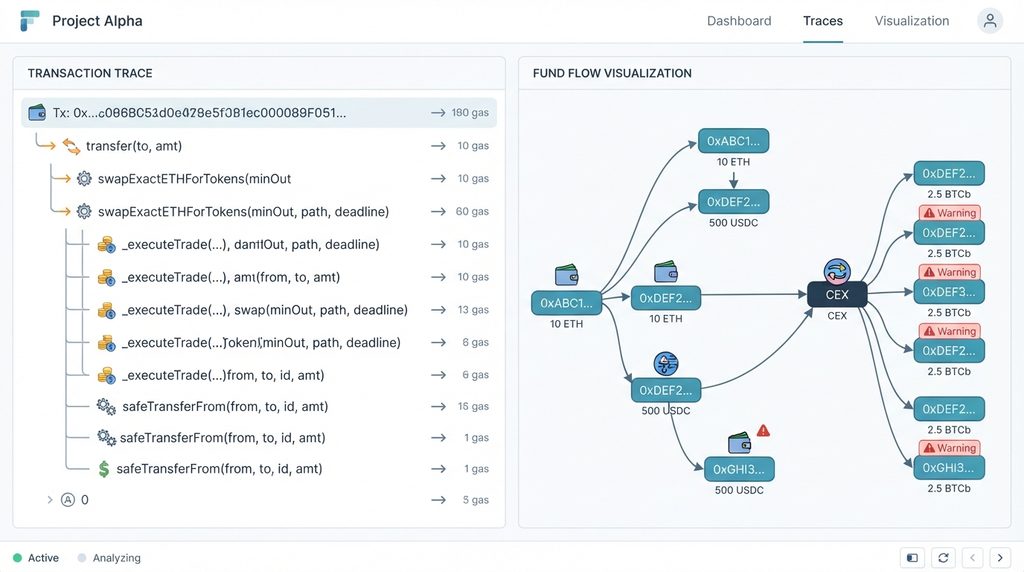
That distinction matters because “charts” means different things to different people. In BlockSec’s world, a chart is a graph of addresses and transfers. It is not a price chart. That is useful for scams, hacks, exchange deposits and whale wallets, but it will not replace a market analytics platform.
BlockSec’s tools are also built around investigation. The addresses carry labels such as exchange, attacker or sanctioned, and the transaction views show things a normal block explorer hides, like internal call flow and contract state changes.
This guide explains what each tool does, walks through a practical workflow for each, covers the limits that rival guides tend to skip, and points to alternatives for jobs BlockSec does not cover.
Explore the Complete Guide: What Is BlockSec? Crypto Data, Features, and Best Uses
Table of Contents
What BlockSec Offers for On-Chain Research
BlockSec’s public tooling splits into two research products that matter for most readers.
Phalcon Explorer is a transaction explorer aimed at the DeFi community. It shows invocation flow, source code, balance changes, fund flows within a transaction, gas profiling and state changes, and it supports debugging and simulation.
MetaSleuth is a fund-tracking and investigation platform. BlockSec describes it as a tool for tracking funds, visualizing flows, monitoring real-time movements, saving findings and sharing them with others.
BlockSec also sells security products such as Phalcon Security, which is positioned around real-time attack detection. That is outside the scope of research and chart work, so this guide does not cover it.
Which BlockSec Tool Should You Use?
| Your question | Best starting tool | Why |
|---|---|---|
| What exactly happened in this transaction? | Phalcon Explorer | Call traces, balance changes and state changes for one transaction |
| Did this contract call behave as intended? | Phalcon Explorer | Debugging and simulation features |
| Where did this wallet’s funds go? | MetaSleuth | Graph of transfers between addresses |
| Is this address linked to an exchange or scam? | MetaSleuth | Address labels and risk information |
| Is this token trending or cheap? | Neither | Not a market-data product |
How to Analyze a Transaction With Phalcon Explorer
Phalcon Explorer works from a transaction hash. BlockSec’s own three-step framing is to start with the execution path, then examine the logic inside the transaction, then check what the transaction actually changed.
- Go to the Phalcon Explorer page on blocksec.com. The page offers example transactions from past incidents, which are a good way to learn the layout before using your own hash.
- Search for your transaction hash on the relevant network. Check the official page for the current list of supported chains, because coverage expands over time.
- Read the invocation flow first. It visualizes the function call sequence with trace-level detail and embedded event logs.
- Review the balance changes. For each involved address, the tool shows how each token balance changed after the transaction.
- Check state changes if you are examining a contract. These reveal how a transaction updated contract variables, including changes a trace alone may not show.
- Use simulation or the debugger only if you need deeper developer-level inspection. Simulation lets you replay a transaction from any block or position with chosen inputs.
For setup help, BlockSec maintains Phalcon documentation with a user manual, a status page and a GitHub issue link for feature requests and bug reports.
How to Trace Wallets and Funds With MetaSleuth
MetaSleuth is the better fit for wallet research and for anything that resembles a chart. BlockSec’s documentation says it requires no preparation to use.
- Open metasleuth.io and paste a wallet address, contract address or transaction hash. BlockSec advises reviewing labeled information and the immediate fund flow first, then expanding the graph step by step and confirming each hop before going deeper.
- Choose the chain you want to analyze. The documentation example searches an address and then selects Arbitrum to view that wallet’s fund flow on that chain.
- Read the graph. Nodes represent blockchain addresses, shown as rounded rectangles, and the lines between them represent transfers.
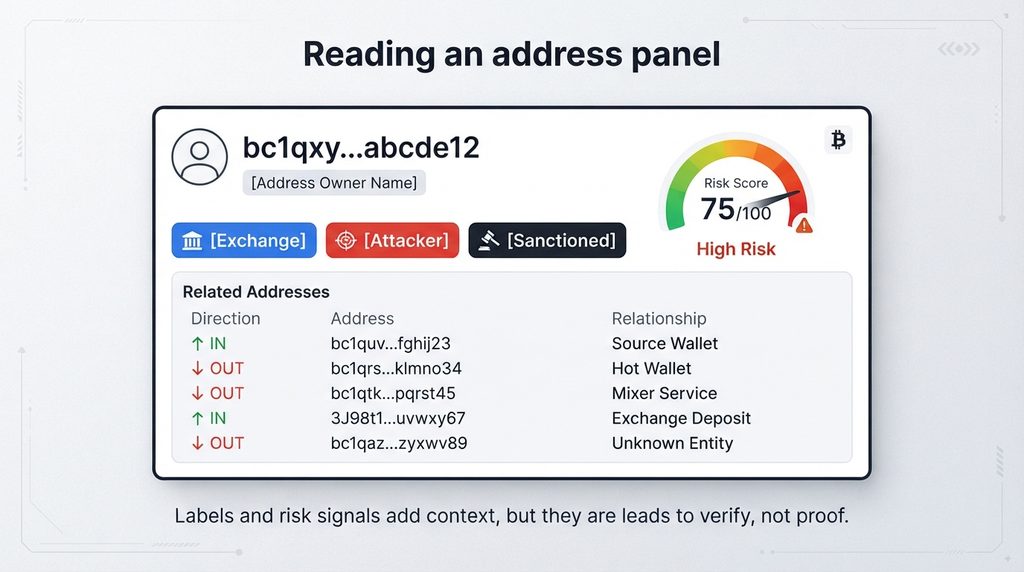
- Click an address node to open its panel. The panel can show a name tag, a compliance risk score, address labels, related addresses and transfers.
- Expand the graph using the documented controls. The user manual lists Analyze, Expand In/Out, Load More and Advanced Analysis as ways to retrieve transfer data.
- Add your own labels and notes. When both exist, your private label is shown ahead of a BlockSec label.
- Save your work and share it with collaborators using the save and share options described in the manual.
BlockSec also publishes a walkthrough on tracking outgoing funds from an address, which filters a busy wallet down to unusual flows, such as transfers to an address labeled as phishing.
What Chains and Data Does It Cover?
On its product pages, MetaSleuth lists Bitcoin, Ethereum, BSC, TRON and Solana among supported networks. The same pages cite more than 400 million address labels and entities, with data updated every minute. Those are vendor claims, and BlockSec’s older blog posts quoted smaller label counts, so treat the numbers as indicative and check the live site.
Phalcon Explorer’s chain coverage has also grown. A BlockSec announcement describes the explorer as covering 26+ chains, but the current list should be checked on the official page before you depend on a specific network.
Limitations to Know Before You Rely on It
BlockSec is strongest for security-style investigation. It is weaker for the following uses:
- Market charts and indicators. It does not replace TradingView-style tools.
- Custom queries. There is no SQL dashboard builder comparable to Dune.
- Label certainty. Labels help, but they are not proof of identity. Confirm important findings with other evidence.
- Heuristic tracing. MetaSleuth describes using heuristic algorithms to follow funds through mixers. Heuristics produce leads, not courtroom-grade conclusions.
- Incomplete data. The tool flags when the data for an address is incomplete. Do not ignore that warning.
Pricing and Access
Public pricing for MetaSleuth was not verifiable in current search results. The documentation says it offers several plans, directs readers to metasleuth.io/plans for details, and accepts card or crypto payments. Check that page for what is included at each tier. Phalcon Explorer’s access terms should likewise be confirmed on BlockSec’s site.
Security and Privacy Tips
- Treat labels as hints. A “clean” label does not make an address safe.
- Never share seed phrases or private keys with any analytics site. Research tools only need public addresses and hashes.
- Be careful about what you save and share. Investigation notes and shared graphs can reveal your research targets.
- Use the official BlockSec and MetaSleuth domains. Fake tool sites are a common phishing route in crypto.
Who Should Use BlockSec?
BlockSec fits security researchers, DeFi developers, compliance staff, and careful users investigating a scam, a suspicious token approval or an exchange deposit trail. It also suits anyone who wants to learn how a hack unfolded, since BlockSec publishes incident analyses and weekly security reports.
It is a poor primary tool for traders who want price action, token screening or social sentiment data.
Alternatives to BlockSec
These descriptions come from general product knowledge. Verify current features and pricing on each vendor’s site.
Etherscan and chain-specific explorers. The default way to look up transactions and balances on a given chain. Strength: familiar and widely referenced. Limitation: less visual tracing and less investigation tooling. Best for: quick lookups.
Dune. A platform for community SQL queries and public dashboards. Strength: custom charts and datasets. Limitation: requires SQL knowledge. Best for: analysts building metrics.
Arkham Intelligence. An on-chain intelligence platform focused on entity identification and wallet tracking. Strength: entity-centered exploration. Limitation: attribution quality varies by entity. Best for: following known wallets and entities.
Nansen. A wallet-labeling and analytics platform often used for smart-money tracking. Strength: market-oriented wallet insights. Limitation: paid access for most advanced features. Best for: traders and fund researchers.
Tenderly. A developer platform for simulation and debugging. Strength: developer workflows and testing. Limitation: more developer-focused than investigator-focused. Best for: smart contract teams.
Pros & Cons Table
| Pros | Cons |
|---|---|
| Phalcon Explorer exposes call traces, balance changes and state changes for a single transaction | Not a price-chart or market-data platform |
| MetaSleuth turns wallet activity into visual fund-flow graphs | No SQL-style custom dashboard building |
| Address labels and risk information add context to raw addresses | Labels and heuristics can be wrong or incomplete |
| Transaction simulation and debugging help developers test behavior | Advanced features may be too technical for casual users |
| Private labels, notes and sharing support collaborative investigations | Plan details and limits must be confirmed on the vendor’s plans page |
Comparison Table
| Tool | Best use case | Main strength | Main limitation |
|---|---|---|---|
| BlockSec (Phalcon Explorer and MetaSleuth) | Transaction forensics and fund tracing | Trace-level detail and labeled fund-flow graphs | Not built for market charts |
| Etherscan-style explorers | Quick chain lookups | Familiar, widely referenced | Limited visual tracing |
| Dune | Custom metrics and dashboards | Flexible SQL-based charts | Requires query skills |
| Arkham | Entity and wallet tracking | Entity-focused exploration | Attribution can be uncertain |
| Nansen | Market-oriented wallet analysis | Wallet labels for trading research | Advanced features are paid |
| Tenderly | Contract testing and debugging | Developer-grade simulation | Less suited to investigations |
Pricing is intentionally left out of this table because it changes often and was not verifiable for every tool.
Alternatives
Etherscan-style explorers, Dune, Arkham Intelligence, Nansen and Tenderly, as described in the article above.
FAQs
What is BlockSec used for?
Answer: BlockSec is a blockchain security company. Its research tools are used to analyze transactions, trace funds between wallets and read address labels, mainly for security, compliance and investigation work.
Is BlockSec a crypto charting tool?
Answer: No. It does not focus on price charts or technical indicators. Its “charts” are fund-flow graphs showing how assets move between addresses.
What is the difference between Phalcon Explorer and MetaSleuth?
Answer: Phalcon Explorer analyzes what happened inside a single transaction, including call flow, balance changes and state changes. MetaSleuth maps transfers between addresses so you can follow funds across wallets.
Do I need to be a developer to use BlockSec?
Answer: Not for basic use. Pasting a hash or address into MetaSleuth needs no coding. Phalcon’s debugger and simulation features are more technical and suit developers and security researchers.
Which blockchains does BlockSec support?
Answer: MetaSleuth’s pages list networks including Bitcoin, Ethereum, BSC, TRON and Solana. Phalcon Explorer covers many EVM chains. Both lists change, so check the official pages for current coverage.
Is BlockSec free?
Answer: Pricing could not be verified here. MetaSleuth directs users to its plans page, and details for Phalcon Explorer should be checked on BlockSec’s site.
Can BlockSec prove who owns a wallet?
Answer: No. Labels and heuristics provide leads, not proof of identity. Confirm important findings with additional sources.
How do I trace a stolen-funds or scam transaction?
Answer: Paste the victim’s or scammer’s address into MetaSleuth, review the labels, then expand outgoing transfers step by step. Save the graph, and report to the relevant exchange, platform or authorities with the transaction hashes.
Quick Take
Main point: BlockSec is a security-focused toolset for transaction forensics and fund tracing, not a market-chart platform.
Best use case: Investigating a specific transaction or following funds from a wallet.
Main advantage: Trace-level transaction detail plus labeled, visual fund-flow graphs.
Main limitation: No market charts or custom dashboards.
Best alternative: Dune for custom charts, or Arkham and Nansen for entity and wallet intelligence.
Conclusion
BlockSec is worth using if your question is about what a transaction did or where funds went. Phalcon Explorer and MetaSleuth cover those jobs well, and both help beginners see beyond raw addresses and hashes.
Security researchers, DeFi developers, compliance teams and careful users investigating scams should add it to their toolkit. Traders who want price charts, screeners or custom dashboards should look elsewhere or combine BlockSec with another platform.
The most important takeaway is to match the tool to the question, then treat labels and heuristic tracing as leads to verify.
Author Bio
TechyUpdate Editorial Team covers practical technology, AI tools, apps, software and digital productivity, with a focus on clear, useful and independently researched guides
2 Comments
Pingback: BlockSec Data Explained: Prices, Charts, Metrics & Alerts
Pingback: BlockSec Alternatives: Best Crypto Analytics Tools